
MCP server · Finance and crypto
Jupiter MCP server
by kukapay
Ask your AI to swap crypto tokens on Solana and it handles the trade for you.
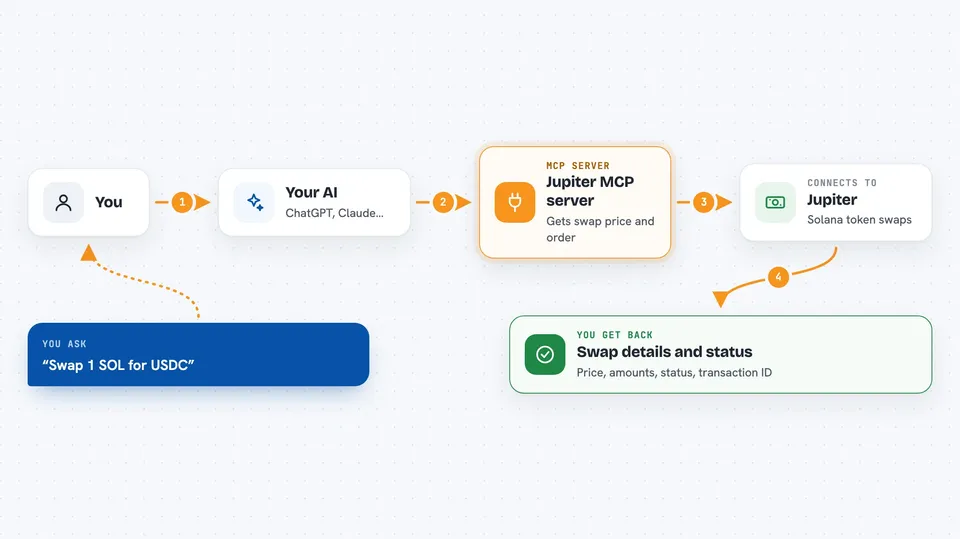
This is a helper that lets your AI trade one crypto token for another on the Solana blockchain, using a service called Jupiter. It is handy for people who already hold tokens on Solana and want to swap them by just typing a request in plain words. You do not need to know how the blockchain works, but you do need a Solana wallet.
What is an MCP server? The 30-second version
On its own, your AI can only chat. An MCP server is a small helper program that gives your AI a new skill or a connection to an app or service. This one connects your AI to Jupiter, a service that swaps tokens on Solana. Once it is connected, you can ask your AI to look up a swap price or carry out the swap, and it will do that for you.
What this MCP server does
You type a request like swapping some SOL for USDC. Your AI passes that to this helper, which asks Jupiter for a swap order and a price. Jupiter sends back the details of the trade, including a ready-made transaction. If you then tell the AI to go ahead, the helper sends that transaction to Jupiter to be carried out, and you get back the result, including the amount you received.
 Click to zoom
What you can do with it
- Get a swap price for one token against another
- Swap SOL for USDC or any other Solana token
- Set how much price movement you are willing to accept
- Execute a swap order that was fetched earlier
- See the final amounts you gave and received after a swap
What it gives back to you
You get back the details of the trade: the price, the amount going in, and the amount coming out. After a swap is carried out, you also see a status, a transaction ID, and the final amounts you gave and received. In the chat this shows up as a short summary or a block of numbers and IDs.
Before you start
What you need
- Node.js version 18 or higher installed on your computer
- A Solana wallet private key (a long code that proves the wallet is yours)
- Access to a Solana RPC address (a web address that talks to the Solana network; a public one is often fine)
Good to know
This server can move real crypto from your wallet, so only use it with a wallet you are willing to trade from and double-check the amounts before you say yes.
Install it with your AI
Add Jupiter MCP server to your AI, no technical skills needed
You don't install anything by hand. You copy one prompt, paste it into an AI that can work on your computer, and it checks, installs and connects the server for you, asking you when it needs something.
Sign in to get the install prompt
Members get a ready-made prompt that lets the Claude desktop app check Jupiter MCP server, install it and connect it for them, step by step. You don't need any technical skills: you copy, paste and answer a few questions. Your connected AI can also find and install any of the 4,609 MCP servers here for you.
Who it's for
People who already hold crypto tokens on Solana and want to swap them by chatting with their AI instead of using a trading website.



