
MCP server · Finance and crypto
Raydium LaunchLab MCP server
by kukapay
Lets your AI create, buy, and sell tokens on the Raydium Launchpad for you.
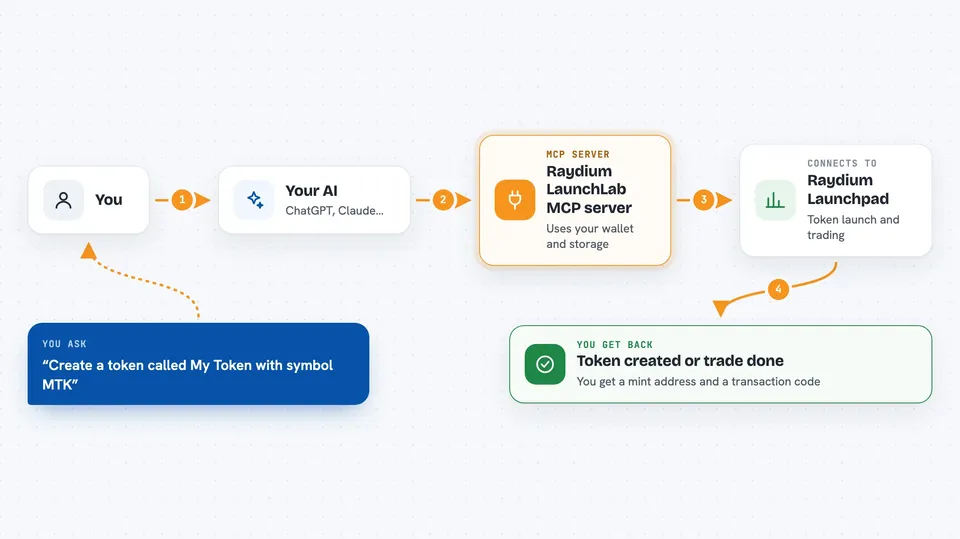
This is a small helper that connects your AI assistant to Raydium Launchpad, a place on the Solana blockchain where new tokens are created and traded. Once it is set up, you can ask your AI in plain words to create a token, buy one, or sell one, and it will do the steps for you. It is handy for people who work with crypto tokens but do not want to click through every screen themselves.
What is an MCP server? The 30-second version
On its own, your AI can only chat. It cannot reach out to a crypto platform and do things there. An MCP server is a small helper program that gives your AI a new skill, in this case a connection to Raydium Launchpad. So when you ask your AI to create or trade a token, the AI passes your request to this helper, and the helper talks to Raydium on your behalf.
What this MCP server does
You ask your AI something like create a token called My Token, or buy some of this token with half a SOL. Your AI sends that request to this helper program running on your computer. The helper uses your Solana wallet and a Pinata account to talk to Raydium Launchpad. It creates the token, or places the buy or sell, and sends the transaction. Then it tells your AI what happened, and your AI tells you the result.
 Click to zoom
What you can do with it
- Create a new token on Raydium Launchpad with a name, symbol, and logo
- Set how much SOL you want to raise and how much of the supply to sell
- Buy tokens from a Launchpad pool using SOL
- Sell tokens back to a Launchpad pool
- Upload your token image and details to IPFS storage
- Choose how much slippage you will accept on a trade
Try asking your AI
- “Create a new token on Raydium Launchpad named My Token with symbol MTK, using the logo at /assets/logo.png, and a fundraising target of 35 SOL.”
- “Buy tokens from the Raydium Launchpad pool with mint address ABC123 using 0.5 SOL and 1% slippage.”
- “Sell 1,000,000 tokens from the Raydium Launchpad pool with mint address ABC123 with 1% slippage.”
- “Create a token called Sunrise with symbol SUN and a total supply of 500,000,000.”
What it gives back to you
You get a short answer in the chat, like Successfully created token, along with the token's mint address and the transaction signature. For buys and sells, you get the mint address and the transaction signature too. A transaction signature is a long code you can use to look up the trade on a Solana explorer. That is the whole reply, no files or charts.
Before you start
What you need
- Node.js version 18 or newer installed on your computer
- A Solana wallet with some SOL in it, plus its private key
- A Solana RPC URL (a web address that lets apps talk to the Solana network)
- A Pinata account for IPFS storage, with its JWT and gateway details
Good to know
This server can move real money and create tokens using your wallet, so a wrong amount or address can cost you SOL, and you should keep your private key safe.
Install it with your AI
Add Raydium LaunchLab MCP server to your AI, no technical skills needed
You don't install anything by hand. You copy one prompt, paste it into an AI that can work on your computer, and it checks, installs and connects the server for you, asking you when it needs something.
Sign in to get the install prompt
Members get a ready-made prompt that lets the Claude desktop app check Raydium LaunchLab MCP server, install it and connect it for them, step by step. You don't need any technical skills: you copy, paste and answer a few questions. Your connected AI can also find and install any of the 4,609 MCP servers here for you.
Who it's for
People who work with crypto tokens, like founders launching a token, small teams running a community token, or anyone who trades on Raydium Launchpad and wants to do it by chatting.



