
MCP server · Finance and crypto
Stargate Bridge MCP server
by kukapay
Let your AI look up bridge routes and move tokens between blockchains for you.
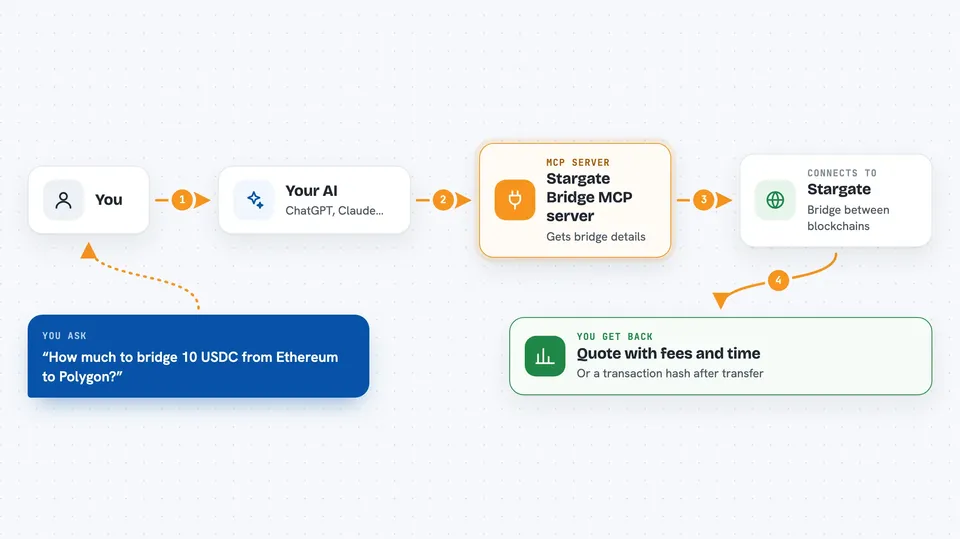
This is a helper that connects your AI assistant to Stargate, a service for moving crypto tokens from one blockchain to another. It is handy if you already hold tokens on chains like Ethereum, Polygon, or Arbitrum and want to send them somewhere else without clicking through a website. You just ask in plain words and the AI does the looking up and the sending.
What is an MCP server? The 30-second version
On its own, your AI can only chat. It cannot reach out to a blockchain or move anything. An MCP server is a small helper program that gives your AI a new skill, and here that skill is talking to Stargate, the bridge service. Once it is connected, your AI can check routes and carry out transfers on your behalf when you ask.
What this MCP server does
You ask your AI something like which chains are supported, or how much it costs to move 10 USDC from Ethereum to Polygon. The AI passes your request to this helper. The helper talks to the Stargate service and to the blockchains involved, gathers the details, and hands them back. Your AI then shows you a tidy answer in the chat, like a table of chains or a quote with fees and timing. If you ask it to actually do the transfer, the helper signs the transaction with your wallet key and sends it.
 Click to zoom
What you can do with it
- See every blockchain Stargate supports
- Find which tokens you can bridge from one chain to others
- Get a quote with fees and estimated time before you commit
- Compare what you would receive on the other side
- Execute a bridge transfer and get the transaction hash back
Try asking your AI
- “Show me all the chains Stargate supports for bridging.”
- “What tokens can I bridge from Ethereum to other chains?”
- “Get me a quote for moving 10 USDC from Ethereum to Polygon.”
- “Go ahead and bridge 10 USDC from Ethereum to Polygon.”
What it gives back to you
For chain and token questions you get a neat Markdown table you can read right in the chat. For quotes you get the expected amount you would receive, the minimum, the estimated time, the fees, and the steps involved. When you run an actual transfer, you get back the transaction hash so you can look it up on a block explorer. If something goes wrong, like not enough gas, you get a short error message instead.
Before you start
What you need
- Python 3.10 or newer installed on your computer
- The uv tool for managing Python packages (the README also allows pip)
- Your wallet private key, stored in a .env file, never shared or committed
Good to know
This helper can move real crypto using your wallet private key, so a wrong amount or address can lose money, and you should never share that key with anyone.
Install it with your AI
Add Stargate Bridge MCP server to your AI, no technical skills needed
You don't install anything by hand. You copy one prompt, paste it into an AI that can work on your computer, and it checks, installs and connects the server for you, asking you when it needs something.
Sign in to get the install prompt
Members get a ready-made prompt that lets the Claude desktop app check Stargate Bridge MCP server, install it and connect it for them, step by step. You don't need any technical skills: you copy, paste and answer a few questions. Your connected AI can also find and install any of the 4,609 MCP servers here for you.
Who it's for
People who already use crypto and want a quicker, chat-based way to move tokens between chains without opening a bridge website.



