MCP server · Research
Web3 Jobs MCP server
by kukapay
Lets your AI look up fresh Web3 job listings from web3.career and show them in your chat.
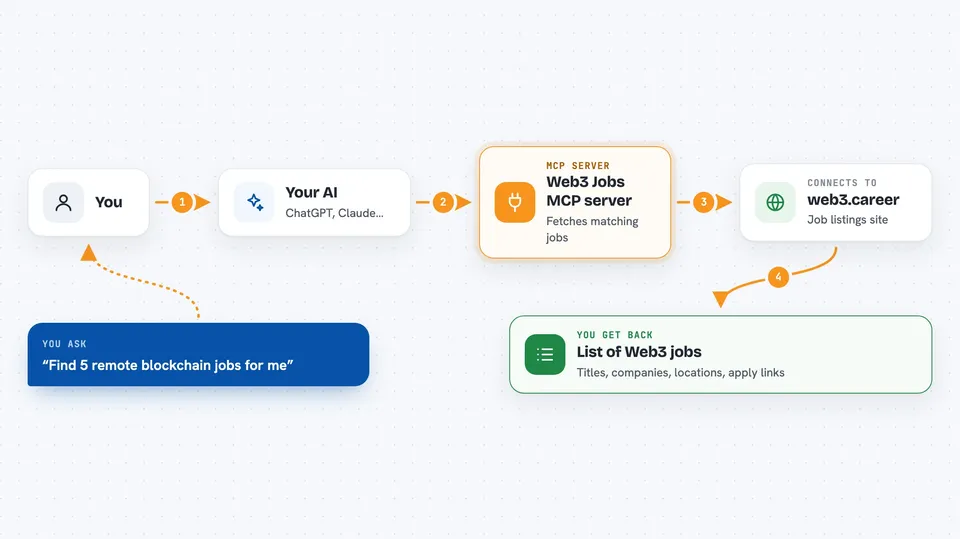
This is a small helper that connects your AI assistant to web3.career, a job board for Web3 and crypto roles. Once it is set up, you can simply ask your AI for job openings and it will fetch real listings for you. It is handy if you are job hunting in crypto, or if you help others find roles in that space.
What is an MCP server? The 30-second version
On its own, your AI can only chat with you using what it already knows. An MCP server is a small helper program that gives your AI a new skill or a connection to an outside service. This one connects your AI to web3.career, the job board. So when you ask for jobs, your AI can actually go and look them up there instead of guessing.
What this MCP server does
You ask your AI something like find me remote blockchain jobs. Your AI passes that request to this helper program. The helper talks to web3.career using a special access token and pulls back matching job listings. Then your AI shows you those listings right in the chat, with titles, companies, locations, dates and apply links. You can also narrow things down by country, by tag like react or blockchain, or by how many jobs you want.
 Click to zoom
What you can do with it
- Find remote-only Web3 jobs
- Filter jobs by country such as the United States
- Search jobs by tag like react or blockchain
- Limit how many listings come back, from 1 to 100
- See job titles, companies, locations and publish dates
- Get a clickable apply link for each job
- Ask for a ready-made search prompt for a role and location
Try asking your AI
- “Find 5 remote blockchain jobs for me”
- “Show me 10 Web3 jobs in the United States”
- “Are there any react jobs listed right now?”
- “Give me a search prompt for a blockchain developer role in remote”
What it gives back to you
You get a tidy list of job listings in the chat. Each one shows the job ID, title, company, location, whether it is remote, the date it was posted, a short description, and a link to apply. It is formatted so you can read it quickly and click straight through to web3.career.
Before you start
What you need
- Python 3.10 or newer
- A web3.career API token (a kind of password for apps; you request one on their site)
- The uv tool installed, which the README recommends for managing the setup
- The Claude desktop app if you want to add it there
Good to know
You need your own web3.career API token, and the listings come straight from that site, so treat the details as a starting point and check the original posting before applying.
Install it with your AI
Add Web3 Jobs MCP server to your AI, no technical skills needed
You don't install anything by hand. You copy one prompt, paste it into an AI that can work on your computer, and it checks, installs and connects the server for you, asking you when it needs something.
Sign in to get the install prompt
Members get a ready-made prompt that lets the Claude desktop app check Web3 Jobs MCP server, install it and connect it for them, step by step. You don't need any technical skills: you copy, paste and answer a few questions. Your connected AI can also find and install any of the 4,609 MCP servers here for you.
Who it's for
People looking for Web3 or crypto jobs, and recruiters or career coaches who help others find roles in that world.