MCP server · Research · official
ENTIA business data MCP server
by ENTIA-IA · official
Look up companies, VAT numbers and business details across 10 countries right from your AI chat.

This is a helper that lets your AI look up real information about companies. You can ask it to check a business name, a VAT number, or who a company's competitors are, and it goes and finds the answer. It is handy if you work with suppliers, clients, or invoices and want to check who you are dealing with.
What is an MCP server? The 30-second version
On its own, your AI can only chat with you. It cannot go and look things up in the outside world. An MCP server is a small helper that gives your AI a new skill or a connection to a service. This one connects your AI to ENTIA, a business data service, so when you ask about a company, your AI can fetch the real details for you.
What this MCP server does
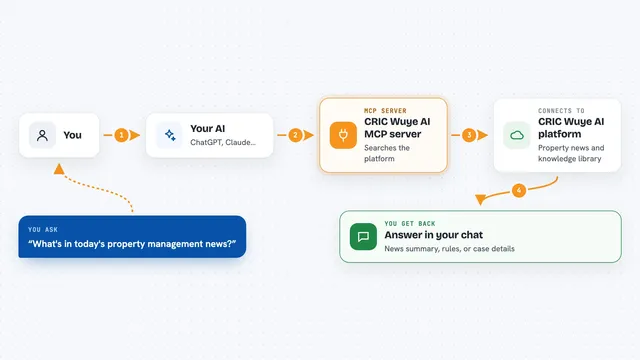
You type a question about a company, like a name or a VAT number. Your AI sends that question to this helper. The helper talks to ENTIA, which pulls from official public records like the Spanish mercantile registry, EU VAT checks, and the global LEI list. Then the answer comes back into your chat as a short summary or a list of details. You do not have to visit any website yourself.
 Click to zoom
What you can do with it
- Check if a company exists and confirm its official name and ID
- Validate a European VAT number in real time
- Search for companies by name, country, or sector
- Find competitors of a business in the same area
- Get a full profile of a company with many fields at once
- Look up a Spanish postal code's income and business density
- Run a basic digital risk check on a company's website
Try asking your AI
- “Look up Telefonica in Spain”
- “Is this VAT number valid: ESA28015865”
- “Find competitors of a bakery in Madrid”
- “Show me the business profile for a company called Siemens in France”
What it gives back to you
You get back a clear answer in the chat. It might be a short summary, a list of matching companies, or a detailed profile with fields like address, registration number, and status. For VAT checks, it tells you if the number is valid or not. For competitor searches, it gives you a list of similar businesses.
Before you start
What you need
- An ENTIA API key (you get one for free at entia.systems/mcp-setup)
- The Claude desktop app or another AI tool that supports MCP
- Node.js installed if you use the remote connection method
Good to know
The free plan allows 100 requests per month, and after that you are blocked until you upgrade, so keep an eye on how many lookups you do.
Install it with your AI
Add ENTIA business data MCP server to your AI, no technical skills needed
You don't install anything by hand. You copy one prompt, paste it into an AI that can work on your computer, and it checks, installs and connects the server for you, asking you when it needs something.
Sign in to get the install prompt
Members get a ready-made prompt that lets the Claude desktop app check ENTIA business data MCP server, install it and connect it for them, step by step. You don't need any technical skills: you copy, paste and answer a few questions. Your connected AI can also find and install any of the 4,361 MCP servers here for you.
Who it's for
Anyone who needs to check business details for work, like salespeople, accountants, compliance officers, or small business owners.