MCP server · Generative art
ImmoStage MCP server
Let your AI stage empty rooms with furniture and create a full property marketing package for you.
ImmoStage is a helper that lets your AI turn photos of empty rooms into furnished, realistic-looking pictures, and then build a marketing package around them. It is made for people who sell or rent out homes and want nicer listing photos without booking a photographer and a stylist. If you work with property photos, this saves you a lot of back and forth.
What is an MCP server? The 30-second version
On its own, your AI can only chat with you. An MCP server is a small helper program that gives your AI a new skill, in this case a connection to the ImmoStage service. Once it is connected, your AI can send your room photos to ImmoStage and bring the results back to you. You just ask in normal words, and the helper does the technical part in the background.
What this MCP server does
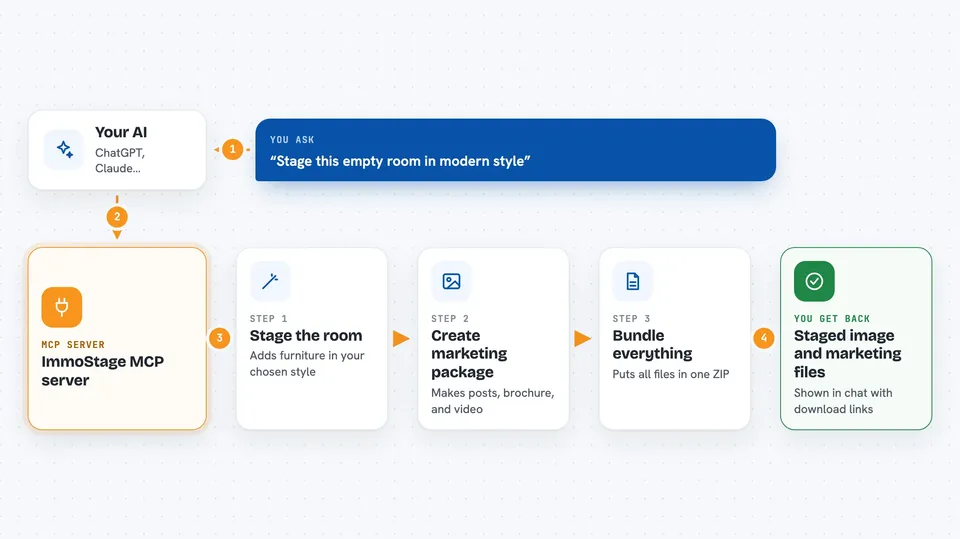
You give your AI a photo of an empty room and tell it which style you want. Your AI passes that to the ImmoStage helper, which sends the picture off to be staged with furniture. After about half a minute to a minute and a half, you can ask your AI to check on the job, and it shows you the finished staged image right in the chat. You can then ask for a marketing package, which includes social media posts, a PDF brochure, and a property video. Finally, you ask for a download link and get everything bundled together.
 Click to zoom
What you can do with it
- Stage an empty room photo in a style like modern, scandinavian, classic, minimal, or luxury
- Check on a staging job and see the finished image in your chat
- Generate six social media posts for a property
- Create an Exposé PDF brochure for a listing
- Produce a property video (needs the Pro plan)
- Get a download link with all the finished files in one ZIP
- Reuse the same property name to keep all the assets together
Try asking your AI
- “Stage this room in modern style: https://example.com/empty-living-room.jpg”
- “Check the status of job abc123”
- “Generate the marketing package for Hubertstraße 10, Berlin”
- “Get the download link for Hubertstraße 10, Berlin”
What it gives back to you
You get the staged room image shown right in the chat, plus a link to download it. When you ask for the marketing package, you get social media posts, a PDF brochure, and a video, and then a download link that bundles everything into one ZIP file. The ZIP link stays valid for three days, and you also get a permanent link to your ImmoStage dashboard. Everything appears as normal chat messages and links you can click.
Before you start
What you need
- An ImmoStage account (you can create one at app.immostage.ai)
- An API key from your ImmoStage account, under Einstellungen then Claude / MCP Zugang (this is like a password for apps, and you make it yourself in a few clicks)
- A public web link to the room photo you want to stage, or you can paste the image directly
- Credits on your account after the first 3 free staging images
Good to know
Staging and marketing generation use up credits on your ImmoStage account, and the video part needs the Pro plan, so keep an eye on your plan and balance.
Install it with your AI
Add ImmoStage MCP server to your AI, no technical skills needed
You don't install anything by hand. You copy one prompt, paste it into an AI that can work on your computer, and it checks, installs and connects the server for you, asking you when it needs something.
Sign in to get the install prompt
Members get a ready-made prompt that lets the Claude desktop app check ImmoStage MCP server, install it and connect it for them, step by step. You don't need any technical skills: you copy, paste and answer a few questions. Your connected AI can also find and install any of the 4,361 MCP servers here for you.
Who it's for
Real estate agents, property photographers, and anyone who prepares listings and marketing material for homes.