
MCP server · Finance and crypto
Liquidiction MCP server
by Liquidiction
Lets your AI look up live Hyperliquid prediction market odds, order books, trades and wallet positions for you.
This is a small helper that connects your AI assistant to Hyperliquid, a place where people trade prediction markets. Once it is set up, you can just ask your AI questions about those markets and it will go and fetch the numbers for you. It is handy if you follow prediction markets and want quick answers without clicking around a website.
What is an MCP server? The 30-second version
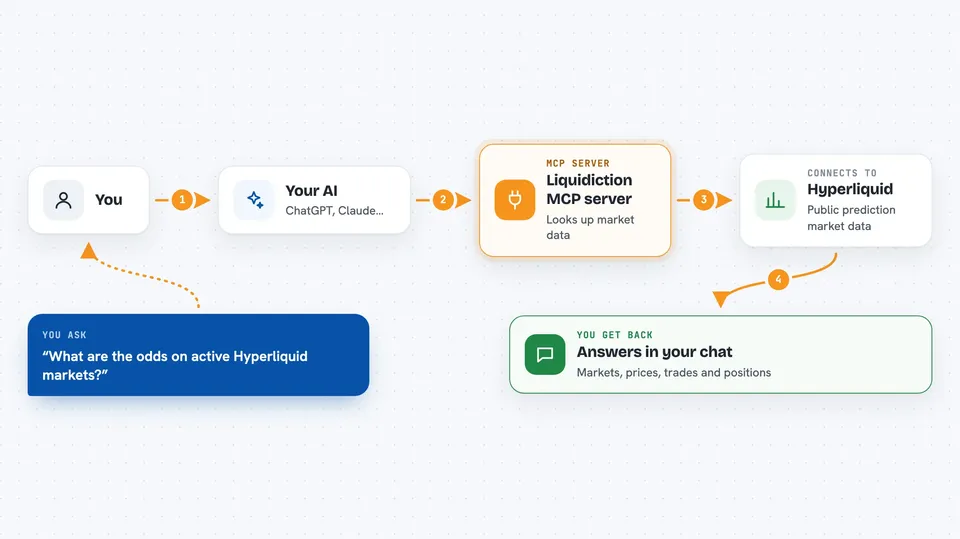
On its own, your AI can only chat with you using what it already learned. An MCP server is a small helper program that gives your AI a new skill or a connection to an app or service. This one connects your AI to Hyperliquid's public prediction market data, so it can look things up there when you ask. You stay in the chat, and the helper does the fetching behind the scenes.
What this MCP server does
You ask your AI something about Hyperliquid prediction markets, like the odds on a market or the recent trades. Your AI passes that request to this helper program running on your computer. The helper talks to Hyperliquid's public data service, which is open and does not need a login. It brings the answer back and your AI writes it out for you in the chat. It only reads information, so nothing is bought, sold or changed.
 Click to zoom
What you can do with it
- List active prediction markets with their outcomes and prices
- Get the order book for a market, including top bids, asks and the spread
- Pull recent price history as candles for a chosen market
- See recent public trades for a market
- Look up a wallet's open orders and positions
- Check a wallet's recent fills
- Get current mid-prices for all outcomes
Try asking your AI
- “What prediction markets are active on Hyperliquid right now?”
- “Show me the order book for outcome 1866.”
- “What are the recent trades on this market?”
- “Show the HIP-4 positions for this wallet, including venue, team, total shares and held shares.”
What it gives back to you
You get answers written out in the chat, like a list of markets with their prices, a small table of bids and asks, or a summary of a wallet's positions. Price history comes back as candle data you can read or ask the AI to describe. Wallet lookups return details such as shares held, venue and estimated mark values. Everything is text in the conversation, so you can ask follow-up questions right away.
Before you start
What you need
- Node.js 20 or newer and npm installed on your computer
- The Liquidiction MCP server files downloaded from its GitHub page
- An MCP-compatible AI client, such as the Claude desktop app or Claude Code
- A wallet address if you want to look up positions or orders (no login or key needed)
Good to know
It only reads public data and never places trades, but the numbers are not a live snapshot and mark values are estimates, not real sale prices, so do not treat them as exact.
Install it with your AI
Add Liquidiction MCP server to your AI, no technical skills needed
You don't install anything by hand. You copy one prompt, paste it into an AI that can work on your computer, and it checks, installs and connects the server for you, asking you when it needs something.
Sign in to get the install prompt
Members get a ready-made prompt that lets the Claude desktop app check Liquidiction MCP server, install it and connect it for them, step by step. You don't need any technical skills: you copy, paste and answer a few questions. Your connected AI can also find and install any of the 4,609 MCP servers here for you.
Who it's for
People who follow or trade prediction markets and want quick, plain-language answers about Hyperliquid markets and wallets.



