MCP server · Health and learning
Mibly Apple Health MCP server
by littlenew117
Let your AI read your Apple Health data (sleep, steps, heart rate, workouts) from your own computer.
This is a small helper that lets your AI assistant look at your Apple Health data: sleep, steps, heart rate, HRV, workouts, weight and body fat. Your health data is sent from the Mibly iPhone app to a program running on your own computer, and stays there. It is handy if you already use Mibly on your iPhone and want to ask your AI questions about your health without sending that data to a company's servers.
What is an MCP server? The 30-second version
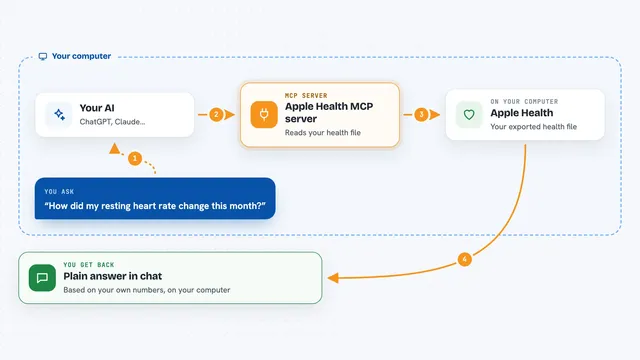
On its own, your AI can only chat. An MCP server is a small helper program that gives your AI a new skill or a connection to something else. Here, the helper connects your AI to your Apple Health data, which the Mibly app sends to your own machine. Once it is set up, you can ask your AI about your sleep or steps and it will look the answer up for you.
What this MCP server does
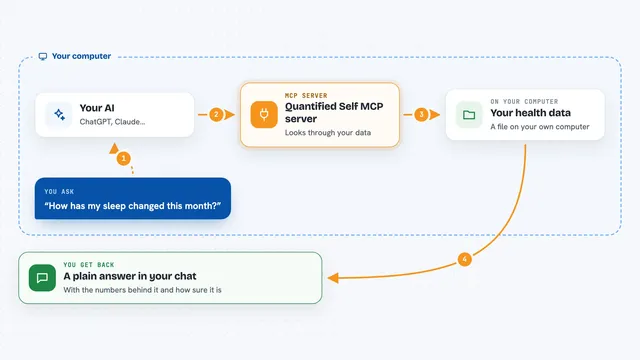
You ask your AI a question about your health, like how you slept last week. Your AI passes the question to this helper program running on your computer. The helper reads the health data that the Mibly app on your iPhone has already sent over your home Wi-Fi, and it is stored encrypted on that machine. It then hands the answer back to your AI, which explains it to you in the chat. Nothing is sent out to the internet, and no account is needed.
What you can do with it
- Ask about your sleep, steps, heart rate, HRV or workouts
- Look up your latest weight or body fat reading
- Compare a few days or weeks of activity
- Get a summary of your recent workouts
- Ask questions in plain English and get plain answers
- Keep everything on your own computer, encrypted
Try asking your AI
- “How did I sleep this past week?”
- “What was my average step count last month?”
- “Show me my workouts from the last few days.”
- “What is my latest resting heart rate?”
What it gives back to you
You get answers in the chat, in normal sentences, based on your own health data. Depending on what you ask, that can be a short summary, a list of recent workouts, or a few numbers like your average steps. The helper does not change anything in your health data; it only reads it.
Before you start
What you need
- An iPhone with the Mibly app installed (free from the App Store)
- A computer that stays on and is on the same Wi-Fi as your iPhone
- Node.js 18 or newer on that computer
- The pairing token that the Mibly app gives you
Good to know
Your health data is private: anyone who has your pairing token can read it, and the connection over your home Wi-Fi is not encrypted, so do not expose it to the public internet.
Install it with your AI
Add Mibly Apple Health MCP server to your AI, no technical skills needed
You don't install anything by hand. You copy one prompt, paste it into an AI that can work on your computer, and it checks, installs and connects the server for you, asking you when it needs something.
Sign in to get the install prompt
Members get a ready-made prompt that lets the Claude desktop app check Mibly Apple Health MCP server, install it and connect it for them, step by step. You don't need any technical skills: you copy, paste and answer a few questions. Your connected AI can also find and install any of the 4,361 MCP servers here for you.
Who it's for
People who already track their health with an iPhone and want to ask an AI about their own data without handing it to a cloud service.