
MCP server · Analytics
Tautulli MCP server
by lodordev
Ask your AI about your Plex server: who is watching, what was played, and how streams perform.
This is a small helper that connects your AI assistant to Tautulli, the tool many Plex owners use to keep an eye on their media server. Once it is set up, you can just ask questions in plain words instead of clicking around dashboards. It is handy for anyone who runs a Plex server for family or friends and wants quick answers.
What is an MCP server? The 30-second version
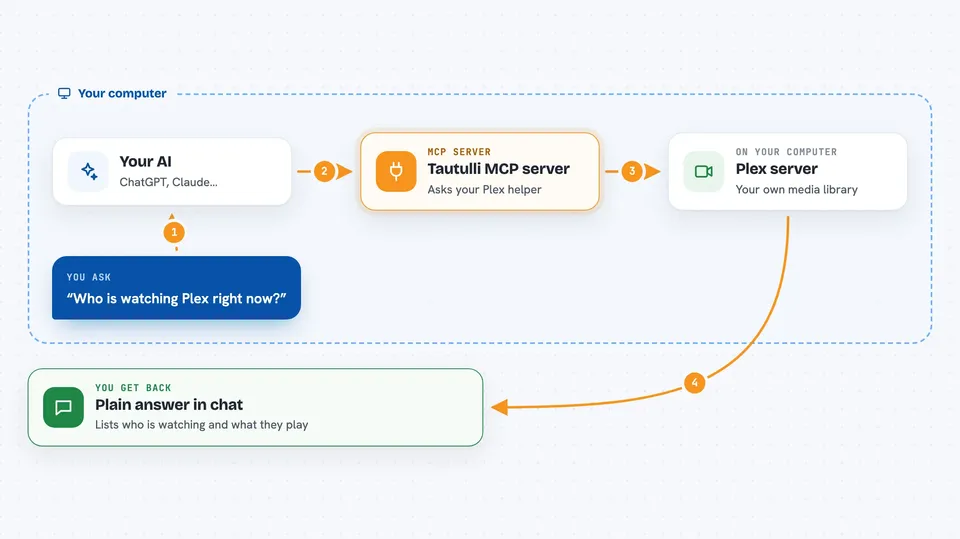
On its own, your AI can only chat with you. An MCP server is a little helper program that gives your AI one new skill. This helper gives your AI a connection to your Tautulli setup, so it can look up your Plex activity and stats for you. You ask a question, the AI uses this helper to fetch the answer, and then tells you in the chat.
What this MCP server does
You type a question, like who is watching right now or what was played this week. Your AI passes that request to this helper program. The helper talks to your Tautulli server using your Tautulli address and API key. Tautulli sends back the numbers and details, and the helper hands them to your AI. Your AI then writes the answer for you in normal sentences, often with a small list or chart made of text.
 Click to zoom
What you can do with it
- See who is streaming right now and how far into the show or movie they are
- Look up recent playback history, filtered by user, type, or date
- Check watch stats for one user, one item, or a whole library
- Find your largest files and see their resolution and codec
- See how much is direct play versus transcode, and on which devices
- Spot viewing patterns by day of the week or hour of the day
- Search your Plex libraries by title
Try asking your AI
- “Who is watching something on Plex right now?”
- “Show me the playback history for the last 7 days.”
- “Which movies in my library are the biggest files?”
- “What are the most watched TV shows this month?”
What it gives back to you
You get answers written in plain language, often with short lists or simple text charts. For example, it can list active streams with progress and quality, or show a bar chart of plays per day of the week. It can also return details for one item, like resolution, codecs, and file size. Everything shows up right in your chat.
Before you start
What you need
- A running Tautulli instance
- Your Tautulli API key (find it in Tautulli under Settings, then Web Interface, then API Key)
- Python 3.10 or newer
- An MCP-compatible client such as Claude Code or Claude Desktop
Good to know
Tautulli does not offer a read-only key, so the key you give this helper is a full-access one; the helper itself only runs read-only commands, but keep that key private.
Install it with your AI
Add Tautulli MCP server to your AI, no technical skills needed
You don't install anything by hand. You copy one prompt, paste it into an AI that can work on your computer, and it checks, installs and connects the server for you, asking you when it needs something.
Sign in to get the install prompt
Members get a ready-made prompt that lets the Claude desktop app check Tautulli MCP server, install it and connect it for them, step by step. You don't need any technical skills: you copy, paste and answer a few questions. Your connected AI can also find and install any of the 4,066 MCP servers here for you.
Who it's for
Plex server owners and home media fans who want quick answers about their server without opening the Tautulli dashboard.



