MCP server · Analytics · official
Netdata MCP server
by netdata · official
Ask your AI about your servers, containers, and apps, and get answers from live Netdata monitoring data.

Netdata is a free tool that watches your computers and servers in real time. It keeps an eye on things like CPU, memory, disk, network, containers, and logs. This MCP server connects your AI assistant to Netdata, so you can simply ask questions in plain words instead of clicking through dashboards.
What is an MCP server? The 30-second version
On its own, your AI can only chat with you. It cannot see your servers or your monitoring data. An MCP server is a small helper that gives your AI a new skill. This one connects your AI to Netdata, so it can look up metrics, logs, systems, containers, processes, and network connections for you.
What this MCP server does
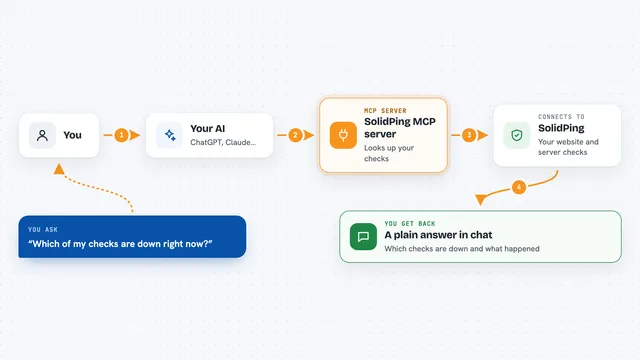
You ask your AI a question in normal words, like why a server is slow. The AI uses this helper to talk to your Netdata setup. Netdata then looks through its live and stored monitoring data. The AI reads the results and explains what it found. You get a clear answer in the chat, often with the numbers behind it.
 Click to zoom
What you can do with it
- Check CPU, memory, and disk usage on a server
- Find out which container or process is using the most resources
- Look at recent logs to spot errors
- See which network connections are open
- Compare a metric over time to spot a trend
- Get help finding the likely cause of a problem
- Ask for a short report on the health of a system
Try asking your AI
- “Why was my web server slow yesterday afternoon?”
- “Which container is using the most memory right now?”
- “Show me any errors in the logs from the last hour.”
- “Is the CPU usage on my database server normal today?”
What it gives back to you
You get answers in plain words, written by your AI. It can show lists of systems or containers, numbers from specific metrics, short summaries, and its best guess at what is going wrong. It can also point you to the exact metric or log line it used.
Before you start
What you need
- A Netdata Agent running somewhere (it is free and installs in one line on Linux)
- The address of that Netdata Agent, usually http://localhost:19999
- An AI assistant that supports MCP servers, like the Claude desktop app
Good to know
Your AI can read a lot of detail about your systems, so only connect it to Netdata instances you are allowed to share with that AI service.
Install it with your AI
Add Netdata MCP server to your AI, no technical skills needed
You don't install anything by hand. You copy one prompt, paste it into an AI that can work on your computer, and it checks, installs and connects the server for you, asking you when it needs something.
Sign in to get the install prompt
Members get a ready-made prompt that lets the Claude desktop app check Netdata MCP server, install it and connect it for them, step by step. You don't need any technical skills: you copy, paste and answer a few questions. Your connected AI can also find and install any of the 4,361 MCP servers here for you.
Who it's for
This is most useful for people who look after servers, websites, or apps, like sysadmins, developers, and small IT teams, even if they are not monitoring experts.