MCP server · Research
Hong Kong Observatory MCP server
by louiscklaw
Ask your AI for Hong Kong weather, forecasts, tides, earthquakes and more.
This is a small helper that connects your AI to the Hong Kong Observatory, the official weather service for Hong Kong. Once it is set up, you can just ask your AI things like what the weather will be on Wednesday, and it will look it up for you. It is handy if you live in or travel to Hong Kong, or if you just want to keep an eye on the weather there.
What is an MCP server? The 30-second version
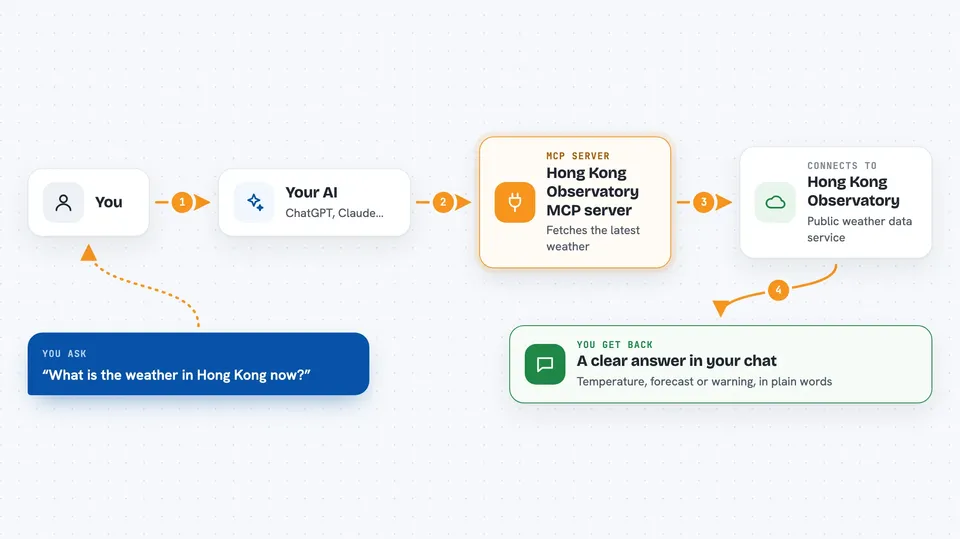
On its own, your AI can only chat with you using what it already knows. An MCP server is a small helper program that gives your AI a new skill, in this case a connection to the Hong Kong Observatory. When you ask a weather question, your AI passes it to this helper, the helper fetches the answer from the Observatory, and your AI tells you the result. You do not need to understand how it works, you just need to add it once.
What this MCP server does
You ask your AI a question about Hong Kong weather, like what the forecast is for next Wednesday. Your AI sends that request to this helper program running on your computer. The helper talks to the Hong Kong Observatory's public data service and pulls back the latest information. Then your AI reads it and gives you a clear answer in the chat. It can also fetch warnings, earthquake reports, tide times, rainfall and more.
 Click to zoom
What you can do with it
- Get the 9-day weather forecast for Hong Kong
- Check the current weather right now
- See weather warnings and special tips
- Look up earthquake messages and felt tremors
- Find tide information and sunrise or sunset times
- Check rainfall, lightning, visibility and radiation levels
- Look up the lunar date and temperature records
Try asking your AI
- “What is the weather in Hong Kong now?”
- “What is the forecast for next Wednesday?”
- “Are there any weather warnings in Hong Kong today?”
- “What time is sunrise in Hong Kong tomorrow?”
What it gives back to you
You get a plain answer in the chat, like the temperature, the forecast for a certain day, or a warning message. For lists like the 9-day forecast, your AI will usually summarise the important parts for you. It can also show tide times, rainfall numbers, or earthquake details. Everything appears as normal text in your conversation.
Before you start
What you need
- The Claude desktop app or another AI app that supports MCP servers
- Node.js installed on your computer (the free software that runs the helper)
- An internet connection so the helper can reach the Hong Kong Observatory
Install it with your AI
Add Hong Kong Observatory MCP server to your AI, no technical skills needed
You don't install anything by hand. You copy one prompt, paste it into an AI that can work on your computer, and it checks, installs and connects the server for you, asking you when it needs something.
Sign in to get the install prompt
Members get a ready-made prompt that lets the Claude desktop app check Hong Kong Observatory MCP server, install it and connect it for them, step by step. You don't need any technical skills: you copy, paste and answer a few questions. Your connected AI can also find and install any of the 4,609 MCP servers here for you.
Who it's for
Anyone who lives in, works in, or travels to Hong Kong and wants quick weather and tide answers from their AI.