
MCP server · Research
National Rail MCP server
Ask your AI about UK train departures and arrivals, live or on a chosen date.
This is a small helper that lets your AI look up UK National Rail train times for you. You ask in normal words, and it fetches live departures and arrivals from a train data service. It is handy if you travel by train in Britain or plan trips for others.
What is an MCP server? The 30-second version
On its own, your AI can only chat with you using what it already knows. An MCP server is a little helper program that gives your AI a new skill, in this case a connection to UK National Rail train information. Once it is set up, your AI can ask this helper for train times and then tell you the answer. You do not need to understand how it works under the hood.
What this MCP server does
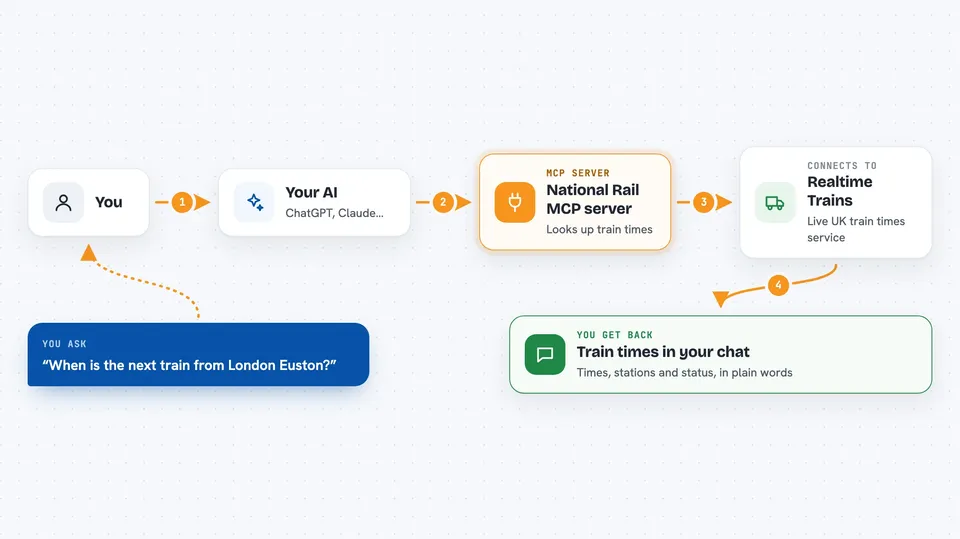
You ask your AI something like when the next train leaves a certain station. Your AI passes that question to this helper, which talks to the Realtime Trains service. The service sends back the train times, and the helper hands them to your AI. Your AI then writes the answer out for you in the chat, in plain words.
 Click to zoom
What you can do with it
- Check live departures from a station
- Check live arrivals at a station
- Look up departures for a specific date
- Look up arrivals for a specific date
- Plan a journey by seeing what is leaving soon
- Check what time a train is expected in
Try asking your AI
- “What trains are leaving London Euston in the next hour?”
- “Show me live arrivals at Manchester Piccadilly right now.”
- “What departures are there from Leeds on 15 March?”
- “List arrivals at Bristol Temple Meads for next Friday morning.”
What it gives back to you
You get a list of trains with times, stations, and status, written out in the chat. For live queries it shows what is happening now, and for dated queries it shows the schedule for that day. Your AI may summarise it or show it as a simple list.
Before you start
What you need
- A Realtime Trains API account from api.rtt.io
- Your Realtime Trains API username and password
- Node.js installed on your computer
- The Claude desktop app or another MCP client
Good to know
It only reads train times, so it cannot book tickets or change your journey, but it does need your Realtime Trains login details, so keep those private.
Install it with your AI
Add National Rail MCP server to your AI, no technical skills needed
You don't install anything by hand. You copy one prompt, paste it into an AI that can work on your computer, and it checks, installs and connects the server for you, asking you when it needs something.
Sign in to get the install prompt
Members get a ready-made prompt that lets the Claude desktop app check National Rail MCP server, install it and connect it for them, step by step. You don't need any technical skills: you copy, paste and answer a few questions. Your connected AI can also find and install any of the 4,609 MCP servers here for you.
Who it's for
People who travel by train in the UK, commuters, and anyone who plans rail trips or checks train times often.




