
MCP server · Developer tools
ASP.NET Core Debugger MCP server
by magna-nz
Lets your AI pause your .NET app, read real values, and explain bugs instead of guessing.
This is a helper that lets your AI actually debug a .NET or ASP.NET Core app for you. Instead of guessing where the bug is, the AI can pause your running code, look at the real values, and tell you what it found. It is handy for developers who work on .NET apps and want faster answers about crashes, hangs, or wrong results.
What is an MCP server? The 30-second version
On its own, your AI can only chat. It cannot see inside your running program. An MCP server is a small helper program that gives your AI a new skill or a connection to another tool. This one connects your AI to a .NET debugger, so it can pause your app, read values, and explain what is really happening when you ask.
What this MCP server does
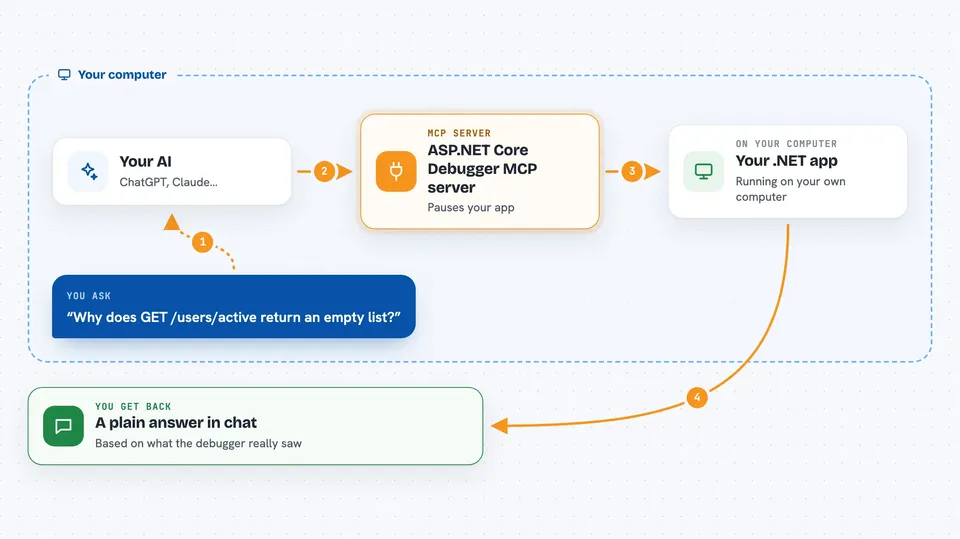
You describe the problem to your AI, like an endpoint returning the wrong data or a request that hangs. The AI uses this helper to start or attach to your .NET app. The helper talks to a debugger called netcoredbg, which pauses the app at the right spot. The AI then reads the actual values, threads, and call stack, and tells you what it saw. It can also change a value in memory to test a fix without you editing code.
 Click to zoom
What you can do with it
- Pause your app at a specific line and read the real variable values
- Step through code line by line to see how execution flows
- Find out why a request hangs by analyzing what each thread is waiting on
- Trace a slow request and show where the time is spent
- Inspect an exception with its full chain, top frames, and local values
- Change a value in memory to test a fix without restarting
- Attach to a running app instead of starting a new one
Try asking your AI
- “Why does GET /users/active return an empty list?”
- “My /admin/users endpoint returns 401 for Anna. What does the auth handler actually see?”
- “The /reports endpoint hangs forever in staging. Attach and tell me what is blocking.”
- “GET /order/42 takes 800ms. Show me where the time is going.”
What it gives back to you
You get answers in the chat, grounded in what the debugger actually saw. That can be variable values, a call stack, a list of threads and what they are waiting on, a timeline of a slow request, or a summary of an exception. If the AI changed a value in memory, it tells you what it set and what happened next.
Before you start
What you need
- The .NET 10 SDK installed on your computer
- A .NET or ASP.NET Core app you want to debug
- The Claude desktop app or Claude Code
Good to know
It can change values in your running app's memory and pause or control your program, so use it on a test or staging app rather than something live that real users depend on.
Install it with your AI
Add ASP.NET Core Debugger MCP server to your AI, no technical skills needed
You don't install anything by hand. You copy one prompt, paste it into an AI that can work on your computer, and it checks, installs and connects the server for you, asking you when it needs something.
Sign in to get the install prompt
Members get a ready-made prompt that lets the Claude desktop app check ASP.NET Core Debugger MCP server, install it and connect it for them, step by step. You don't need any technical skills: you copy, paste and answer a few questions. Your connected AI can also find and install any of the 4,609 MCP servers here for you.
Who it's for
Developers and engineers who work on .NET or ASP.NET Core apps and want faster, evidence-based answers about bugs.




