
MCP server · Finance and crypto
CSPR.trade MCP server
Lets your AI look up Casper Network token prices, swap quotes, and your wallet balances on CSPR.trade.
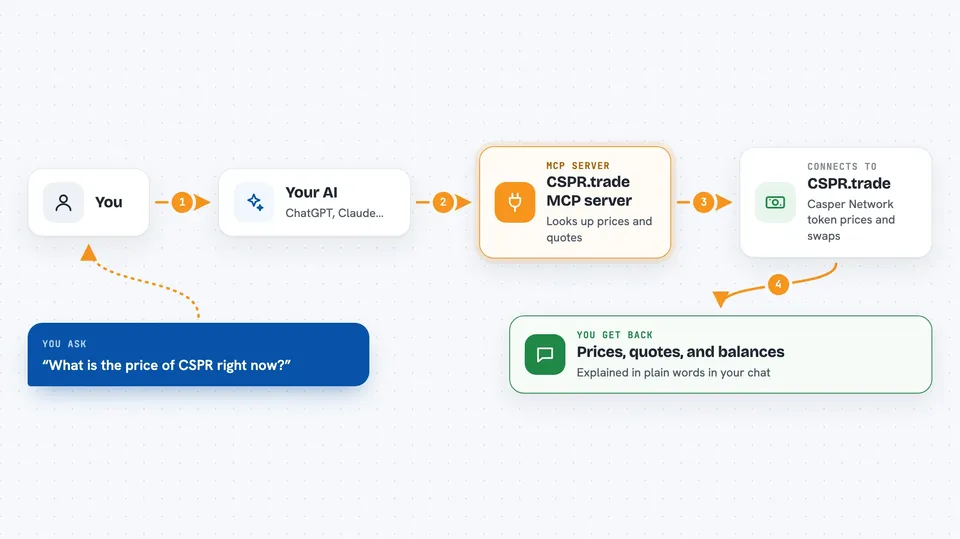
This is a helper that connects your AI assistant to CSPR.trade, a trading site on the Casper Network. It lets your AI check prices, compare tokens, look at your balances, and prepare trades for you. It is handy if you already trade on CSPR.trade or want to keep an eye on Casper tokens without clicking around a website.
What is an MCP server? The 30-second version
On its own, your AI can only chat with you. An MCP server is a small helper program that gives your AI a new skill or a connection to an app. This one connects your AI to CSPR.trade, a trading site on the Casper Network. Once it is connected, your AI can look things up there and prepare trades when you ask.
What this MCP server does
You ask your AI something like what is the price of a token or how much would I get if I swapped. Your AI sends that question to this helper, and the helper talks to CSPR.trade on the Casper Network. CSPR.trade sends back the numbers, like prices, quotes, or your balances. Your AI then explains the answer to you in plain words in the chat. For trades, the helper builds the transaction, and you sign it yourself on your own machine.
 Click to zoom
What you can do with it
- Check token prices and price history on Casper
- Get a swap quote before you trade
- See your token balances and liquidity positions
- Estimate price impact and slippage for a trade
- Look at your swap history and portfolio value
- Build a swap or liquidity transaction for you to sign
- Prepare adding or removing liquidity from a pool
Try asking your AI
- “What is the current price of CSPR on CSPR.trade?”
- “How much would I get if I swapped 100 CSPR for another token?”
- “Show me my token balances and liquidity positions.”
- “What is the price history for this token over the last week?”
What it gives back to you
You get answers in the chat: prices, quotes, balances, position lists, and simple summaries. For trades, it gives you a transaction that is ready for you to sign. It can also show charts-style numbers like price history and estimates for price impact or slippage. Nothing is signed or sent by the helper itself unless you set up local signing.
Before you start
What you need
- An MCP client like Claude Desktop or Cursor
- A Casper wallet if you want to trade or check your own balances
- Node.js if you want to run it yourself instead of using the hosted link
Good to know
It can prepare real trades on the Casper Network, so always read the quote and the transaction carefully before you sign, and never share your private keys with the hosted server.
Install it with your AI
Add CSPR.trade MCP server to your AI, no technical skills needed
You don't install anything by hand. You copy one prompt, paste it into an AI that can work on your computer, and it checks, installs and connects the server for you, asking you when it needs something.
Sign in to get the install prompt
Members get a ready-made prompt that lets the Claude desktop app check CSPR.trade MCP server, install it and connect it for them, step by step. You don't need any technical skills: you copy, paste and answer a few questions. Your connected AI can also find and install any of the 4,609 MCP servers here for you.
Who it's for
People who trade or hold tokens on the Casper Network and want their AI to check prices, quotes, and balances for them.



