MCP server · Finance and crypto
x402-list MCP server
by mcccsm
Lets your AI search a directory of x402 payment services, check their health, prices and on-chain volume.
This is a small helper that connects your AI assistant to x402-list, a public directory of online services that accept x402 payments (a way of paying for things over the web with stablecoins). It is handy if you are comparing or checking payment services and want your AI to look them up for you instead of you clicking around a website.
What is an MCP server? The 30-second version
On its own, your AI can only chat with you. An MCP server is a small helper program that gives your AI a new skill, in this case a connection to the x402-list directory. Once it is connected, your AI can ask x402-list for information, like which services exist, how healthy they are, and how much money has settled on-chain. You just ask in normal words and the AI does the looking up.
What this MCP server does
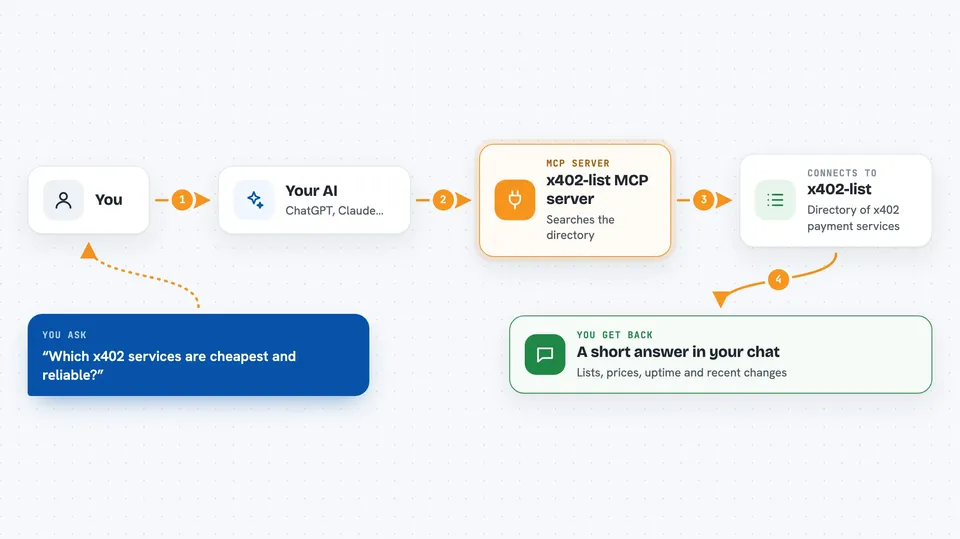
You ask your AI something like which x402 services are cheapest and reliable. The AI uses this helper, which talks to the public x402-list website. The website sends back a list of services with their prices, uptime and networks. Your AI then turns that into a short answer for you in the chat. It can also check live health, look at facilitator settlement volumes, and show a feed of recent changes on listed services.
 Click to zoom
What you can do with it
- Search the directory by keyword, category, network or status
- Get full details for one service, including its endpoints and prices
- Ask for a ranked recommendation for a specific need
- Check live health and uptime for the whole directory or one service
- See on-chain settlement volume per facilitator
- Read a feed of recent changes on listed services
- Request a paid AI comparison of a shortlist of services
Try asking your AI
- “Find x402 services in the data category on Base that are up right now”
- “Which x402 service is best for image generation under a dollar per call”
- “Show me the on-chain settlement volume for each facilitator in the last 30 days”
- “What changed on listed services in the past week”
What it gives back to you
You get back plain answers in the chat: lists of services, short summaries, prices in US dollars, uptime numbers, and change events. For a single service you get its endpoints, per-endpoint prices, networks and settlement asset. The paid comparison tool returns a written report, and if you asked for a live probe it adds a short verdict with trimmed extracts.
Before you start
What you need
- An MCP client like Claude Desktop or another app that supports MCP
- Node.js installed on your computer if you run it locally
- A funded x402 wallet if you want to use the paid comparison tool
Good to know
The paid comparison tool costs $0.25 USDC on Base, and adding a live probe adds that service's price on top, which is not refunded.
Install it with your AI
Add x402-list MCP server to your AI, no technical skills needed
You don't install anything by hand. You copy one prompt, paste it into an AI that can work on your computer, and it checks, installs and connects the server for you, asking you when it needs something.
Sign in to get the install prompt
Members get a ready-made prompt that lets the Claude desktop app check x402-list MCP server, install it and connect it for them, step by step. You don't need any technical skills: you copy, paste and answer a few questions. Your connected AI can also find and install any of the 4,361 MCP servers here for you.
Who it's for
People who compare or pick online payment services, and anyone curious about which x402 services are healthy, cheap and actually used.