MCP server · Finance and crypto
The Stall MCP server
by thebrierfox
Let your AI fetch paid financial data like stock filings, options chains, and crypto analytics, paying per request.
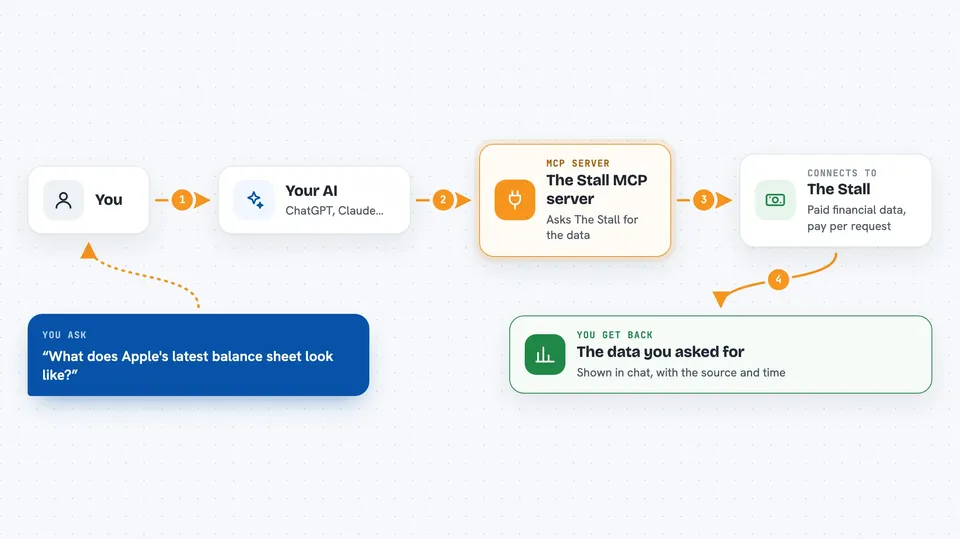
The Stall is a paid data service your AI can reach through an MCP connection. It offers hundreds of financial data lookups, from company balance sheets to options chains and prediction markets. It is handy for analysts, researchers, or anyone who wants their AI to pull fresh market data on demand.
What is an MCP server? The 30-second version
On its own, your AI can only chat with you using what it already learned. An MCP server is a small helper that gives your AI a new skill or a connection to an outside service. This one connects your AI to The Stall, a paid data service, so the AI can request financial information for you. When you ask a question, the AI reaches out to The Stall, pays a small fee from your wallet, and brings back the data.
What this MCP server does
You ask your AI a question that needs outside financial data, like a company's latest balance sheet. The AI uses this MCP helper to send a request to The Stall. The Stall replies with a payment challenge showing the price. If your wallet is set up and you approve the payment, the AI pays in USDC on the Base network and gets the data back. Then the AI shows you the result in the chat.
 Click to zoom
What you can do with it
- Look up a company's balance sheet from SEC filings
- Check options chains and dealer gamma exposure
- Pull macro economic data
- See recent congressional trades
- Check prediction market odds
- Read crypto and DeFi analytics
- Fetch SEC filings for a ticker
Try asking your AI
- “What does Apple's latest quarterly balance sheet look like?”
- “Show me the options chain for Tesla expiring next month.”
- “What are the current prediction market odds for the next election?”
- “Get me the latest SEC filing for Microsoft.”
What it gives back to you
You get back the data you asked for, like a table of numbers, a summary of a filing, or a list of trades. The AI presents it in the chat as text, often with the source and time noted. If a payment is needed, you first see a price quote before anything is charged.
Before you start
What you need
- A wallet with USDC on the Base network (crypto stablecoin)
- The Claude desktop app or another MCP-compatible AI tool
- A way to approve small payments, like the Coinbase Agentic Wallet CLI
Good to know
Each data request costs real money in USDC, so set spending limits and check the price quote before approving.
Install it with your AI
Add The Stall MCP server to your AI, no technical skills needed
You don't install anything by hand. You copy one prompt, paste it into an AI that can work on your computer, and it checks, installs and connects the server for you, asking you when it needs something.
Sign in to get the install prompt
Members get a ready-made prompt that lets the Claude desktop app check The Stall MCP server, install it and connect it for them, step by step. You don't need any technical skills: you copy, paste and answer a few questions. Your connected AI can also find and install any of the 4,361 MCP servers here for you.
Who it's for
Financial analysts, researchers, and anyone who wants their AI to pull live market and company data without a subscription.