MCP server · Coding · official
Melbis Shop MCP server
by melbis · official
Let your AI work inside your Melbis Shop store as a staff member, with that person's rights.
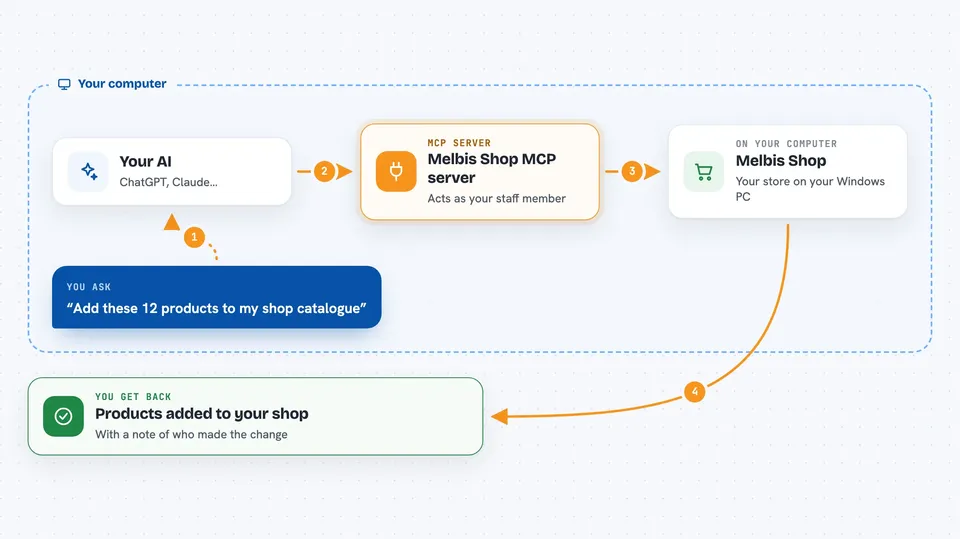
Melbis Shop is a store platform you run on your own server, with a Windows back-office and a website. This MCP server is the piece that lets an AI assistant work inside that store as an employee, using a staff login and that person's permissions. It is handy if you run a small shop with a team and want help with products, prices, catalogues and pages without clicking through everything yourself.
What is an MCP server? The 30-second version
On its own, your AI can only chat with you. An MCP server is a small helper program that gives your AI a new skill or a connection to an app. Here, the helper is MelbisMCP.exe, which comes with the Windows client and talks to your Melbis Shop store. Once it is connected, you can ask your AI in plain words to look things up or make changes in your store, and it does that under the staff login it was started with.
What this MCP server does
You type a request in your AI app, like adding products or checking a catalogue. The AI sends that request to the Melbis MCP server running on your Windows machine. The server then talks to your Melbis Shop store through the same business logic the back-office uses. Whatever the store returns, like a list of products, a page preview or a confirmation of a change, comes back into your chat. Every action is signed with the name of the staff member the agent is running as.
 Click to zoom
What you can do with it
- Add or edit products, prices and descriptions in your catalogue
- Work with catalogue trees, attributes and supplier price lists
- Read and change project files like modules, templates and images, with version history
- Look at storefront pages the way a visitor sees them
- Run database queries through pools of steps with locks and cache marks
- Import goods and files in batches
- Check orders, users, scheduler tasks and image profiles
Try asking your AI
- “Add these 12 products to the catalogue with the prices from this list”
- “Show me all products in the Tools category that have no description yet”
- “Create a new supplier called Nordic Supplies and link these products to it”
- “Show me the home page of the storefront as a visitor would see it”
What it gives back to you
You get answers in your chat: lists of products, prices, categories, suppliers or orders, and short summaries of what was found. When the AI makes a change, it tells you what it changed and under whose staff login. For files and pages, you can see the content or a preview, and version history is kept for project files. Numbers like counts, totals or token use can also come back when relevant.
Before you start
What you need
- A Melbis Shop store installed on your own server (the Windows client installs it for you)
- The Melbis Shop Windows client on the same machine as your AI app
- A staff login in the store with the rights you want the agent to have
- A licence bound to that staff login (demo mode is free to try)
Good to know
The agent works with the rights of the staff login it runs under, so it can change or delete real data in your store, and a licence is billed per staff login from 1 euro per day.
Install it with your AI
Add Melbis Shop MCP server to your AI, no technical skills needed
You don't install anything by hand. You copy one prompt, paste it into an AI that can work on your computer, and it checks, installs and connects the server for you, asking you when it needs something.
Sign in to get the install prompt
Members get a ready-made prompt that lets the Claude desktop app check Melbis Shop MCP server, install it and connect it for them, step by step. You don't need any technical skills: you copy, paste and answer a few questions. Your connected AI can also find and install any of the 4,361 MCP servers here for you.
Who it's for
Small shop owners and their teams who run a Melbis Shop store and want an AI assistant to help with catalogue, prices, pages and everyday back-office work.