MCP server · Developer tools
Dynadot MCP server
by mikusnuz
Let your AI search, buy and manage domain names through your Dynadot account.

This connects your AI assistant to Dynadot, where many people buy and keep track of website addresses called domains. Once it is hooked up, you can just say "find me a cheap domain ending in .com" instead of clicking around the Dynadot website yourself. It saves time if you handle several domains, either for work or for personal projects.
What is an MCP server? The 30-second version
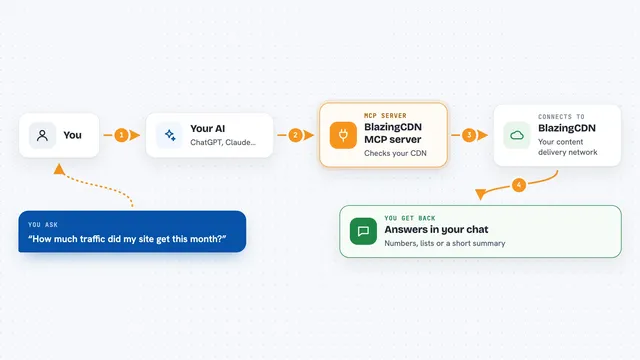
On its own, your AI can only talk. An MCP server is a little helper program that runs quietly behind the scenes and hands your AI a brand new ability. This particular helper links your AI to your Dynadot account, so whenever you ask something about your domains, the AI passes the request along and brings the answer straight back to the chat. You never touch any of the wiring underneath.
What this MCP server does
When you ask your AI something like checking whether a certain web address is still free, the AI sends that question to this helper. The helper then calls Dynadot on your behalf, waits for the reply, and turns it into normal readable text inside your conversation. If you tell it to actually make a change, such as pointing a domain somewhere else or turning on privacy, it carries out those steps too. Either way, everything happens while you sit in the same chat window.
 Click to zoom
What you can do with it
- Check whether one or many domain names are still available, sometimes up to a hundred together
- Buy a fresh domain or grab several in one go
- Look up the details stored against each of your domains
- Change how a domain points elsewhere online, including mail rules
- Turn WHOIS privacy off or on so strangers see less of your data
- Start moving a domain away from Dynadot or bring someone else's in
Try asking your AI
- “Is coolcoffeeshop dot com taken? And show me roughly what it would cost per year.”
- “Please turn on privacy for mybakery.net so nobody sees my home address anymore.”
- “What domains am I holding right now? Give me a simple table sorted by expiry date.”
- “Point www.myportfolio.org at my new website provider.”
What it gives back to you
Mostly you receive tidy written replies rather than raw computer output. For searches you might get lines saying whether each name was free plus a price tag next to the ones that were. Lookups come back as neat lists showing dates, servers and contact labels. Whenever the tool really changed something, like switching privacy on, you simply hear confirmation that it went ahead.
Before you start
What you need
- Your own Dynadot login, since some actions happen inside your real account
- A Dynadot access token, obtained free from the security area of your profile after logging in
- Either Node installed on your computer or permission to let the system fetch whatever it requires automatically
Good to know
Because this reaches your genuine paid account, careless wording asking removals or purchases may genuinely execute leaving lasting consequences worth double checking beforehand.
Install it with your AI
Add Dynadot MCP server to your AI, no technical skills needed
You don't install anything by hand. You copy one prompt, paste it into an AI that can work on your computer, and it checks, installs and connects the server for you, asking you when it needs something.
Sign in to get the install prompt
Members get a ready-made prompt that lets the Claude desktop app check Dynadot MCP server, install it and connect it for them, step by step. You don't need any technical skills: you copy, paste and answer a few questions. Your connected AI can also find and install any of the 4,066 MCP servers here for you.
Who it's for
Handy mainly for freelancers, tiny agencies and anyone juggling lots of websites whose owners dislike hopping between browser tabs to fiddle with domains.