
MCP server · Finance and crypto
WAIaaS wallet MCP server
Let your AI check balances and send crypto from your own machine, with spending limits you control.
WAIaaS is a wallet program you run on your own computer. It lets an AI assistant look at your crypto wallets and make payments on Solana and Ethereum-style networks, while you keep the keys and set the rules. It is handy if you already use an AI assistant and want it to handle small crypto tasks without handing over your funds.
What is an MCP server? The 30-second version
On its own, your AI can only chat. An MCP server is a small helper program that gives your AI a new skill or a connection to an app or service. This one connects your AI to your own WAIaaS wallet program, so the AI can check balances, send tokens, or look up transactions for you when you ask. The wallet program still runs on your machine, and your keys stay there.
What this MCP server does
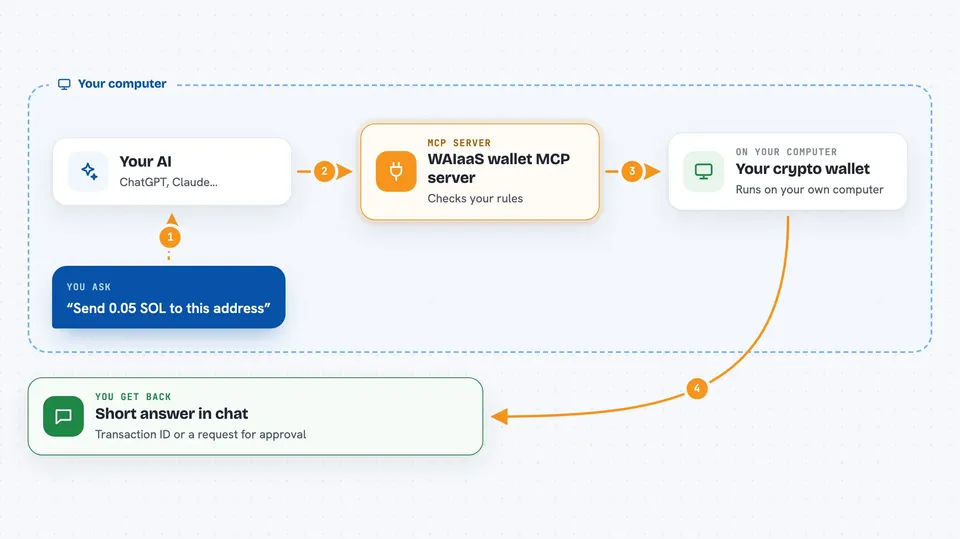
You ask your AI something like send 0.1 SOL to this address. The AI passes the request to this MCP server, which talks to the WAIaaS wallet program running on your computer. That program checks your rules, like how much can be spent without asking you, and then sends the transaction to the blockchain. You get back a short answer in the chat, such as the transaction ID or a note that it needs your approval first.
 Click to zoom
What you can do with it
- Check the balance of your Solana or EVM wallets
- Send tokens to another address
- Look up recent transactions and their status
- Call a smart contract or approve a token spender
- Swap tokens through DeFi providers like Jupiter
- Review and adjust spending policies
- Pause everything with the Kill Switch if something looks wrong
Try asking your AI
- “What is my Solana wallet balance right now?”
- “Send 0.05 SOL to this address and show me the transaction ID”
- “Show my last five transactions and their status”
- “What are my current spending limits?”
What it gives back to you
You get plain answers in the chat: balances with the token symbol, transaction IDs, short lists of recent activity, and confirmations when a policy change or a transfer goes through. If a transaction is above your limit, it tells you it is waiting for your approval instead of sending it. Everything is a short reply, not a file you have to open.
Before you start
What you need
- Node.js 18 or newer installed on your computer
- The WAIaaS command line tool installed (npm install -g @waiaas/cli)
- A wallet created with the waiaas quickset command, which also prints the MCP config for you
- The Claude desktop app or another AI tool that supports MCP
Good to know
This server can move real money and change your wallet settings, so start on a testnet, set small spending limits, and keep your master password and recovery key safe.
Install it with your AI
Add WAIaaS wallet MCP server to your AI, no technical skills needed
You don't install anything by hand. You copy one prompt, paste it into an AI that can work on your computer, and it checks, installs and connects the server for you, asking you when it needs something.
Sign in to get the install prompt
Members get a ready-made prompt that lets the Claude desktop app check WAIaaS wallet MCP server, install it and connect it for them, step by step. You don't need any technical skills: you copy, paste and answer a few questions. Your connected AI can also find and install any of the 4,609 MCP servers here for you.
Who it's for
People who already use an AI assistant and want it to handle small crypto payments or check wallet activity without giving up control of their keys.



