MCP server · API
AuthMCP Gateway
by loglux
A shared front door for your MCP servers, with logins, permissions, and a live activity dashboard.

AuthMCP Gateway is a helper that sits in front of your MCP servers and checks who is allowed in. Instead of giving every tool its own password, you log in once and the gateway handles the rest. It is handy for teams and admins who run several MCP servers and want to see what is happening.
What is an MCP server? The 30-second version
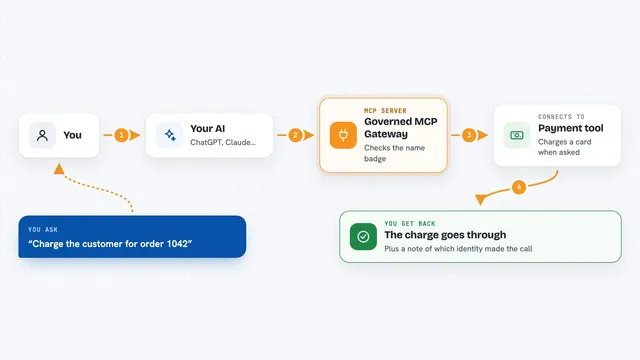
On its own, your AI can only chat. An MCP server is a small helper program that gives your AI a new skill or a connection to an app. This gateway is a helper that stands in front of other MCP servers, like a receptionist for a building. When your AI asks for something, the gateway checks your login, decides which back-end server should handle it, and passes the answer back.
What this MCP server does
You connect your AI tool to the gateway instead of connecting it to each MCP server separately. When you ask your AI to do something, the AI sends the request to the gateway. The gateway checks your login and permissions, then forwards the request to the right back-end server. The back-end server does the work and sends the result back through the gateway. You see the answer in your chat, and the gateway records the activity in its dashboard.
 Click to zoom
What you can do with it
- Log in once and reach many MCP servers through one address
- List all tools, resources, and prompts from every connected server in one place
- Call a tool on a specific back-end server by name
- Let MCP clients register themselves automatically with OAuth
- Set per-user request limits so one person cannot overload a server
- Watch live requests, response times, and success rates in a dashboard
- Review security events like failed logins and blocked requests
Try asking your AI
- “List all the tools I can use right now”
- “Show me the resources available from the docs server”
- “Run the rag_query tool with the question: what is our refund policy”
- “Show me the prompts from the WhatsApp server”
What it gives back to you
You get back the normal answers from your MCP servers: lists of tools, resources, or prompts, and the results of any tool you run. The gateway also shows a live feed of requests, response times, and success rates in its dashboard. Security events like blocked logins are listed separately for admins to review.
Before you start
What you need
- Python 3.10 or newer, or Docker if you prefer containers
- At least one MCP server for the gateway to connect to
- A web browser to open the setup wizard and create the admin user
Good to know
The gateway can pass through actions that change or delete things on your back-end servers, so only give access to people you trust and review the security events regularly.
Install it with your AI
Add AuthMCP Gateway to your AI, no technical skills needed
You don't install anything by hand. You copy one prompt, paste it into an AI that can work on your computer, and it checks, installs and connects the server for you, asking you when it needs something.
Sign in to get the install prompt
Members get a ready-made prompt that lets the Claude desktop app check AuthMCP Gateway, install it and connect it for them, step by step. You don't need any technical skills: you copy, paste and answer a few questions. Your connected AI can also find and install any of the 4,361 MCP servers here for you.
Who it's for
Teams and administrators who run several MCP servers and want one secure, monitored entry point for their users.