MCP server · Developer tools
Kill Process MCP server
by misiektoja
Ask your AI to list what is running on your computer and shut down the programs you pick.

This is a small helper that lets your AI look at the programs running on your own computer and close the ones you want gone. It is handy when something is eating all your memory or CPU and you cannot find it in Task Manager or Activity Monitor. You talk to your AI in normal words, and it does the finding and the closing for you.
What is an MCP server? The 30-second version
On its own, your AI can only chat. It cannot see what is happening on your machine. An MCP server is a small helper program that gives your AI a new skill, and here that skill is looking at and stopping programs running on your computer. Once it is connected, your AI can check your running programs and shut one down when you ask.
What this MCP server does
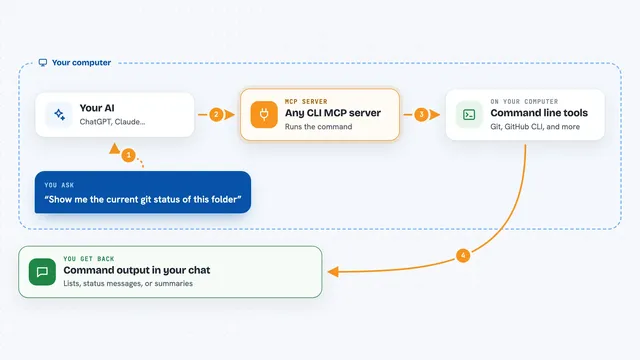
You ask your AI something like which programs are using the most memory. The AI passes that request to this helper. The helper looks at the list of programs running on your computer, sorts them the way you asked, and sends the list back. The AI then shows you that list in the chat in plain words. If you then say to close one of them, the AI asks the helper to stop that program, and the helper does it.
 Click to zoom
What you can do with it
- List running programs sorted by CPU or memory use
- Filter the list by program name, user, or status
- Show only programs above a certain CPU or memory level
- Hide system programs so you only see your own
- Limit the list to a certain number of entries
- Close a specific program you point to
Try asking your AI
- “Which programs are using the most memory right now?”
- “List my top 5 programs by CPU use”
- “Show me every running program with Spotify in its name”
- “Close the program that is hogging my CPU”
What it gives back to you
You get a list of programs in the chat, with details like their name, the user running them, and how much CPU and memory they use. You can ask for it sorted or filtered however you like. When you close a program, the AI tells you it was stopped. Nothing is shown as a file or a chart, just text in the conversation.
Before you start
What you need
- An AI app that supports MCP, like Claude Desktop or Cursor
- Python 3.13 or newer
- uv, a small tool you install once (the README shows how)
Good to know
Closing the wrong program can lose unsaved work or crash something you need, so check the name carefully before you let it stop anything.
Install it with your AI
Add Kill Process MCP server to your AI, no technical skills needed
You don't install anything by hand. You copy one prompt, paste it into an AI that can work on your computer, and it checks, installs and connects the server for you, asking you when it needs something.
Sign in to get the install prompt
Members get a ready-made prompt that lets the Claude desktop app check Kill Process MCP server, install it and connect it for them, step by step. You don't need any technical skills: you copy, paste and answer a few questions. Your connected AI can also find and install any of the 4,361 MCP servers here for you.
Who it's for
Anyone who wants to find and stop a runaway program on their own computer without digging through Task Manager or Activity Monitor.