MCP server · Email
TossInbox MCP server
Your AI can create a throwaway email address, wait for a verification code, and read it back to you.
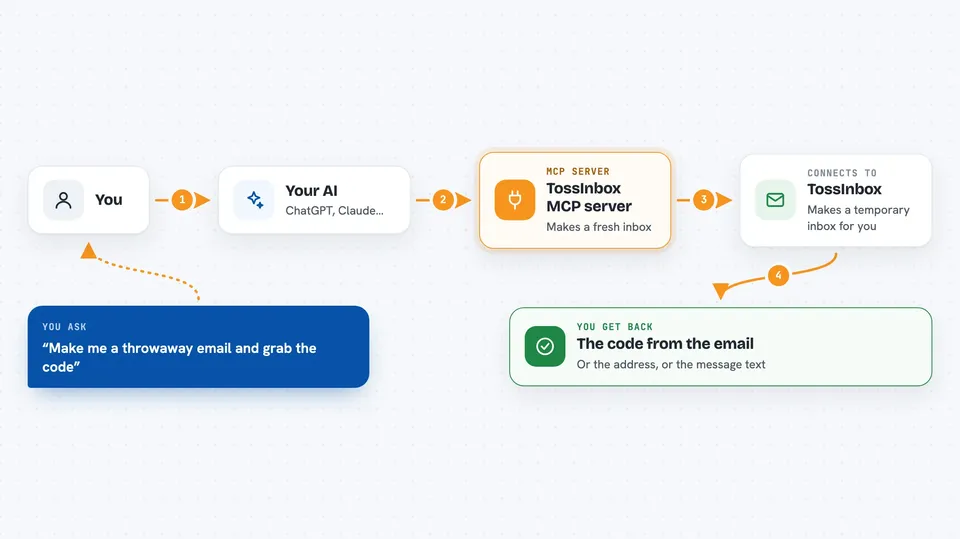
TossInbox gives your AI its own temporary email address. It makes a brand new inbox in seconds, waits for the confirmation email to arrive, and pulls out the code inside. It is handy when a website asks you to confirm your email and you would rather not hand over your real address.
What is an MCP server? The 30-second version
On its own, your AI can only chat with you. An MCP server is a small helper program that gives your AI one new skill, in this case a connection to a disposable email service. Once you add TossInbox, your AI can ask it to make a temporary inbox, check what landed in it, and hand you the verification code. You never leave the chat to do it yourself.
What this MCP server does
You ask your AI to set up a throwaway email address. Your AI passes that request to TossInbox, which creates a fresh inbox with one of several free email services and gives back the address. You use that address on a signup form, then tell your AI to wait for the confirmation email. TossInbox checks the inbox until the message arrives, reads it, and gives your AI the code inside. When you are finished, the inbox can be thrown away.
 Click to zoom
What you can do with it
- Create a brand new disposable email address
- List the messages sitting in that inbox
- Read a full message, including any code it contains
- Wait until a confirmation email arrives and pull out the code
- See whether a message has attachments
- Save an attachment or the message body to a folder
- Throw the inbox away when you are done
Try asking your AI
- “Create a disposable inbox for me and tell me the address.”
- “Wait for the verification code from example.com and give it to me.”
- “Show me the messages in that inbox.”
- “Read the last message and tell me what it says.”
What it gives back to you
You get the email address as plain text in the chat, and later the message contents or just the code. If you ask for a list, you get the sender, subject, and a short preview of each message. When it saves attachments, it tells you the folder where they went.
Before you start
What you need
- Node.js 18 or newer on your computer
- An MCP client such as Claude Desktop, Cursor, or another app that supports MCP
Good to know
These inboxes are public throwaway addresses, so do not use them for anything private or important, and some websites block disposable email domains.
Install it with your AI
Add TossInbox MCP server to your AI, no technical skills needed
You don't install anything by hand. You copy one prompt, paste it into an AI that can work on your computer, and it checks, installs and connects the server for you, asking you when it needs something.
Sign in to get the install prompt
Members get a ready-made prompt that lets the Claude desktop app check TossInbox MCP server, install it and connect it for them, step by step. You don't need any technical skills: you copy, paste and answer a few questions. Your connected AI can also find and install any of the 4,361 MCP servers here for you.
Who it's for
Anyone who signs up for services often and wants to keep their real email private, plus testers and developers checking signup and verification flows.