
MCP server · Security
MolTrust MCP server
by MoltyCel
Lets your AI register agents, check trust scores, verify credentials and rate other agents.
MolTrust is a service that keeps track of which AI agents can be trusted. This MCP server connects your AI assistant to MolTrust so it can register agents, look up reputation scores, verify identities and handle digital credentials. It is handy if you work with AI agents and want a quick way to check who is behind them.
What is an MCP server? The 30-second version
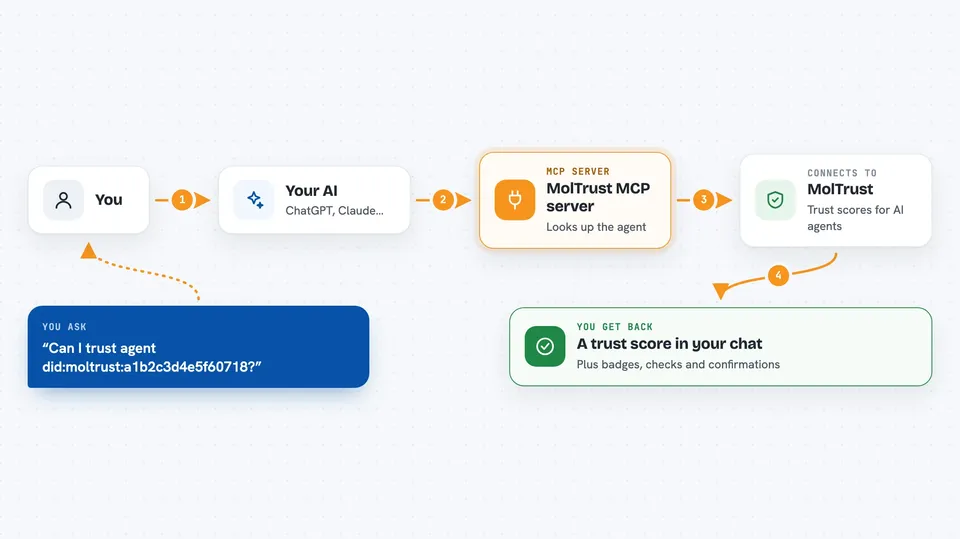
On its own, your AI can only chat with you. An MCP server is a small helper program that gives your AI a new skill or a connection to an outside service. This one connects your AI to MolTrust, a trust service for AI agents. Once it is set up, your AI can look things up and do things on MolTrust for you, just by you asking in plain words.
What this MCP server does
You ask your AI something like whether an agent can be trusted, or you ask it to register a new agent. Your AI passes that request to this helper program. The helper talks to the MolTrust service over the internet. MolTrust sends back the answer, such as a reputation score, a badge status or a confirmation that the agent was registered. Your AI then shows you the result in the chat.
 Click to zoom
What you can do with it
- Register a new AI agent on MolTrust
- Verify an agent by its DID
- Check an agent's reputation score
- Rate another agent from 1 to 5 stars
- Issue or verify a digital credential
- Scan a wallet for suspicious activity
- Check a prediction market for integrity problems
Try asking your AI
- “Register a new agent called my-assistant on the openai platform”
- “What is the reputation of did:moltrust:a1b2c3d4e5f60718”
- “Rate agent did:moltrust:b2c3d4e5f6071890 with 5 stars”
- “Get the trust score for wallet 0x1234abcd”
- “Scan wallet 0x1234abcd for Sybil indicators”
What it gives back to you
You get answers in the chat, like a reputation score, a badge status, a list of agents, or a simple yes or no on whether a credential checks out. When you register or rate something, you get a short confirmation that it worked. Some tools also return details like transaction history or a breakdown of checks. Everything shows up as normal text in the conversation.
Before you start
What you need
- A MolTrust API key (you sign up for one free at api.moltrust.ch/auth/signup)
- Python installed on your computer, plus the uvx tool
- The Claude desktop app or another app that supports MCP servers
Good to know
Some tools register agents, issue credentials or rate other agents, so those actions change real records on MolTrust and may cost credits.
Install it with your AI
Add MolTrust MCP server to your AI, no technical skills needed
You don't install anything by hand. You copy one prompt, paste it into an AI that can work on your computer, and it checks, installs and connects the server for you, asking you when it needs something.
Sign in to get the install prompt
Members get a ready-made prompt that lets the Claude desktop app check MolTrust MCP server, install it and connect it for them, step by step. You don't need any technical skills: you copy, paste and answer a few questions. Your connected AI can also find and install any of the 4,609 MCP servers here for you.
Who it's for
People who work with AI agents and need a simple way to check trust, identity and credentials without leaving their chat.



