MCP server · Security · official
EchelonGraph MCP server
by echelongraph · official
Lets your AI look up CVE details, known exploited bugs, exploit likelihood scores, and internet exposure counts.
This is a free helper that connects your AI assistant to EchelonGraph, a service that collects public security data about software flaws (called CVEs). Once it is connected, you can ask plain questions like whether a bug is being actively exploited, or how many exposed machines on the internet are running a vulnerable version. It is handy for anyone who has to keep software patched and wants quick answers without hunting through several websites.
What is an MCP server? The 30-second version
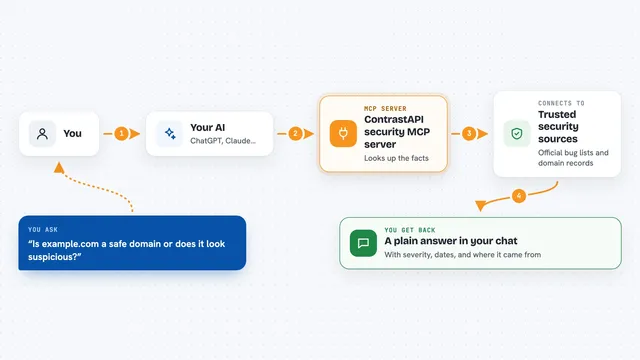
On its own, your AI can only chat with what it already knows. An MCP server is a small helper program that gives your AI one new skill, here a connection to EchelonGraph's public security feed. When you ask a question, your AI passes it to this helper, the helper fetches the answer from EchelonGraph, and your AI explains it back to you. You do not need to know how it works under the hood.
What this MCP server does
You ask your AI a question in normal words, for example whether a specific CVE is being exploited. Your AI sends that request to this helper. The helper talks to EchelonGraph's public service, which mixes data from NVD, MITRE, CISA's known exploited list, EPSS scores, GitHub advisories and internet exposure scans. The helper brings the result back, and your AI turns it into a clear answer in your chat window. Every answer also says when it was measured and how, so your AI will not treat a missing result as a clean bill of health.
What you can do with it
- Look up one CVE and see its severity, exploit likelihood, and whether it is on CISA's known exploited list
- Search CVEs by keyword, severity, or minimum CVSS score
- Check how many internet exposed services are running a version tied to a CVE
- See the newest additions to CISA's Known Exploited Vulnerabilities catalog
- Check whether a product or package version is affected by known flaws
- Review a software bill of materials (SBOM) or a project's lockfiles for known issues
- Read a weakness type (CWE) and the CVEs linked to it
Try asking your AI
- “Is CVE-2023-44487 actively exploited, and how many exposed services does EchelonGraph's radar show for it?”
- “Find critical CVEs that mention Tomcat with a CVSS of 9 or more.”
- “Which CVEs has CISA added to KEV since 1 September, and which have known ransomware use?”
- “How has CVE-2024-3094's EPSS score changed over time?”
What it gives back to you
You get answers in the chat as text: counts, lists, short summaries, numbers with labels, and sometimes links to references. For a single CVE, you may see its severity scores, exploit likelihood, known exploited status, and internet exposure count. Results also include notes about when the data was measured and whether it was fully assessed. Nothing gets changed on your computer or in any account; it is purely reading information.
Before you start
What you need
- For the hosted version: nothing to install, just a Claude or other AI client that supports custom connectors
- For running locally: Node.js 20 or later
- No account or API key is required
Good to know
This server is read only and does not change anything, but the exposure counts come from scanning the internet and may not be complete or perfectly accurate, so treat them as a clue, not a final answer.
Install it with your AI
Add EchelonGraph MCP server to your AI, no technical skills needed
You don't install anything by hand. You copy one prompt, paste it into an AI that can work on your computer, and it checks, installs and connects the server for you, asking you when it needs something.
Sign in to get the install prompt
Members get a ready-made prompt that lets the Claude desktop app check EchelonGraph MCP server, install it and connect it for them, step by step. You don't need any technical skills: you copy, paste and answer a few questions. Your connected AI can also find and install any of the 4,210 MCP servers here for you.
Who it's for
Anyone who needs quick answers about software vulnerabilities, like IT support, system administrators, security analysts, and developers who want to check if a version is safe.