MCP server · Research
Rakuten MCP server
by mrslbt
Lets your AI search Rakuten for products, books, hotels, recipes, eBooks, and golf plans in Japan.
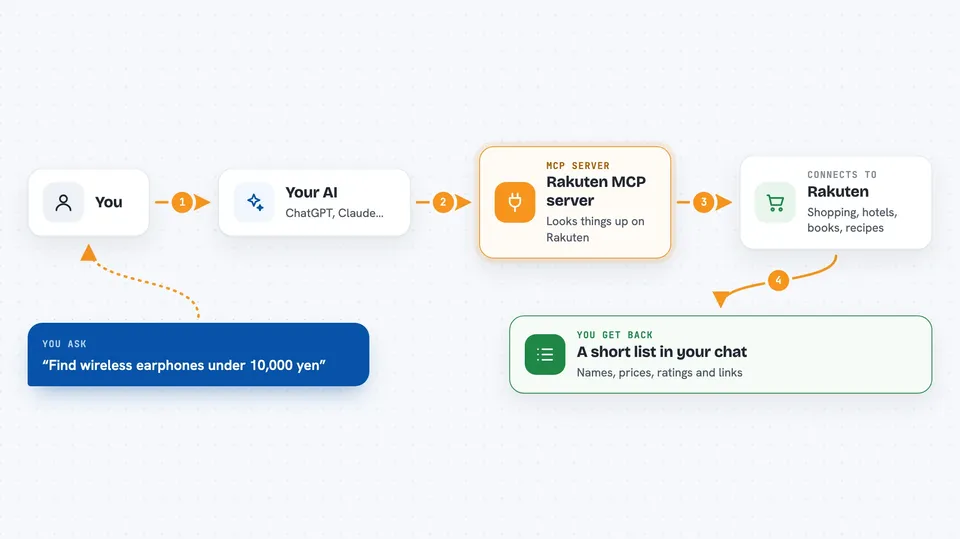
This is a helper that connects your AI assistant to Rakuten, the big Japanese shopping and travel site. Once it is set up, you can just ask your AI in plain words and it will look things up on Rakuten for you. It is handy if you shop, book trips, or cook, and you want answers without clicking through pages yourself.
What is an MCP server? The 30-second version
On its own, your AI can only chat with you using what it already knows. An MCP server is a small helper program that gives your AI a new skill or a connection to an app or service. This one connects your AI to Rakuten, so it can look up products, books, hotels, recipes, eBooks, and golf courses for you. You stay in the chat; the helper does the fetching behind the scenes.
What this MCP server does
You ask your AI a question, like finding cheap wireless earphones or a hotel near Tokyo Station. Your AI sends that request to this helper program. The helper talks to Rakuten's public service and pulls back the matching results. Then your AI reads those results and writes them up for you in the chat. Everything is read-only, so it only looks things up; it never buys, books, or changes anything.
 Click to zoom
What you can do with it
- Search Rakuten Ichiba for products by keyword, price, and genre
- See bestseller rankings overall or by genre, age, or gender
- Compare the same product across sellers with min, max, and average prices
- Find printed books, CDs, DVDs, magazines, games, and software
- Look up hotels with rooms free on your dates, with nightly and total prices
- Browse Rakuten Recipe categories and top recipes with ingredients and prep time
- Search Kobo eBooks and golf course plans by area or date
Try asking your AI
- “Find wireless earphones under 10,000 yen on Rakuten with at least 4 stars”
- “Show me Haruki Murakami eBooks on Rakuten Kobo, newest first”
- “Hotels near Tokyo Station, July 1 to 2, two people, under 15,000 yen per night”
- “Popular chicken breast recipes on Rakuten Recipe with ingredients and cooking time”
What it gives back to you
You get back a written answer in the chat, usually a short list with names, prices, ratings, and links. For hotels you also see room plans with per-night and total prices. For recipes you get titles, ingredients, prep time, and a cost estimate. It is all text in the conversation, not a separate app or file.
Before you start
What you need
- A Rakuten Web Service account (free to register)
- An Application ID from that account
- An Access Key from that account (a kind of password that starts with pk_)
- Node.js installed on your computer if you run it yourself
Good to know
It can only read from Rakuten, never buy or change anything, but prices and availability can change, so double-check on Rakuten before you act.
Install it with your AI
Add Rakuten MCP server to your AI, no technical skills needed
You don't install anything by hand. You copy one prompt, paste it into an AI that can work on your computer, and it checks, installs and connects the server for you, asking you when it needs something.
Sign in to get the install prompt
Members get a ready-made prompt that lets the Claude desktop app check Rakuten MCP server, install it and connect it for them, step by step. You don't need any technical skills: you copy, paste and answer a few questions. Your connected AI can also find and install any of the 4,609 MCP servers here for you.
Who it's for
Anyone who shops, reads, travels, cooks, or plays golf in Japan and wants their AI to look things up on Rakuten for them.