
MCP server · Coding
Pharo Smalltalk MCP server
by mumez
Lets your AI run Smalltalk code, look up classes and methods, and run tests in a live Pharo image.
This is a small helper that connects your AI assistant to a running Pharo Smalltalk environment on your own computer. It lets the AI read code, run expressions, search for classes and methods, and run tests, all inside your Pharo image. It is handy if you work with Pharo or Smalltalk and want your AI to help you explore and check code.
What is an MCP server? The 30-second version
On its own, your AI can only chat with you. An MCP server is a small helper program that gives your AI a new skill or a connection to another tool. This helper connects your AI to Pharo Smalltalk, so the AI can look things up and run things there for you. You ask in plain words, and the helper passes your request to Pharo and brings the answer back.
What this MCP server does
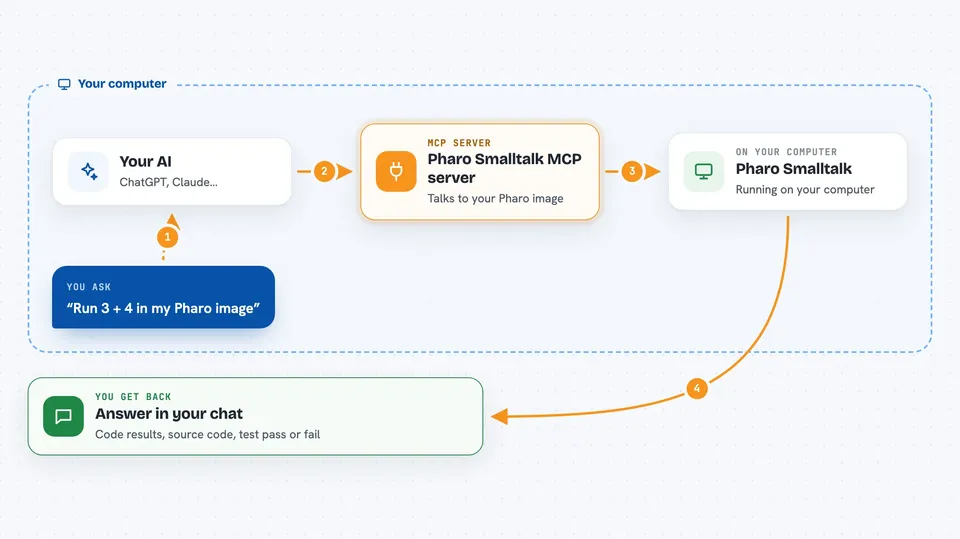
You ask your AI something about your Pharo code, like to run a line of Smalltalk or find a class. The AI sends that request to this helper program. The helper talks to a small server running inside your Pharo image. Pharo does the work, like running the code or finding the method, and sends the result back. The helper hands that result to your AI, which shows it to you in the chat.
 Click to zoom
What you can do with it
- Run Smalltalk expressions and see the result
- Read the source code of a class or a method
- Read a class comment to see its documentation
- Search for classes, methods, and traits by name pattern
- Find where a method is implemented or referenced
- List packages, classes, and methods in your image
- Export or import a package in Tonel format
- Install a project with Metacello
Try asking your AI
- “Run this Smalltalk expression and show me the result: 3 + 4”
- “Show me the source code of the class OrderedCollection”
- “Find all methods with 'sort' in the name”
- “Run the tests for the package CollectionsTests”
- “Take a screenshot of the current Pharo window and describe what is on screen”
What it gives back to you
You get answers in the chat, like the result of a Smalltalk expression, the source code of a class or method, or a list of matching classes and methods. When you run tests, you get a pass or fail summary. For the screen reader, you get a screenshot plus a plain description of the windows and shapes on screen. You can also get package exports as files in Tonel format.
Before you start
What you need
- Python 3.10 or later
- The uv package manager
- A running Pharo image with the PharoSmalltalkInteropServer installed
Good to know
This helper can run code and change things inside your live Pharo image, so only use it on a project or image you are happy to experiment with.
Install it with your AI
Add Pharo Smalltalk MCP server to your AI, no technical skills needed
You don't install anything by hand. You copy one prompt, paste it into an AI that can work on your computer, and it checks, installs and connects the server for you, asking you when it needs something.
Sign in to get the install prompt
Members get a ready-made prompt that lets the Claude desktop app check Pharo Smalltalk MCP server, install it and connect it for them, step by step. You don't need any technical skills: you copy, paste and answer a few questions. Your connected AI can also find and install any of the 4,609 MCP servers here for you.
Who it's for
Pharo and Smalltalk developers who want their AI assistant to read, run, and test code inside a live image.




