
MCP server · Gaming
PlayStation MCP server
by murzin-ml
Your AI can read your PSN playtime, trophies and library to suggest games you'll actually like.
This is a small helper program that lets your AI assistant look at your PlayStation history: what you played, for how long, which trophies you earned, and what you already own. It is handy if you keep wondering what to play next and want suggestions based on your real habits instead of random lists. It runs on your own computer and only reads your account, it never changes anything.
What is an MCP server? The 30-second version
On its own, your AI can only chat with you. An MCP server is a small helper program that gives your AI a new skill or a connection to an app or service. This one connects your AI to your PlayStation Network account, so it can look up your playtime, trophies and purchases when you ask. You stay in control: the helper only reads, and it runs locally on your machine.
What this MCP server does
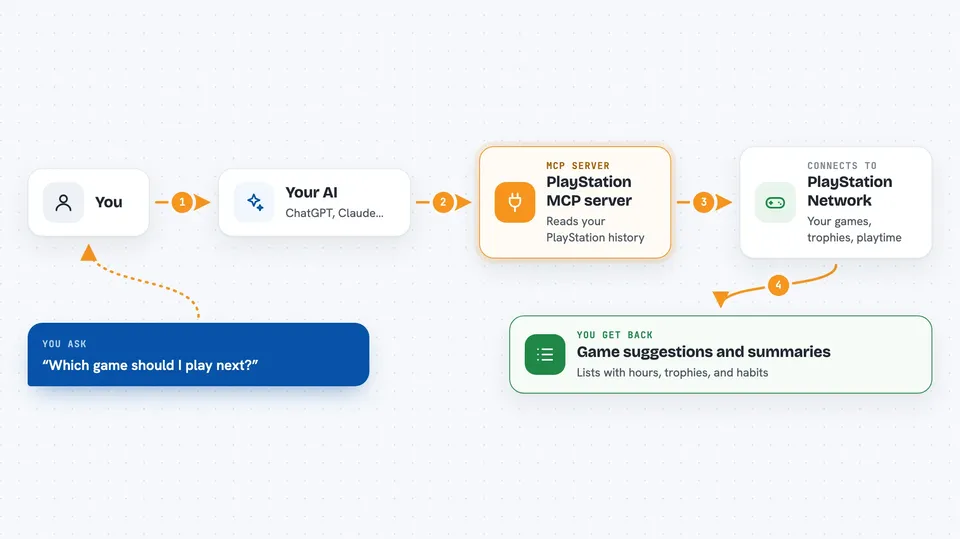
You ask your AI something like which game you should play next. The AI uses this helper, and the helper talks to PlayStation Network using the same connection the PlayStation mobile app uses. It pulls together your hours played, your trophies, your favourite series and the games you bought but never started. Then it hands that back to your AI, which turns it into a recommendation or a short summary for you.
 Click to zoom
What you can do with it
- See your top games ranked by hours played
- Check which trophies you are missing in a specific game
- Find games you bought but never launched
- List what you already own so nothing gets recommended twice
- Spot games you are close to finishing at 100 percent
- See what you played most recently
- Ask for a recommendation based on your real play habits
Try asking your AI
- “Look at my PlayStation history and suggest three games I might like”
- “Which games have I bought but never actually played?”
- “How many hours have I put into my top five games?”
- “Recommend something short I can finish this weekend, based on what I usually play”
What it gives back to you
You get back plain answers in the chat: lists of games with hours, trophy counts, and short summaries of your habits. For example, it might tell you your average session length, your favourite franchises, and which games you abandoned after an hour. Everything appears as normal text you can read and copy.
Before you start
What you need
- A PlayStation Network account you can sign in to
- Python 3.11 or newer installed on your computer
- An NPSSO cookie from your browser (a long code you copy from a PlayStation web page after signing in)
Good to know
It only reads your account, but it needs your PlayStation sign-in code, so keep that code and the saved tokens private, and be careful if you ever publish the server over the internet because it has no password of its own.
Install it with your AI
Add PlayStation MCP server to your AI, no technical skills needed
You don't install anything by hand. You copy one prompt, paste it into an AI that can work on your computer, and it checks, installs and connects the server for you, asking you when it needs something.
Sign in to get the install prompt
Members get a ready-made prompt that lets the Claude desktop app check PlayStation MCP server, install it and connect it for them, step by step. You don't need any technical skills: you copy, paste and answer a few questions. Your connected AI can also find and install any of the 4,361 MCP servers here for you.
Who it's for
PlayStation players who want game suggestions based on what they actually play, and anyone curious to see their own playtime and trophy habits in one place.





