
MCP server · Finance and crypto
Binance Futures MCP server
by muvon
Let your AI check prices, see your positions, and place or manage Binance futures trades for you.
This is a small helper that connects your AI assistant to your Binance USDT-M Futures account. Once it is set up, you can ask your AI in plain words to check a price, look at your open positions, or place an order, and it will do it through Binance for you. It is handy for people who already trade futures on Binance and want to save clicks and typing.
What is an MCP server? The 30-second version
On its own, your AI can only chat. It cannot see your Binance account or press any buttons there. An MCP server is a small helper program that gives your AI a new skill, and this one gives it a connection to Binance USDT-M Futures. So when you ask about a price or an order, your AI passes the request to this helper, and the helper talks to Binance for you.
What this MCP server does
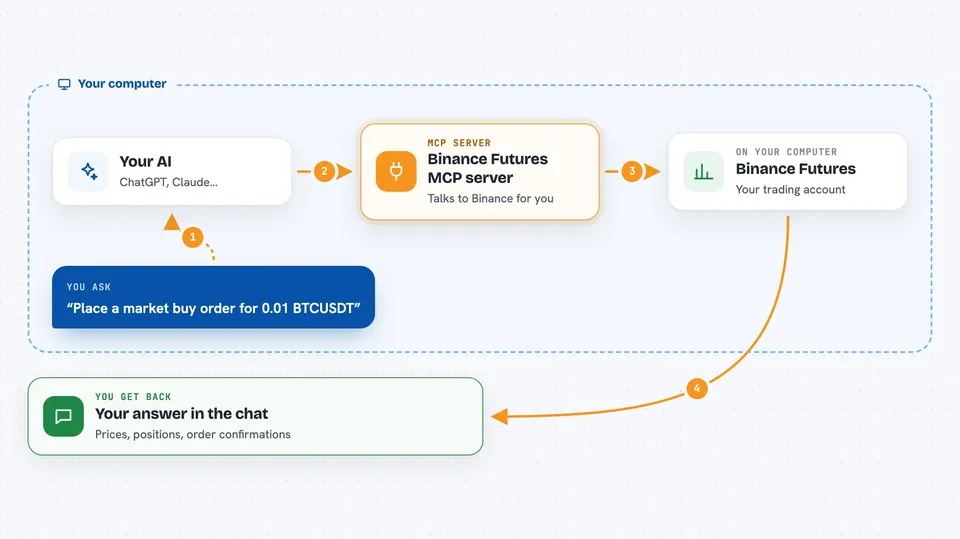
You type a request in your AI chat, like asking for the current Bitcoin price or your open positions. Your AI sends that request to this helper program running on your computer. The helper then talks to Binance using your own API key, which is like a special password that lets apps act on your account. Binance sends back the answer, and the helper passes it to your AI, which explains it to you in the chat. If you ask it to place or cancel an order, the helper sends that instruction to Binance too, and you see the result.
 Click to zoom
What you can do with it
- Check the current price and 24-hour stats for a symbol like BTCUSDT
- See your wallet balances and open positions with profit and loss
- Place market, limit, stop, take-profit, and trailing-stop orders
- Change the price or quantity of an open limit order
- Cancel one order or all open orders for a symbol
- Set leverage and switch between isolated and crossed margin
- Look up your recent order and trade history
Try asking your AI
- “What is the current price of BTCUSDT and its 24 hour change?”
- “Show me my open positions and their unrealized profit and loss.”
- “Place a market buy order for 0.01 BTCUSDT with 10x leverage.”
- “Cancel all open orders for ETHUSDT.”
What it gives back to you
You get answers in plain text in your chat. For prices, that is a number and some stats. For your account, that is a list of balances or positions with profit and loss, leverage, and margin type. When you place or cancel an order, you see a confirmation with the order details, like its ID and status.
Before you start
What you need
- A Binance account with Futures trading enabled
- A Binance API key and secret with Futures trading turned on
- Python 3.11 or newer installed on your computer
- The uv tool or pip to install the server
Good to know
This helper can place and cancel real trades with real money on your Binance account, so double-check every order before you confirm it and keep your API keys safe.
Install it with your AI
Add Binance Futures MCP server to your AI, no technical skills needed
You don't install anything by hand. You copy one prompt, paste it into an AI that can work on your computer, and it checks, installs and connects the server for you, asking you when it needs something.
Sign in to get the install prompt
Members get a ready-made prompt that lets the Claude desktop app check Binance Futures MCP server, install it and connect it for them, step by step. You don't need any technical skills: you copy, paste and answer a few questions. Your connected AI can also find and install any of the 4,609 MCP servers here for you.
Who it's for
People who already trade Binance USDT-M Futures and want to check prices, positions, and place orders by chatting with an AI instead of clicking around.



