
MCP server · Finance and crypto
Usenami Funding MCP server
by namixai
Lets your AI pull funding rates and arbitrage data from 20+ crypto exchanges, including Hyperliquid HIP-3 markets.
This is a helper that connects your AI to Usenami, a service that collects funding-rate data from more than 20 crypto trading venues. It is handy if you follow perpetual futures and want quick numbers without opening ten different exchange websites. You ask in plain words, and the AI fetches the data for you.
What is an MCP server? The 30-second version
On its own, your AI can only chat with you. An MCP server is a small helper program that gives your AI a new skill or a connection to an outside service. This one connects your AI to Usenami's live market data, so it can look up funding rates, open interest, volume, and arbitrage candidates across many exchanges. You just ask a question, and the AI uses this helper behind the scenes to get the answer.
What this MCP server does
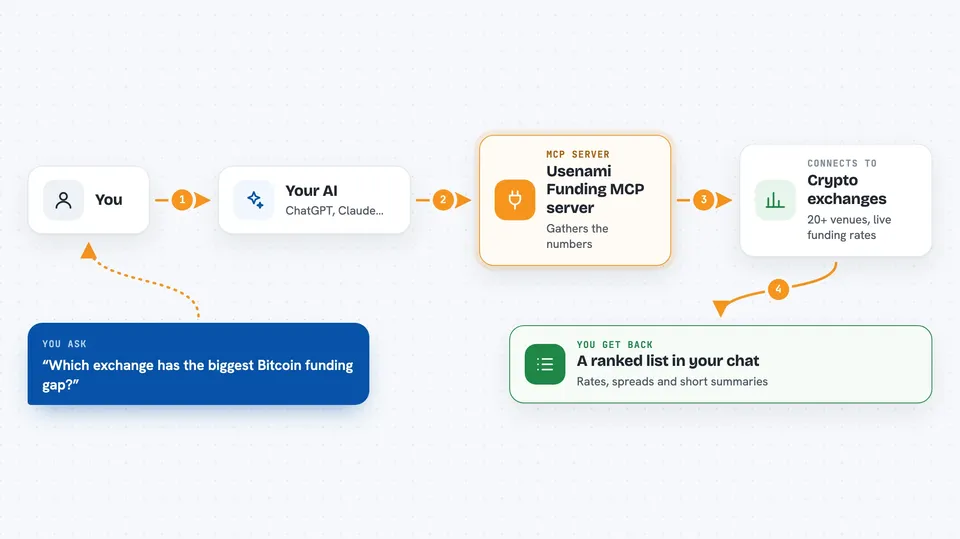
You ask your AI something like which exchanges have the biggest funding-rate gap on Bitcoin right now. The AI passes that request to this helper, which talks to Usenami's live API. Usenami gathers the numbers from the exchanges and sends them back. The AI then shows you a list, a ranking, or a short summary in the chat. Some of the more detailed lookups cost a small amount of USDC, and the free one works with no wallet at all.
 Click to zoom
What you can do with it
- See current funding rates across many exchanges at once
- Rank cross-exchange funding arbitrage candidates
- Check historical funding rates for backtesting
- Look up open interest and how much it changed
- Spot unusual 24-hour volume spikes
- Estimate execution cost and slippage across venues
- Check coverage of HIP-3 real-world assets like stocks, metals, and oil
Try asking your AI
- “Show me current funding rates for BTC across all venues”
- “Which pairs have the biggest funding spread right now”
- “What is the open interest on ETH on Bybit and how did it change this week”
- “Give me historical funding for SOL on Binance for the last 30 days”
What it gives back to you
You get back lists, rankings, and short summaries right in the chat. For example, a table of exchanges with their funding rates, or a ranked list of arbitrage candidates with the spread size. Some tools return numbers like open interest, volume, or slippage estimates. The signal tool adds extra detail like fees, breakeven, and a liquidity flag.
Before you start
What you need
- An MCP-capable AI app like Claude Desktop or another client that supports MCP servers
- Node.js installed on your computer (the helper runs through npx)
- A Base wallet with USDC if you want the paid tools to pay automatically (the free screener needs no wallet)
Good to know
The paid tools spend real USDC from your Base wallet each time they run, and the arbitrage scan is a rough candidate list, not trading advice.
Install it with your AI
Add Usenami Funding MCP server to your AI, no technical skills needed
You don't install anything by hand. You copy one prompt, paste it into an AI that can work on your computer, and it checks, installs and connects the server for you, asking you when it needs something.
Sign in to get the install prompt
Members get a ready-made prompt that lets the Claude desktop app check Usenami Funding MCP server, install it and connect it for them, step by step. You don't need any technical skills: you copy, paste and answer a few questions. Your connected AI can also find and install any of the 4,609 MCP servers here for you.
Who it's for
Crypto traders, analysts, and anyone who follows perpetual futures and wants quick funding-rate and arbitrage numbers without hopping between exchange sites.



