
MCP server · Finance and crypto
Usenami Signer MCP server
by namixai
Let your AI place and cancel real crypto exchange orders without ever holding your secret keys.
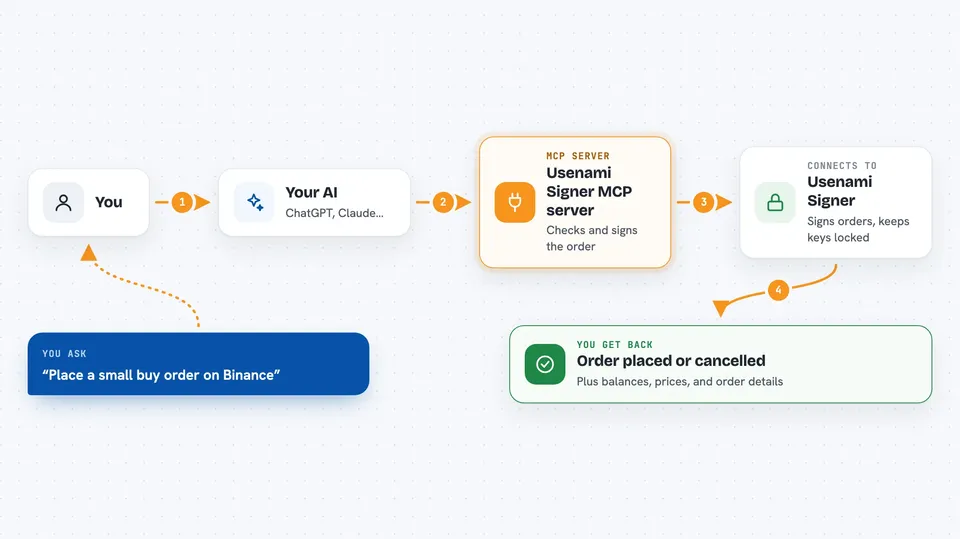
This is a helper that lets your AI assistant trade on crypto exchanges like Binance, OKX and Bybit. The actual secret key that signs your orders lives in a secure box in the cloud, not on your computer and not inside the AI. It is meant for people who want an AI to help run a trading account but do not want to hand over their keys.
What is an MCP server? The 30-second version
On its own, your AI can only chat. An MCP server is a small helper program you connect to your AI so it gains a new skill or a link to another service. This one links your AI to Usenami Signer, a service that signs crypto exchange orders for you. When you ask your AI to buy or sell, it passes the request to this helper, which asks the secure signing service to approve and sign it, all without the key ever touching your machine.
What this MCP server does
You ask your AI something like "place a small buy order on Binance". The AI uses this helper to send that request to the Usenami Signer service. The service checks the request against rules you were given (like a spending cap and which exchanges are allowed), then signs the order with a key that stays locked inside a secure cloud chip. The signed order goes to the exchange, and your AI tells you what happened. You can also ask it to check your account balance or cancel an order.
 Click to zoom
What you can do with it
- List the crypto exchanges this service can sign orders for
- Fetch and verify the security attestation document for the signing service
- Read your account balance and positions on a supported exchange
- Place a market or limit order on an exchange your token allows
- Place a two-leg hedge order across venues
- Cancel an open order
- Get a verified price for an asset (costs one cent in USDC)
Try asking your AI
- “List the venues available through Signer, then return the current attestation document.”
- “Get my Binance account and tell me my free margin.”
- “If I have at least $20 of free margin, place a market buy for 0.001 BTC on Binance.”
- “Cancel my open BTC order on Bybit.”
What it gives back to you
You get answers in the chat: a list of venues, a verified attestation summary, your account balances and positions, or a confirmation that an order was placed or cancelled. The tool also shows the raw details behind each answer, like the order ID or the security checks that passed. Nothing is saved to your computer; the token you use lives only while the AI is running.
Before you start
What you need
- An invite-based access token from Usenami Signer (request it at usenami.io/signer)
- Node.js installed on your computer (the helper runs through npx)
- The Claude Desktop app or another MCP-aware client
- A wallet funded with USDC on Base only if you want to use the price-check tool
Good to know
Orders are real and can spend real money on mainnet unless the person who gave you the token says otherwise, so start with the smallest size your rules allow and check the attestation first.
Install it with your AI
Add Usenami Signer MCP server to your AI, no technical skills needed
You don't install anything by hand. You copy one prompt, paste it into an AI that can work on your computer, and it checks, installs and connects the server for you, asking you when it needs something.
Sign in to get the install prompt
Members get a ready-made prompt that lets the Claude desktop app check Usenami Signer MCP server, install it and connect it for them, step by step. You don't need any technical skills: you copy, paste and answer a few questions. Your connected AI can also find and install any of the 4,609 MCP servers here for you.
Who it's for
People who want an AI assistant to help run a real crypto trading account without exposing their exchange keys, such as active traders or small trading teams.



