
MCP server · Finance and crypto
Subscription Tracker MCP server
by nckhemanth0
Let your AI find, list and track your subscriptions from Gmail and a small database.
This is a helper that connects your AI assistant to your Gmail inbox and a small database, so it can keep track of your subscriptions for you. You ask in plain words, and it searches your email, pulls out the details and saves them. It is handy if you pay for a lot of services and keep losing track of what renews when.
What is an MCP server? The 30-second version
On its own, your AI can only chat. It cannot see your inbox or remember your subscriptions. An MCP server is a small helper program that gives your AI a new skill, and this one gives it a connection to your Gmail and a small database on your own computer. Once it is set up, you just ask your AI things like "what am I subscribed to?" and it uses this helper to look it up for you.
What this MCP server does
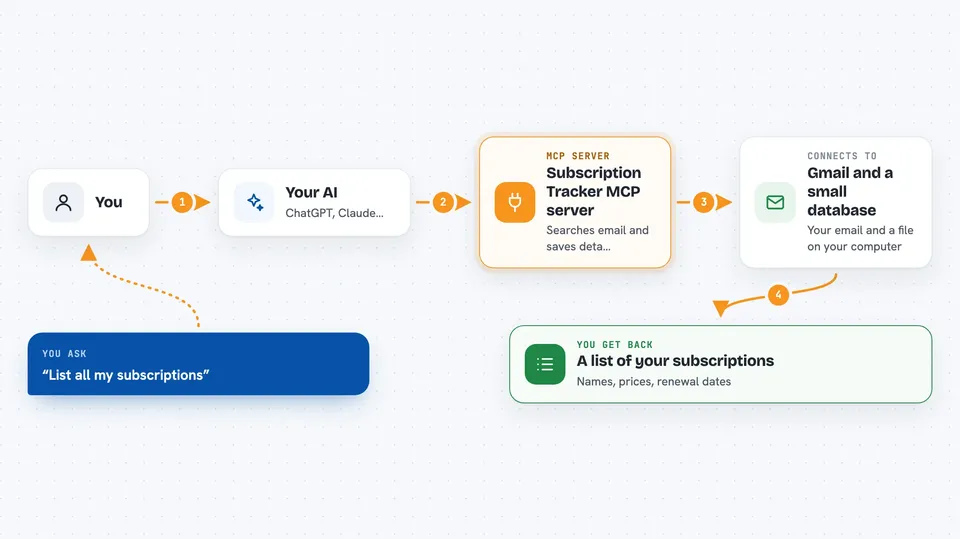
You ask your AI a question about your subscriptions. The AI passes that request to this helper program. The helper searches your Gmail for subscription emails and reads the details inside them, then saves what it finds into a small database on your computer. When you ask again later, it can pull the list back out, spot duplicates, or warn you about a renewal coming up. You get the answer right in the chat.
 Click to zoom
What you can do with it
- List all your subscriptions in one place
- Search your Gmail for subscription emails from a service
- Pull out the price and renewal date from an email
- Save subscription details to a database so they stay put
- Find duplicate subscriptions you may be paying for twice
- Spot missing details or unusual price changes
- Get a heads-up about renewals coming in the next few days
Try asking your AI
- “List all my subscriptions”
- “Search Gmail for Netflix subscription emails”
- “Check for renewals in the next 7 days”
- “Detect duplicate subscriptions”
What it gives back to you
You get answers in the chat, usually as a list or a short summary. For example, it can show you a table of subscriptions with names, prices and renewal dates, or a short note saying it found two possible duplicates. When it saves something to the database, it tells you what it added or changed. It does not send emails or cancel anything on its own.
Before you start
What you need
- Python installed on your computer
- A MySQL database set up on your computer
- Google OAuth credentials from Google Cloud Console (a file Google gives you so the app can read your Gmail)
- The Claude desktop app
Good to know
It reads your Gmail and writes to a database on your computer, so keep your credentials and config file private.
Install it with your AI
Add Subscription Tracker MCP server to your AI, no technical skills needed
You don't install anything by hand. You copy one prompt, paste it into an AI that can work on your computer, and it checks, installs and connects the server for you, asking you when it needs something.
Sign in to get the install prompt
Members get a ready-made prompt that lets the Claude desktop app check Subscription Tracker MCP server, install it and connect it for them, step by step. You don't need any technical skills: you copy, paste and answer a few questions. Your connected AI can also find and install any of the 4,609 MCP servers here for you.
Who it's for
Anyone who pays for several online services and wants an easy way to keep track of them without a spreadsheet.



