MCP server · Research
Calibre-Web MCP server
by ni-c
Let your AI search your own Calibre-Web ebook library, browse shelves, and show covers and download links.
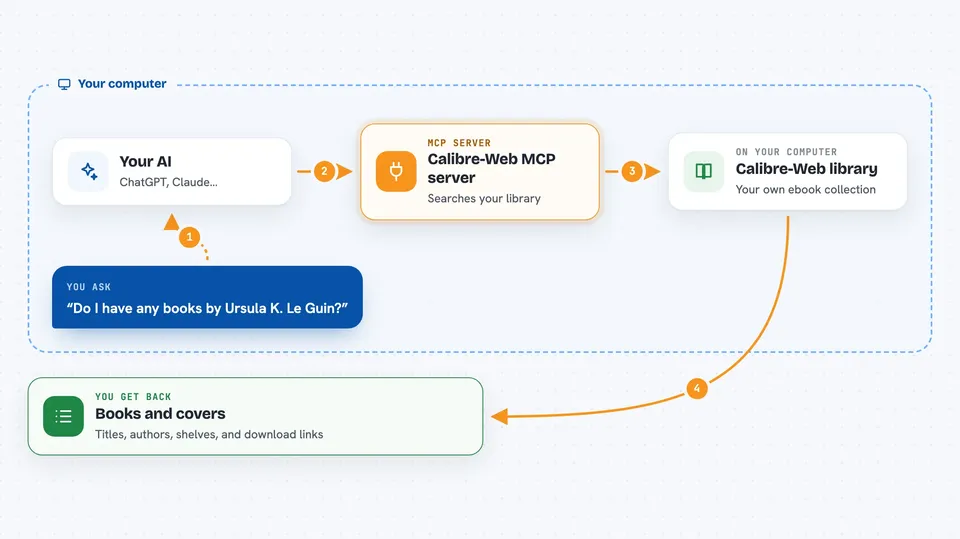
This is a small helper that connects your AI assistant to your own Calibre-Web ebook library. Calibre-Web is the self-hosted web page many people use to keep and read their ebooks. If you already run one, this lets your AI look through it for you.
What is an MCP server? The 30-second version
On its own, your AI can only chat with you. An MCP server is a small helper program that gives your AI one new skill or one new connection. This helper connects your AI to your Calibre-Web library, so when you ask about a book, the AI can actually go and look it up there. It only reads. It never changes or deletes anything in your library.
What this MCP server does
You ask your AI something about your books, like whether you own a certain title. The AI passes your question to this helper. The helper talks to your Calibre-Web instance through a feed that e-reader apps normally use, and gets back the matching book information. Then the AI tells you what it found, with titles, authors, shelves and links you can open yourself.
 Click to zoom
What you can do with it
- Search your library by title, author, series, publisher or tag
- Browse lists like newest, most popular, top rated, read or unread books
- See your shelves and the books on each one
- Pull up a book cover as an image in the chat
- Get a quick count of how many books, authors, categories and series you have
- Get ready-made download links for each book format you own
Try asking your AI
- “Do I have any books by Ursula K. Le Guin in my library?”
- “Show me the covers of the five newest books I added.”
- “What is on my Science Fiction shelf?”
- “How many books and authors are in my library right now?”
What it gives back to you
You get back lists of books with their titles, authors, tags, series, ratings and short summaries. Covers come back as pictures you can see right in the chat. Each book also comes with download links for the formats you own, which you can click yourself. For a simple question like a count, you just get the numbers.
Before you start
What you need
- A Calibre-Web or Calibre-Web Automated instance you can reach online
- A Calibre-Web account for the server to use, ideally a separate one with only View and Download permissions
- Node.js 22 or newer on the machine running the helper
- The URL of your instance, plus that account's username and password
Good to know
This helper only reads, so it cannot change or delete anything, but it does log in to your library with the account you give it, so use a separate account with limited permissions instead of your admin one.
Install it with your AI
Add Calibre-Web MCP server to your AI, no technical skills needed
You don't install anything by hand. You copy one prompt, paste it into an AI that can work on your computer, and it checks, installs and connects the server for you, asking you when it needs something.
Sign in to get the install prompt
Members get a ready-made prompt that lets the Claude desktop app check Calibre-Web MCP server, install it and connect it for them, step by step. You don't need any technical skills: you copy, paste and answer a few questions. Your connected AI can also find and install any of the 4,609 MCP servers here for you.
Who it's for
People who keep their own ebook library in Calibre-Web and want to ask their AI about it without clicking around the web page.