MCP server · Developer tools
ws-mcp (WebSocket MCP bridge)
by nick1udwig
Turn other MCP helper servers into a WebSocket connection your AI tools can talk to.
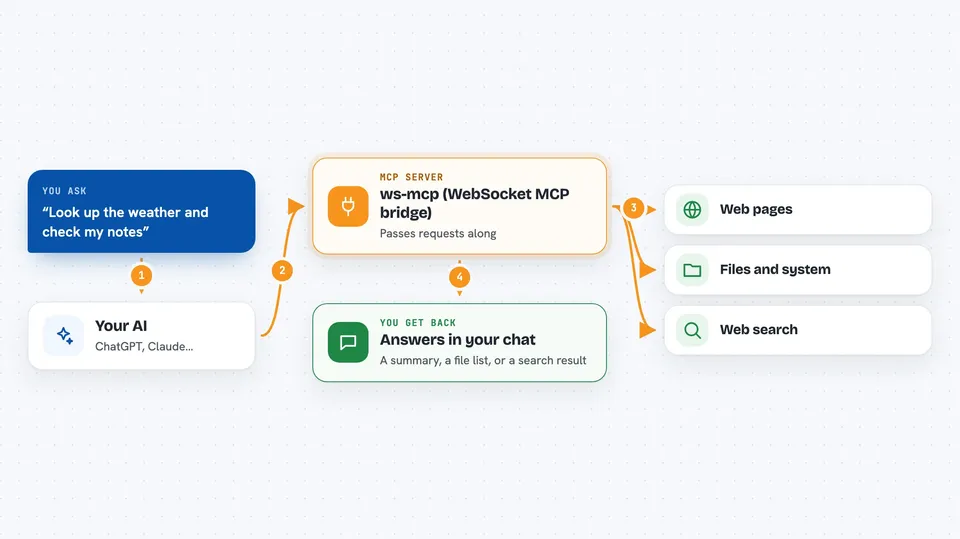
ws-mcp is a small bridge program. It takes other MCP helper servers, which normally talk over a plain text pipe on your computer, and puts them behind a WebSocket address instead. It is handy if you are using kibitz or another tool that expects a WebSocket connection rather than a local command.
What is an MCP server? The 30-second version
On its own, your AI can only chat. An MCP server is a small helper program that gives your AI a new skill, like searching the web or reading files. ws-mcp is a helper that takes other MCP helpers and re-publishes them over a WebSocket, which is a live two-way connection over the network. So instead of your AI launching each helper itself, it connects to ws-mcp at an address, and ws-mcp passes the requests through to the helpers you configured.
What this MCP server does
You start ws-mcp on your computer and tell it which MCP helper servers to run, either with a config file or by listing commands. ws-mcp launches those helpers and listens on a port, like 10125. When a tool such as kibitz connects to that port over WebSocket, ws-mcp forwards whatever the AI asks for to the right helper. The helper does the actual work, and the answer travels back through ws-mcp to your AI. You see the result in your chat as if the helper were connected directly.
 Click to zoom
What you can do with it
- Serve one or more MCP helper servers over a single WebSocket port
- Pick which helpers to run using a config file or command flags
- Pass environment variables and .env files through to the helpers
- Run the fetch helper so your AI can make web requests
- Run the wcgw helper for general system and file operations
- Run the Brave search helper if you supply an API key
- Choose a custom port for each WebSocket endpoint
Try asking your AI
- “Start ws-mcp with the default config on port 10125”
- “Run ws-mcp with the fetch helper on port 3002”
- “Run ws-mcp with the Brave search helper using my BRAVE_API_KEY on port 3003”
- “Run ws-mcp with two helpers at once using a .env file on port 3004”
What it gives back to you
ws-mcp itself does not produce answers. It passes your AI's requests to the helper servers you configured and sends their replies back over the WebSocket. What you see in the chat depends on the helper, for example a web page summary from fetch or a file listing from wcgw. If a helper is not running or the port is wrong, you will see a connection error instead.
Before you start
What you need
- uv installed (a tool for running Python programs; the README shows a one-line install command)
- A config file or one or more --command values naming the MCP helper servers you want to serve
- An API key for helpers that need one, like BRAVE_API_KEY for Brave search
- A client that speaks WebSocket MCP, such as kibitz
Good to know
The helpers you wrap can read files, run system commands, or use paid API keys, so only run ws-mcp with helpers you trust and keep the port off the public internet.
Install it with your AI
Add ws-mcp (WebSocket MCP bridge) to your AI, no technical skills needed
You don't install anything by hand. You copy one prompt, paste it into an AI that can work on your computer, and it checks, installs and connects the server for you, asking you when it needs something.
Sign in to get the install prompt
Members get a ready-made prompt that lets the Claude desktop app check ws-mcp (WebSocket MCP bridge), install it and connect it for them, step by step. You don't need any technical skills: you copy, paste and answer a few questions. Your connected AI can also find and install any of the 4,609 MCP servers here for you.
Who it's for
People who already use MCP helper servers and want to reach them over a WebSocket from a tool like kibitz, rather than launching each helper locally.