
MCP server · Security
MCP Gatehouse
Add permission levels, approval prompts, and an audit log to the tools your AI is allowed to use.
MCP Gatehouse is a helper for people who build or run AI tools and want a say in what the AI is allowed to do. It puts a gate in front of each tool, so reading is easy, writing can ask for a yes, and dangerous actions like cancelling an order need a sign-off. It is handy for anyone who has given an AI access to a real system and wants a record of what happened.
What is an MCP server? The 30-second version
On its own, your AI can only chat. An MCP server is a small helper program that gives your AI a new skill or a connection to an app or service. This one is a gate that sits inside another MCP server, here an order desk, and checks every tool before the AI uses it. When you ask the AI to do something, the gate decides if it is allowed, if it needs your approval, and it writes down what happened.
What this MCP server does
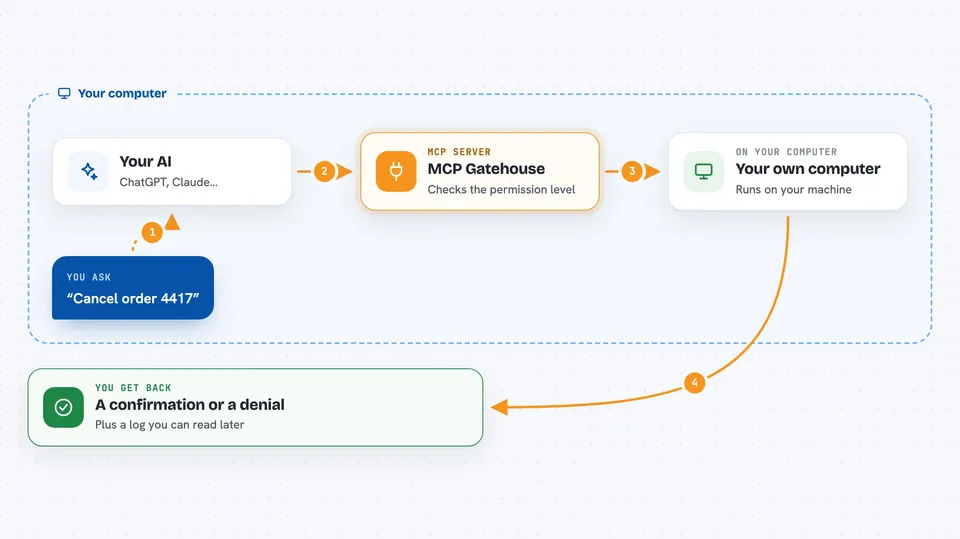
You ask your AI to do something, like look up an order or cancel one. The AI asks the order-desk server to run the matching tool. Before the tool runs, the gate checks its level: reading goes through, writing can be set to ask you first, and destructive actions like cancelling need a yes. If you say yes, the tool runs; if you say no or there is no way to ask, it is denied. Either way, a line is added to a log file so you can see what was asked and what happened.
 Click to zoom
What you can do with it
- Look up an order's status without any approval
- Add a note to an order, with approval if you turn it on
- Cancel an order only after you say yes
- Block a tool completely so the AI can never use it
- Hide passwords and keys before they are written to the log
- Read a log of every call, including the ones that were denied
- Run a demo order desk to see the gate in action
Try asking your AI
- “Look up order 4417 and tell me its status.”
- “Add a note to order 4417 saying call back tomorrow.”
- “Cancel order 4417.”
- “Show me what the AI did today from the audit log.”
What it gives back to you
For a lookup, you get the order details back in the chat. For a note or a cancellation, you get a short confirmation, or a message that the action was denied. The gate also writes a line to a log file with the time, the tool, the level, whether it was allowed, denied, or failed, and the arguments with secrets hidden. You can open that file later to see the full history.
Before you start
What you need
- Python 3.10 or newer
- The mcp-gatehouse package installed with pip
- An MCP server you want to protect, or the demo server that comes with the package
- A way to approve actions, like a terminal prompt, a Slack message, or a ticket
Good to know
It can block or allow actions and can cancel orders, so set your approval rules and approver carefully, and remember it is a gate inside your server, not a full security system.
Install it with your AI
Add MCP Gatehouse to your AI, no technical skills needed
You don't install anything by hand. You copy one prompt, paste it into an AI that can work on your computer, and it checks, installs and connects the server for you, asking you when it needs something.
Sign in to get the install prompt
Members get a ready-made prompt that lets the Claude desktop app check MCP Gatehouse, install it and connect it for them, step by step. You don't need any technical skills: you copy, paste and answer a few questions. Your connected AI can also find and install any of the 4,609 MCP servers here for you.
Who it's for
Developers and operators who run MCP servers and want control and a record of what the AI is allowed to do.



