
MCP server · Finance and crypto
Wallet Signer MCP server
by nikicat
Let your AI send crypto transactions that you approve in your own browser wallet, like MetaMask.
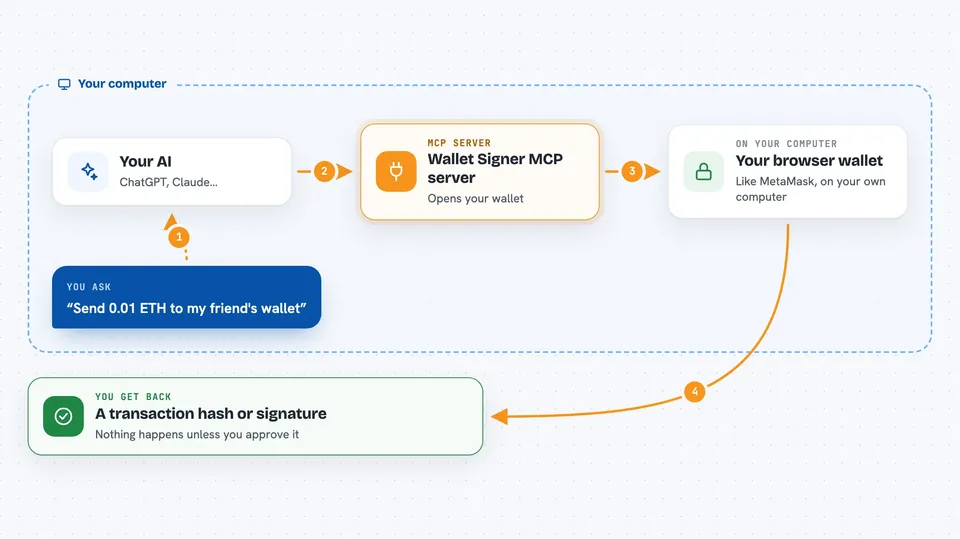
This is a small helper that lets your AI prepare blockchain transactions, but you still approve every single one in your own browser wallet. Your private keys stay in your browser the whole time, never in a file your AI can read. It is handy if you use MetaMask, Rabby, or TronLink and want AI help without handing over full control of your funds.
What is an MCP server? The 30-second version
On its own, your AI can only chat. An MCP server is a small helper program that gives your AI a new skill or a connection to an app. This one connects your AI to your browser wallet, so when you ask it to send crypto or sign something, it can hand the request to your wallet for you to approve. Nothing happens until you click approve in your wallet.
What this MCP server does
You ask your AI to send some crypto or sign a message. The AI passes that request to this helper. The helper opens a page in your browser and asks your wallet to show you the details. You look at it and click approve or reject. If you approve, the wallet signs it and the helper sends back the result, like a transaction hash or a signature.
 Click to zoom
What you can do with it
- Connect your browser wallet and get its address
- Send crypto or call a smart contract
- Sign a plain message
- Sign structured data (EIP-712)
- Choose which blockchain network to use
Try asking your AI
- “Connect my MetaMask wallet and tell me the address”
- “Send 0.01 ETH to 0x1234...abcd”
- “Sign this message with my wallet: Hello world”
- “Sign this typed data for me”
What it gives back to you
You get back simple things in the chat: a wallet address, a transaction hash, or a signature. If you reject the request in your wallet, the AI will see that too. Nothing is sent or signed unless you approve it yourself.
Before you start
What you need
- A browser wallet like MetaMask, Rabby, or TronLink
- Node.js installed on your computer
- An MCP client like Claude Desktop, Cursor, or Windsurf
Good to know
This can move real crypto, so always read the details in your wallet before you click approve.
Install it with your AI
Add Wallet Signer MCP server to your AI, no technical skills needed
You don't install anything by hand. You copy one prompt, paste it into an AI that can work on your computer, and it checks, installs and connects the server for you, asking you when it needs something.
Sign in to get the install prompt
Members get a ready-made prompt that lets the Claude desktop app check Wallet Signer MCP server, install it and connect it for them, step by step. You don't need any technical skills: you copy, paste and answer a few questions. Your connected AI can also find and install any of the 4,609 MCP servers here for you.
Who it's for
People who use crypto and want AI help with transactions but do not want to give an AI their private keys.



