MCP server · API
JitAPI MCP server
by nk3750
Connect any web service to your AI by pointing it at that service's instruction manual.

JitAPI lets your AI talk to almost any online service, as long as that service publishes a public instruction manual (called an OpenAPI spec). Instead of you hunting through hundreds of pages of technical documentation, you just tell your AI what you want in plain English and JitAPI finds the right steps. It is handy for anyone who wants their AI to fetch data or make changes in tools like GitHub, weather services, or movie databases.
What is an MCP server? The 30-second version
On its own, your AI can only chat with you; it cannot reach out to other websites or apps. An MCP server is a small helper program that gives your AI a new skill or a connection to a service. JitAPI is that helper for any service that publishes an OpenAPI spec, which is like a public manual describing what the service can do. Once connected, your AI can look things up or perform actions in that service when you ask.
What this MCP server does
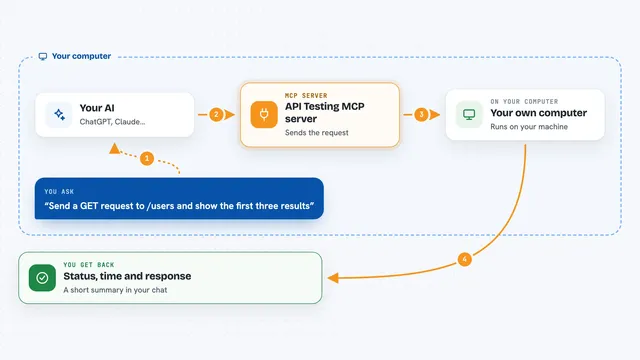
You register a service by giving JitAPI the web address of its OpenAPI spec. JitAPI reads that spec, builds a map of how the different actions relate to each other, and makes them searchable. When you ask a question, JitAPI finds the most relevant actions and any steps that must come first. Then your AI uses those instructions to make the actual calls to the service. You get the results back in your chat, like a list of your repositories or the current weather.
 Click to zoom
What you can do with it
- Register any API that has a public OpenAPI spec
- Search for the right endpoints using plain English
- Plan multi-step workflows that depend on each other
- Execute API calls with your authentication
- List all the APIs you have registered
- Get the full schema for a specific endpoint
- Remove an API you no longer need
Try asking your AI
- “Register the GitHub API from its OpenAPI spec URL”
- “List my repositories”
- “Find the top popular movie on TMDB, then get the weather where it was filmed”
- “Set bearer auth for GitHub using env var GITHUB_TOKEN”
What it gives back to you
You get answers in your chat, like a list of your repositories or the current weather in a city. JitAPI can also show you the steps it took, such as which endpoints it called. If you ask for something that requires multiple steps, it will chain them together and give you the final result.
Before you start
What you need
- Python 3.10 or newer
- The uvx command (comes with the uv tool)
- A Claude desktop app or Claude Code
Good to know
JitAPI can make changes in the services you connect, so be careful when asking it to do things like delete or modify data.
Install it with your AI
Add JitAPI MCP server to your AI, no technical skills needed
You don't install anything by hand. You copy one prompt, paste it into an AI that can work on your computer, and it checks, installs and connects the server for you, asking you when it needs something.
Sign in to get the install prompt
Members get a ready-made prompt that lets the Claude desktop app check JitAPI MCP server, install it and connect it for them, step by step. You don't need any technical skills: you copy, paste and answer a few questions. Your connected AI can also find and install any of the 4,609 MCP servers here for you.
Who it's for
Anyone who uses ChatGPT or Claude for work and wants their AI to interact with online services without writing code.