
MCP server · Developer tools
Hirð compiler MCP server
by no-materials
Lets your AI ask the Hirð compiler about types, actors, effects and supervision instead of guessing from source.
This is a small helper that connects your AI assistant to the Hirð compiler, a tool for a programming language used to build long-running agent systems. Instead of your AI reading code files and guessing what they mean, it can ask the compiler directly and get real answers. It is handy if you work with Hirð code, or if you are curious about a language where every tool call and actor message is tracked.
What is an MCP server? The 30-second version
On its own, your AI can only chat with you. An MCP server is a small helper program that gives your AI a new skill or a connection to another tool. This one connects your AI to the Hirð compiler, so it can look up types, definitions, effects and actor structures for you. You ask a question in plain words, and the AI quietly asks the compiler behind the scenes.
What this MCP server does
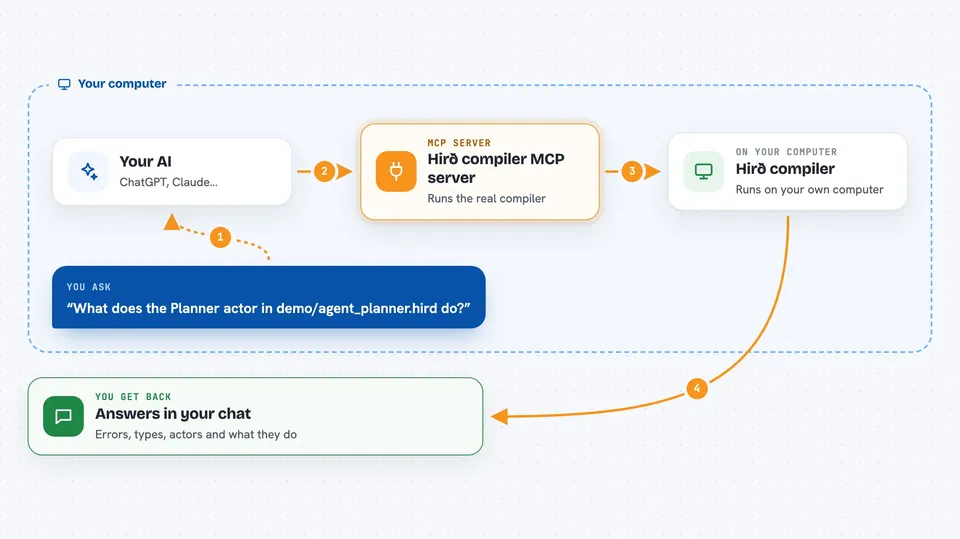
You ask your AI something about a Hirð program, like what an actor does or why a file fails to check. Your AI sends that question to this helper, which runs the real Hirð compiler on your files. The compiler answers with diagnostics, type information, definitions or a graph of actors and supervisors. Your AI then explains the answer back to you in the chat. Nothing is guessed from reading the source; the answers come from the compiler itself.
 Click to zoom
What you can do with it
- Check a Hirð file and list every warning and error
- Look up what a definition or symbol means
- Infer the type of an expression
- Explain the effect row of a function or actor
- Show a fragment of the compiler's internal representation
- Describe an actor's protocol and messages
- Draw the effect graph of actors, mailboxes and supervisors
- Get a short summary of a symbol that fits a token budget
Try asking your AI
- “What does the Planner actor in demo/agent_planner.hird do? Ask the compiler instead of reading the source.”
- “If the Executor in demo/agent_fleet crashes mid-round, who restarts it and what is the restart budget?”
- “Give me a 50-token summary of the Planner actor. Now 400 tokens. What got dropped?”
- “Check demo/counter_demo.hird and tell me every diagnostic, warnings included.”
What it gives back to you
You get answers in the chat: lists of diagnostics, type information, definitions, effect rows, or a description of an actor graph. Errors come back in a structured way, so the AI can see what went wrong and try again. For summaries, you get a short text that fits the token budget you asked for, plus what was left out.
Before you start
What you need
- The hird-mcp program installed (a prebuilt binary from the releases page, or built from source with Rust)
- Erlang/OTP on your PATH if you want to compile and run programs (checking files works without it)
- An MCP client such as Claude Code, pointed at the hird-mcp binary
Good to know
This is pre-1.0 and experimental, so the language and its answers can change without warning, and the answers describe your code rather than changing it.
Install it with your AI
Add Hirð compiler MCP server to your AI, no technical skills needed
You don't install anything by hand. You copy one prompt, paste it into an AI that can work on your computer, and it checks, installs and connects the server for you, asking you when it needs something.
Sign in to get the install prompt
Members get a ready-made prompt that lets the Claude desktop app check Hirð compiler MCP server, install it and connect it for them, step by step. You don't need any technical skills: you copy, paste and answer a few questions. Your connected AI can also find and install any of the 4,361 MCP servers here for you.
Who it's for
Developers and technically curious people who work with Hirð code, or who want an AI to answer questions about types, actors and effects from the compiler rather than from guesswork.





