
MCP server · Chat
Noisy Studio voice for Claude Code
by noisy
Talk to your coding agent out loud and hear its replies spoken back while it works.
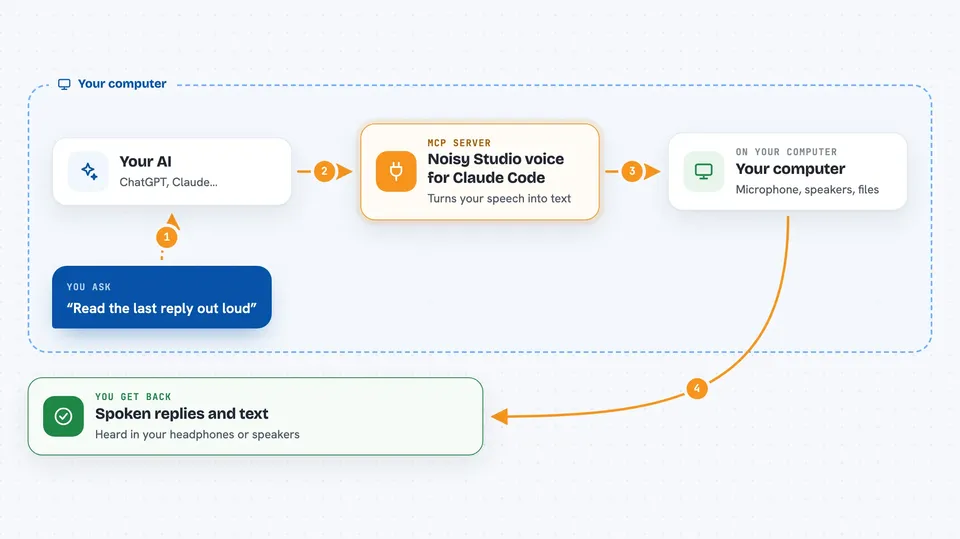
Noisy Studio is a desktop app that lets you speak to your coding agent and hear it answer out loud. It listens to you, turns your speech into text, and reads the agent's replies back in a voice you choose. It is handy if you like to keep your hands on the keyboard or you want to follow along while the agent works.
What is an MCP server? The 30-second version
On its own, your AI can only chat in a text box. An MCP server is a small helper program that gives your AI a new skill or a connection to another app. This one connects your AI to Noisy Studio, a voice app on your computer, so you can talk to your agent and hear it talk back. You still ask in plain words, and the helper handles the voice part for you.
What this MCP server does
You speak into your microphone and Noisy Studio turns your words into text. That text goes to your coding agent, which does the work you asked for. When the agent replies, Noisy Studio reads the answer out loud in a voice you picked. You can also watch a dashboard that shows the conversations you are following. The app and the plugin work together, so you do not need to install Python or run a separate service.
 Click to zoom
What you can do with it
- Talk to your coding agent with your voice instead of typing
- Hear your agent's replies spoken out loud
- Pick a different voice for each conversation
- Follow several conversations on a dashboard
- Give subagents their own voice personas
- Set up voice in Claude Code with a plugin
Try asking your AI
- “Set up Noisy Studio voice for me”
- “Start listening and tell me when the build finishes”
- “Read the last reply out loud in the calm voice”
- “Switch this conversation to the friendly voice”
What it gives back to you
You get spoken replies in your headphones or speakers, and the same text in your chat window. The dashboard shows the conversations you are following, with their status. If you ask for a summary, the agent can read it out loud. Changes you make, like picking a voice, show up in the app settings.
Before you start
What you need
- A Mac with Apple Silicon (the validated release platform)
- The Noisy Studio app installed from Releases
- The companion plugin added to Claude Code
- Provider and audio setup done inside the app
Good to know
It listens to your microphone and speaks out loud, so be careful in shared or quiet spaces and check your audio and provider settings.
Install it with your AI
Add Noisy Studio voice for Claude Code to your AI, no technical skills needed
You don't install anything by hand. You copy one prompt, paste it into an AI that can work on your computer, and it checks, installs and connects the server for you, asking you when it needs something.
Sign in to get the install prompt
Members get a ready-made prompt that lets the Claude desktop app check Noisy Studio voice for Claude Code, install it and connect it for them, step by step. You don't need any technical skills: you copy, paste and answer a few questions. Your connected AI can also find and install any of the 4,609 MCP servers here for you.
Who it's for
Developers and anyone who uses Claude Code and prefers talking and listening over typing and reading.




