
MCP server · Finance and crypto
Paybond MCP server
by nonameuserd
Lets your AI check and approve spending against a budget before it pays for anything, then keep a receipt.
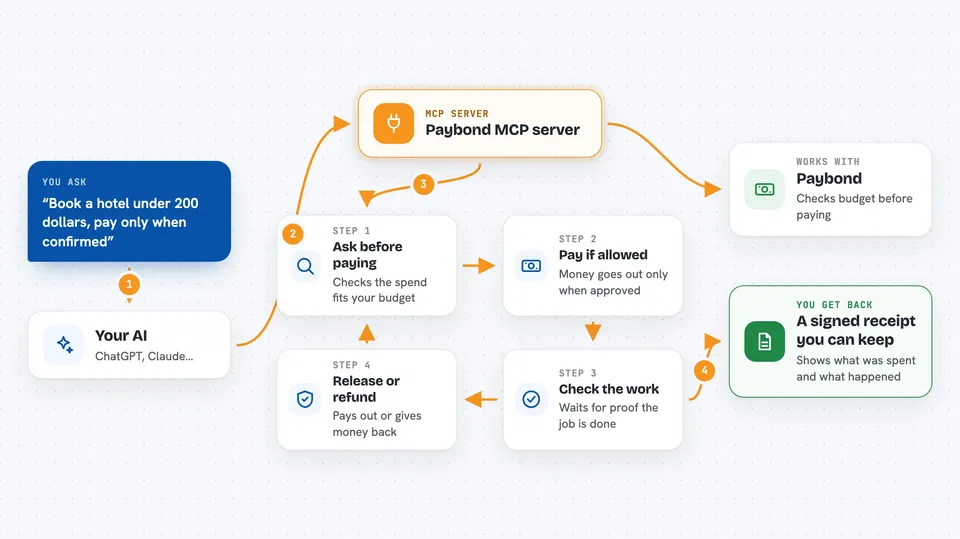
Paybond is a tool that puts a spending limit and a paper trail around the money your AI is allowed to move. It is made for teams whose AI can book travel, buy things, or call paid services, and who want a cap plus proof that the work actually happened. If your AI never touches money, you do not need this.
What is an MCP server? The 30-second version
On its own, your AI can only chat. An MCP server is a small helper program that gives your AI a new skill or a connection to another service. This one connects your AI to Paybond, so when you ask it to spend money on something, it can first check the budget and rules you set, then pay, then confirm the job was done. You stay in charge of the limits; the AI just follows them.
What this MCP server does
You ask your AI to do something that costs money, like booking a hotel or calling a paid service. Before anything is charged, the AI uses this helper to ask Paybond whether the spend fits inside your budget and rules. If it does, the payment goes through. Afterward, the AI sends back proof that the work was completed, and Paybond either releases the money or refunds it. You end up with a signed receipt you can look at later.
 Click to zoom
What you can do with it
- Set a spending cap for a specific task before your AI pays for anything
- Approve or block a paid action based on your own rules
- Release payment only after proof that the job was finished
- Get a refund when the work was not delivered
- Keep a signed receipt for each spend for your records
- Check the history of what your AI spent and on what
Try asking your AI
- “Book a hotel for this trip but do not spend more than 200 dollars, and only pay once it is confirmed.”
- “Call the paid translation service for this document, but keep it under 5 dollars.”
- “Show me everything my AI spent money on this week with the receipts.”
- “Refund the last payment if the vendor did not actually deliver.”
What it gives back to you
You get clear answers in the chat: whether a spend was allowed or blocked, how much was charged, and whether it was released or refunded. You also get a signed receipt for each spend, which you can save or share. If you ask for a summary, it can list what was spent and on what.
Before you start
What you need
- A Paybond account (a free sandbox signup is available, no card required)
- A Paybond API key (a kind of password for apps; you get one when you sign up or run the login command)
- Node.js 22 or newer on the machine running the helper
- For real payments: a paid production plan and a signing key your team sets up
Good to know
This helper can approve, release, or refund real money, so set your budget and rules carefully and start in the free sandbox before using real payments.
Install it with your AI
Add Paybond MCP server to your AI, no technical skills needed
You don't install anything by hand. You copy one prompt, paste it into an AI that can work on your computer, and it checks, installs and connects the server for you, asking you when it needs something.
Sign in to get the install prompt
Members get a ready-made prompt that lets the Claude desktop app check Paybond MCP server, install it and connect it for them, step by step. You don't need any technical skills: you copy, paste and answer a few questions. Your connected AI can also find and install any of the 4,066 MCP servers here for you.
Who it's for
Teams and developers whose AI agents can move money and who need spending limits, proof of delivery, and clean records.




