
MCP server · Security
Domain Security Checker MCP server
by OksigeniaSL
Ask your AI to scan a domain and get a scored security and privacy report with plain advice.
This is a small helper that lets your AI check how safe a website or domain looks. You ask it to scan a domain, and it runs real live checks on things like the site's certificate, its email setup, and its security settings. It is handy for anyone who owns a website or just wants to know if a site is set up well.
What is an MCP server? The 30-second version
On its own, your AI can only chat with you. An MCP server is a small helper program that gives your AI a new skill or a connection to a service. This one gives your AI the skill of checking domains, so it can look up real information about a website and tell you what it finds. You stay in the chat, and the helper does the technical work in the background.
What this MCP server does
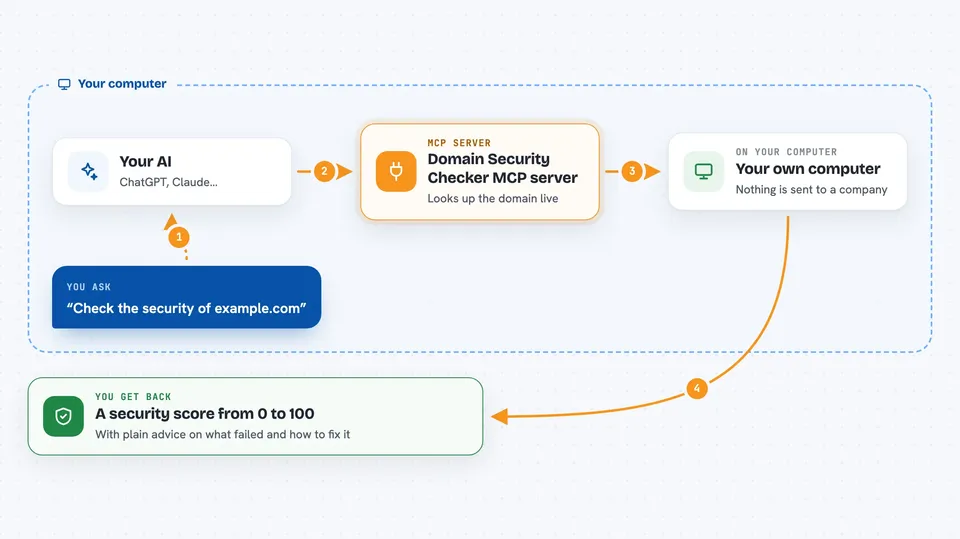
You ask your AI something like check the security of example.com. The AI passes that request to this helper program running on your own computer. The helper then does live lookups: it reads the site's certificate, checks the email records, looks at DNS settings, and reads the security headers the site sends back. It puts all of that into a scored report from 0 to 100 and explains in plain words what failed and how to fix it.
 Click to zoom
What you can do with it
- Scan a domain and get a security score from 0 to 100
- Check if a site's SSL certificate is valid and not about to expire
- See whether email protections like SPF, DMARC and DKIM are set up
- Look at DNS settings such as DNSSEC and CAA records
- Check the website's security headers and content security policy
- List every check it can run and why each one matters
- Ask for a plain explanation of a single check and how to fix a failure
Try asking your AI
- “Check the security of example.com”
- “Scan my website myshop.com and tell me what is wrong”
- “Explain the dmarc check and how to fix it”
- “List all the checks you can run on a domain”
What it gives back to you
You get back a scored report in the chat, grouped by category: certificate, email, DNS and web. Each check shows whether it passed or failed, and anything that failed comes with a short, plain explanation of how to fix it. You can also ask for the raw numbers as JSON, or ask about one check at a time.
Before you start
What you need
- Node.js 18 or newer installed on your computer
- An MCP client such as Claude Desktop or Claude Code
- An internet connection, since the checks are live lookups
Good to know
The domain name you scan is sent to outside services like Cloudflare and public RDAP to run the checks, so only scan domains you are fine sharing with those services.
Install it with your AI
Add Domain Security Checker MCP server to your AI, no technical skills needed
You don't install anything by hand. You copy one prompt, paste it into an AI that can work on your computer, and it checks, installs and connects the server for you, asking you when it needs something.
Sign in to get the install prompt
Members get a ready-made prompt that lets the Claude desktop app check Domain Security Checker MCP server, install it and connect it for them, step by step. You don't need any technical skills: you copy, paste and answer a few questions. Your connected AI can also find and install any of the 4,609 MCP servers here for you.
Who it's for
Website owners, small business teams, and anyone who wants a quick, plain-language security check on a domain without hiring a specialist.



