
MCP server · API · official
On va où ? routes MCP server
by onvaou-app · official
Let your AI find places in Europe and plan bike, walking, scooter or wheelchair routes between them.
This is a small helper that lets your AI assistant look up places in Europe and work out routes between them. You can ask for a bike ride, a walk, a scooter trip or a wheelchair-friendly path, and it comes back with options and details. It is handy if you plan trips, commutes or outings and want the AI to do the looking up for you.
What is an MCP server? The 30-second version
On its own, your AI can only chat. An MCP server is a little helper program that gives your AI a new skill or a connection to an app or service. This one connects your AI to the On va où ? routing service, which knows addresses and routes across Europe. Once it is connected, your AI can ask that service for places and paths, and then tell you the answer in plain words.
What this MCP server does
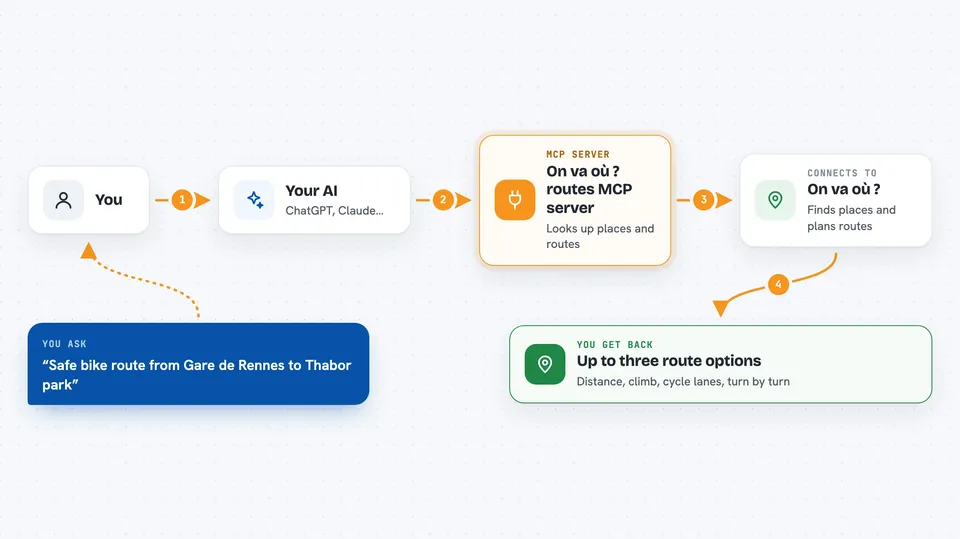
You ask your AI something like a safe bike route from one place to another. The AI first uses this helper to turn the place names into coordinates. Then it asks the helper for routes between those points, in the mode you want. The helper talks to the On va où ? service, which returns up to three route options with details like how much is on cycle lanes or unpaved. Your AI then shows you a short summary, and you can ask follow-up questions.
 Click to zoom
What you can do with it
- Find the coordinates of an address, station or landmark in Europe
- Plan a bike, e-bike, scooter, motorcycle, walking or wheelchair route
- Compare safe, balanced and fast route options
- See how much of a route is on cycle lanes or unpaved surfaces
- Avoid ferries, steps, tolls, highways, unpaved roads or steep climbs
- Get turn-by-turn directions in several languages
Try asking your AI
- “Find a safe bike route from Gare de Rennes to the Thabor park”
- “What is the walking route from the Eiffel Tower to the Louvre?”
- “Plan a wheelchair-friendly route from my hotel to the museum, avoiding steps”
- “Show me a scooter route from Alexanderplatz to Tempelhofer Feld, avoiding unpaved roads”
What it gives back to you
You get a short readable summary in the chat first, then the same information in a structured form. For a place search, that means a list of matching places with their full names and a confidence score. For a route, you get up to three options with details like distance, climb, share of cycle lanes and turn-by-turn steps if you asked for them. Each answer also tells you how many searches or requests you have used.
Before you start
What you need
- A free API key from https://console.onvaou.app (10,000 requests per month, no credit card)
- An MCP client like Claude Desktop or Claude Code
- Node.js installed on your computer (the server runs with npx)
Good to know
The results come from OpenStreetMap and other sources, so routes and place details may not always be perfectly up to date; always check before you rely on them for a real trip.
Install it with your AI
Add On va où ? routes MCP server to your AI, no technical skills needed
You don't install anything by hand. You copy one prompt, paste it into an AI that can work on your computer, and it checks, installs and connects the server for you, asking you when it needs something.
Sign in to get the install prompt
Members get a ready-made prompt that lets the Claude desktop app check On va où ? routes MCP server, install it and connect it for them, step by step. You don't need any technical skills: you copy, paste and answer a few questions. Your connected AI can also find and install any of the 4,609 MCP servers here for you.
Who it's for
Anyone who plans trips, commutes or outings in Europe and wants their AI to look up places and routes for them.



