
MCP server · Finance and crypto
MifosX Self Service MCP server
by openMF
Connect your AI to a MifosX banking account so it can check balances, loans, savings and make transfers for you.
This is a helper that lets your AI assistant talk to a MifosX / Apache Fineract banking system. It is made for people who use a MifosX self-service account, like microfinance clients or staff testing the platform. If you want to ask your AI about your accounts instead of clicking around a banking website, this is for you.
What is an MCP server? The 30-second version
On its own, your AI can only chat. An MCP server is a small helper program that gives your AI a new skill or a connection to an app or service. This one connects your AI to a MifosX banking system, so the AI can look up your accounts, loans and savings, or start a transfer when you ask. You stay in the chat; the helper does the talking to the bank behind the scenes.
What this MCP server does
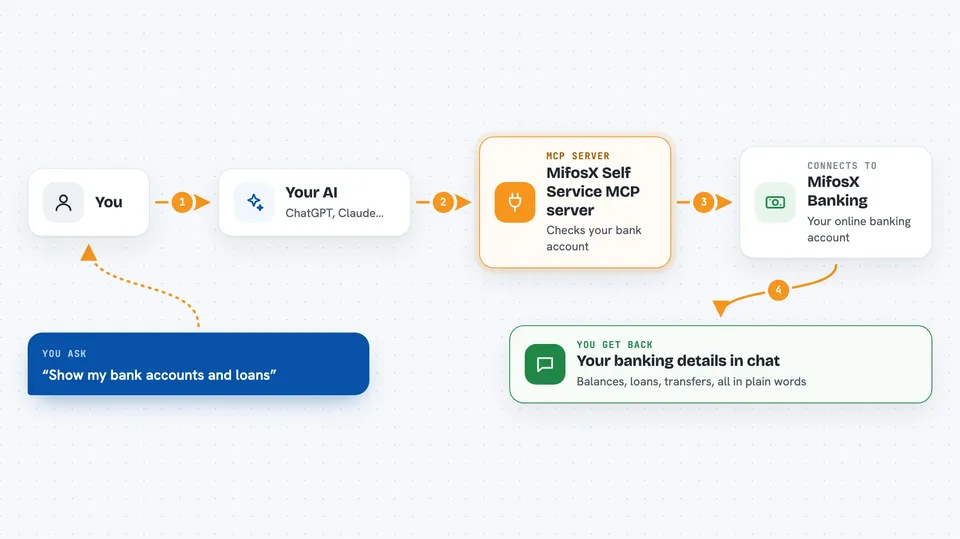
You type a request in plain words, like asking to see your accounts. Your AI passes that request to this helper. The helper then talks to the MifosX banking system using your login details. The bank sends back the information, and the helper hands it to your AI. Your AI then shows you the answer in the chat, in a readable form.
 Click to zoom
What you can do with it
- Log in to your MifosX self-service account
- See your client information and accounts
- List and manage your beneficiaries
- Check your loan accounts and repayment schedules
- View your savings accounts and transactions
- Submit a loan or savings application
- Make a third-party account transfer
Try asking your AI
- “Login using username maria and password password”
- “Get my client information”
- “Show my client accounts”
- “List my beneficiaries”
- “Get my loan accounts”
What it gives back to you
You get answers in the chat, like a list of your accounts, your loan details, or your recent transactions. It can also show you the result of an action, such as a new beneficiary being added or a transfer being made. The information comes straight from the banking system, so it matches what you would see there.
Before you start
What you need
- A MifosX or Apache Fineract self-service account (username and password)
- The web address of your MifosX / Fineract system
- The tenant name for your system (often 'default')
- Python 3 installed on your computer if you run it yourself
Good to know
This helper can change things in your real banking account, like adding beneficiaries or making transfers, so check each action before you confirm it.
Install it with your AI
Add MifosX Self Service MCP server to your AI, no technical skills needed
You don't install anything by hand. You copy one prompt, paste it into an AI that can work on your computer, and it checks, installs and connects the server for you, asking you when it needs something.
Sign in to get the install prompt
Members get a ready-made prompt that lets the Claude desktop app check MifosX Self Service MCP server, install it and connect it for them, step by step. You don't need any technical skills: you copy, paste and answer a few questions. Your connected AI can also find and install any of the 4,609 MCP servers here for you.
Who it's for
MifosX or Apache Fineract users, microfinance clients, and support staff who want to check accounts and do simple banking tasks through an AI chat.



