MCP server · Developer tools
OpenZeppelin Contracts MCP server
by OpenZeppelin
Lets your AI generate ready-to-use smart contract code from OpenZeppelin templates when you ask.
This is a helper that lets your AI assistant write smart contract code for you, using the well-known OpenZeppelin building blocks. It is handy if you work with blockchain projects and want a starting point for a contract without writing every line yourself. You ask in plain words, and the AI produces the code.
What is an MCP server? The 30-second version
On its own, your AI can only chat with you. An MCP server is a small helper program that gives your AI a new skill or a connection to another tool. This one connects your AI to the OpenZeppelin contract templates, so it can build smart contract code for you when you ask. You install it once, and after that your AI can reach for it whenever a request fits.
What this MCP server does
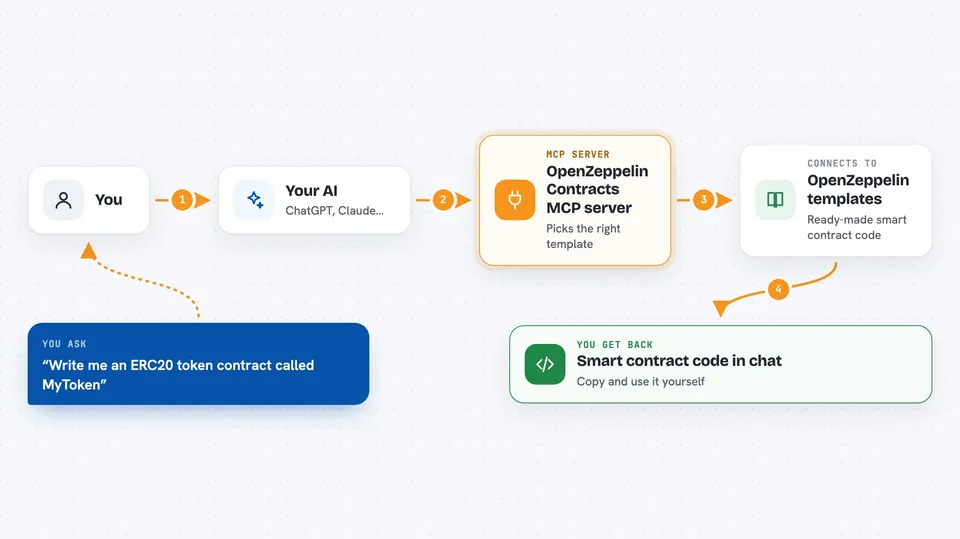
You describe the contract you want, for example a token or a voting system. Your AI decides this helper is the right tool and asks it for a template. The helper picks the matching OpenZeppelin template for the language and contract kind you need. It hands the source code back, and your AI shows it to you in the chat. In some apps you also get a small interactive form with options and a live preview of the code.
 Click to zoom
What you can do with it
- Generate a token contract like an ERC20 or ERC721
- Create a voting or governance contract
- Build a stablecoin or real-world asset contract
- Make an account or multisig contract
- Produce the same kind of contract in different languages such as Solidity, Cairo, or Stylus
- Get a starting template you can then edit yourself
- Preview and adjust options in an interactive form in supported apps
Try asking your AI
- “Write me an ERC20 token contract called MyToken with a fixed supply.”
- “Create a simple governance contract I can use for voting.”
- “Generate an NFT contract in Solidity using OpenZeppelin.”
- “Make a multisig account contract in Cairo.”
What it gives back to you
You get smart contract source code back, shown as text in the chat. In apps that support the interactive form, you also see a live preview and can change options before copying the code. The AI may add a short explanation around the code. Nothing is deployed or changed anywhere; it is just code for you to review and use.
Before you start
What you need
- Node.js installed on your computer
- An AI app that supports MCP servers, such as Cursor, Windsurf, Claude Desktop, Claude Code, or VS Code
Good to know
The AI decides when to use this helper and can make mistakes, so always read the generated contract code carefully before you use it anywhere.
Install it with your AI
Add OpenZeppelin Contracts MCP server to your AI, no technical skills needed
You don't install anything by hand. You copy one prompt, paste it into an AI that can work on your computer, and it checks, installs and connects the server for you, asking you when it needs something.
Sign in to get the install prompt
Members get a ready-made prompt that lets the Claude desktop app check OpenZeppelin Contracts MCP server, install it and connect it for them, step by step. You don't need any technical skills: you copy, paste and answer a few questions. Your connected AI can also find and install any of the 4,361 MCP servers here for you.
Who it's for
Developers and technical teams who build blockchain projects and want a quick, reliable starting point for smart contracts.