
MCP server · Developer tools
ARBuilder MCP server
Lets your AI write Arbitrum code: Stylus contracts, bridges, full dApps, and Orbit chain setups.
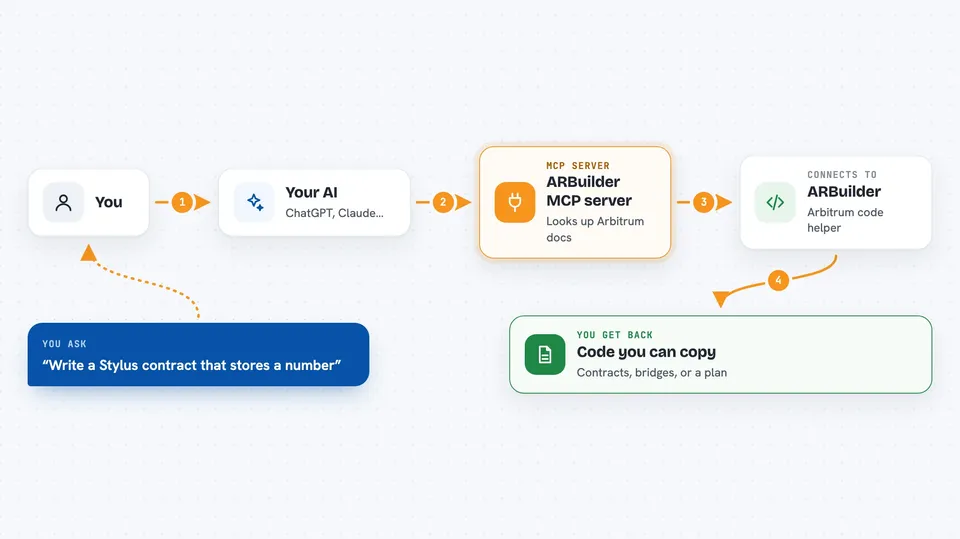
ARBuilder is a helper for people building on Arbitrum, a blockchain network. It lets your AI assistant write code for Arbitrum projects, like smart contracts, bridges, and small apps, based on what you ask for in plain words. It is most useful if you already write code or are learning to, and you want a head start on Arbitrum-specific pieces.
What is an MCP server? The 30-second version
On its own, your AI can only chat. An MCP server is a small helper program that gives your AI a new skill or a connection to an app or service. This one connects your AI to ARBuilder, which knows a lot about Arbitrum. So when you ask for Arbitrum code, your AI can reach out to ARBuilder and bring back real code and answers instead of guessing.
What this MCP server does
You ask your AI for something, like a Stylus smart contract or a bridge setup. Your AI sends that request to ARBuilder through this helper. ARBuilder looks through Arbitrum documentation and code examples it has stored, then writes code or an answer for you. Your AI shows you the result in the chat, usually as code you can copy into your project. It can also help you plan a whole small app, step by step.
 Click to zoom
What you can do with it
- Generate Stylus smart contracts in Rust
- Create cross-chain bridge and messaging code
- Build full dApp pieces like backend, frontend, indexer, and oracle
- Help set up an Orbit chain configuration and deployment
- Write tests for your Stylus contracts
- Answer questions about Stylus and Arbitrum bridging
- Validate Stylus code and suggest fixes
Try asking your AI
- “Write me a simple Stylus contract that stores a number and lets me update it”
- “Show me how to bridge tokens from Ethereum to Arbitrum using the SDK”
- “Generate a small dApp with a Next.js frontend and a backend that reads my contract”
- “Help me set up an Orbit chain config for a test network”
What it gives back to you
You get code files, code snippets, and short explanations right in your chat. Sometimes it returns step-by-step instructions or a plan for a bigger project. It can also return test files or validation notes about your code. Everything comes back as text you can copy into your editor.
Before you start
What you need
- An API key from arbuilder.app (a kind of password the site gives you)
- Node.js installed if you use the hosted setup
- A code editor or AI app that supports MCP servers, like Cursor, VS Code, or Claude Code
Good to know
The code it writes is a starting point, so always read it and test it yourself before using it with real money or on a live network.
Install it with your AI
Add ARBuilder MCP server to your AI, no technical skills needed
You don't install anything by hand. You copy one prompt, paste it into an AI that can work on your computer, and it checks, installs and connects the server for you, asking you when it needs something.
Sign in to get the install prompt
Members get a ready-made prompt that lets the Claude desktop app check ARBuilder MCP server, install it and connect it for them, step by step. You don't need any technical skills: you copy, paste and answer a few questions. Your connected AI can also find and install any of the 4,609 MCP servers here for you.
Who it's for
Developers and technical builders who work on Arbitrum, blockchain apps, or smart contracts and want faster code drafts.




