
MCP server · Finance and crypto
OrcaLayer MCP server
by orcalayer
Lets your AI look up Polymarket whale activity, wallet profits and smart-money moves for you.
OrcaLayer is a helper that connects your AI to prediction market data from Polymarket. It focuses on the big, successful traders often called whales, so you can see what they are buying and selling. It is handy if you follow prediction markets and want quick answers without digging through charts and tables yourself.
What is an MCP server? The 30-second version
On its own, your AI can only chat with you using what it already knows. An MCP server is a small helper program that gives your AI a new skill or a connection to an outside service. This one connects your AI to OrcaLayer, which tracks Polymarket whale and market data. Once it is set up, you can just ask a question in plain words and the AI goes and fetches the answer for you.
What this MCP server does
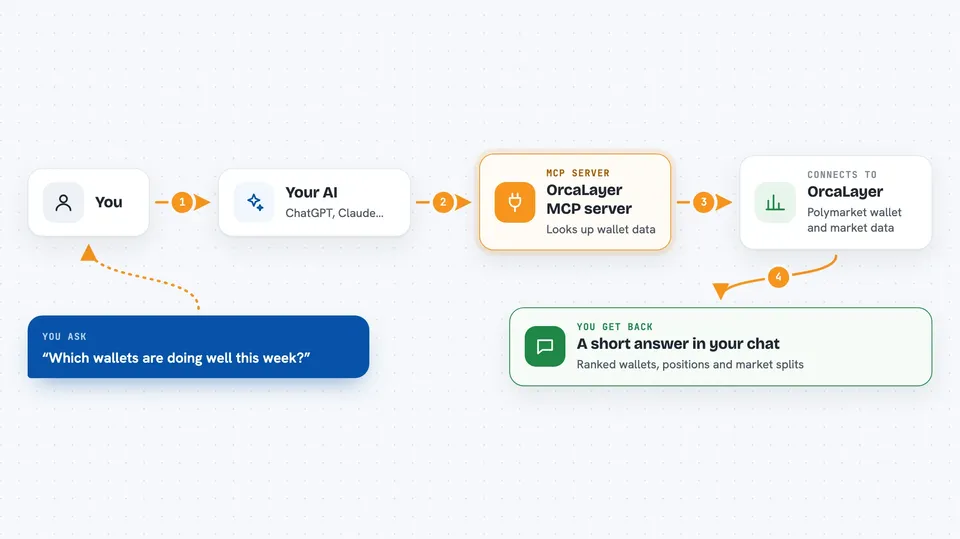
You ask your AI something like which wallets are doing well this week. The AI passes that request to this helper program. The helper then talks to the OrcaLayer service, which holds the Polymarket wallet and market analytics. OrcaLayer sends back the matching wallets, positions or market data, and the AI turns it into a short answer in your chat.
 Click to zoom
What you can do with it
- Rank smart-money wallets by profit, win rate or trading volume
- Look up one wallet's profile, profit and win-rate summary
- See a wallet's largest open positions
- Search markets where smart whales are building up positions
- Check how smart money is split on one market compared with its current price
- Get live alerts on trades from profitable wallets (needs a Premium key)
- Review Ukraine territorial markets with a frontline overlay
Try asking your AI
- “Show me the top smart-money wallets this week by profit”
- “What are the biggest open positions for this wallet address”
- “Which markets are smart whales accumulating in right now”
- “Is smart money on this market agreeing with the current price”
What it gives back to you
You get answers in your chat: ranked lists of wallets, short profiles with profit and win-rate numbers, lists of open positions, and market names with the smart-money split. Some results come as short summaries the AI writes from the data. It is read-only, so nothing on your side is changed.
Before you start
What you need
- The Claude desktop app or another app that supports MCP servers
- uvx installed on your computer (a small tool that runs Python helper programs)
- A Premium API key from OrcaLayer only if you want the live whale alerts tool (the site gives you one after you sign up and pay)
Good to know
This is market data for information only, not financial advice, and the live whale alerts tool needs a paid Premium key.
Install it with your AI
Add OrcaLayer MCP server to your AI, no technical skills needed
You don't install anything by hand. You copy one prompt, paste it into an AI that can work on your computer, and it checks, installs and connects the server for you, asking you when it needs something.
Sign in to get the install prompt
Members get a ready-made prompt that lets the Claude desktop app check OrcaLayer MCP server, install it and connect it for them, step by step. You don't need any technical skills: you copy, paste and answer a few questions. Your connected AI can also find and install any of the 4,609 MCP servers here for you.
Who it's for
People who follow prediction markets and want quick, plain-language answers about whale activity, without being analysts or developers.



