
MCP server · Developer tools
gograph MCP server
by ozgurcd
Gives your AI a map of a Go code project so it can find callers, definitions, and impact before you change code.
gograph is a helper for people who work with Go code. It reads your project and builds a map of how the pieces connect, so your AI can answer questions like who calls this function or what breaks if I change it. It is handy if you or your team maintain a Go codebase and you want your AI to stop guessing.
What is an MCP server? The 30-second version
On its own, your AI can only chat with you. An MCP server is a small helper program that gives your AI a new skill or a connection to something else. This one connects your AI to a Go code project on your computer. Once it is running, your AI can look things up in that project and report back, instead of you copying and pasting code into the chat.
What this MCP server does
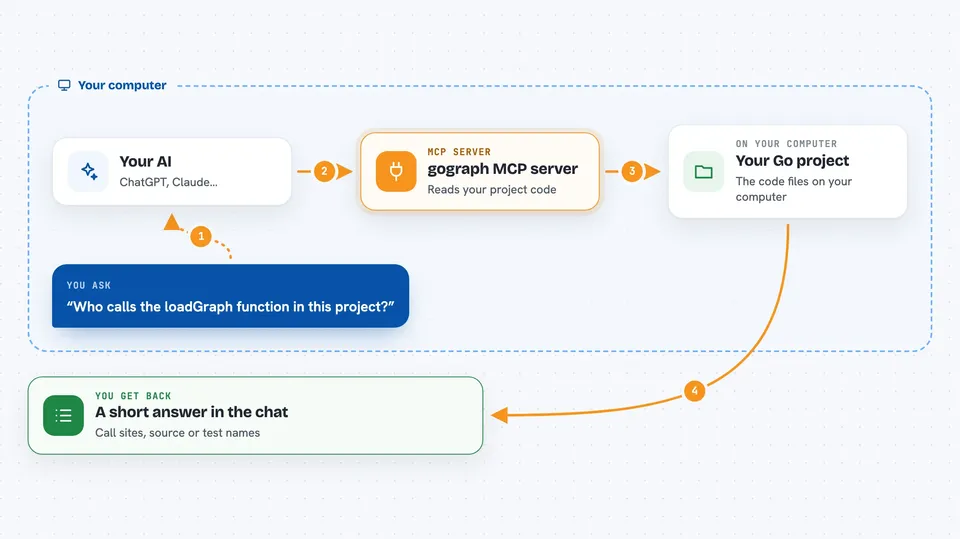
You ask your AI a question about your Go project, like who calls a certain function. Your AI passes that question to gograph, the helper running on your machine. gograph reads the project source and its structure, then finds the matching functions, callers, tests, and related pieces. It sends a short, focused answer back, and your AI explains it to you in the chat. You can also ask it to plan the impact of a change before you make it.
 Click to zoom
What you can do with it
- Find every place a function or method is called
- Show the source code of one function without the rest of the file
- List which interfaces a type implements
- Plan the impact of changing or renaming a symbol
- Show which tests cover a piece of code
- Summarize the busiest or most complex parts of a project
- Check a simple structural fact about the code, like whether a symbol exists
Try asking your AI
- “Who calls the loadGraph function in this project?”
- “Show me the source of the Authorize method and the tests that cover it.”
- “What would break if I rename the Config struct?”
- “Which interfaces does the FileStore type implement?”
What it gives back to you
You get back short, focused answers in the chat: lists of call sites, function source, test names, or a plain summary of what a change would touch. Results are bounded, so you get a page of matches rather than the whole project. When you ask for a plan, it returns the steps and the affected symbols. It does not change your code; it only reads and reports.
Before you start
What you need
- A Go project on your computer
- The Go toolchain installed (the go command)
- The gograph program installed, for example with Homebrew or go install
- An MCP client that can start a local server, such as Claude Desktop or Claude Code
Good to know
It reads your project files and local Git state to build its map, and if you turn on the persist option it writes files under a .gograph folder in your project, so use it on projects you are allowed to analyze.
Install it with your AI
Add gograph MCP server to your AI, no technical skills needed
You don't install anything by hand. You copy one prompt, paste it into an AI that can work on your computer, and it checks, installs and connects the server for you, asking you when it needs something.
Sign in to get the install prompt
Members get a ready-made prompt that lets the Claude desktop app check gograph MCP server, install it and connect it for them, step by step. You don't need any technical skills: you copy, paste and answer a few questions. Your connected AI can also find and install any of the 4,609 MCP servers here for you.
Who it's for
Go developers and teams who want their AI assistant to understand a real codebase before suggesting or reviewing changes.




