
MCP server · Gaming
Chess.com MCP server
by pab1it0
Look up Chess.com players, games, clubs and titled players right inside your AI chat.
This is a small helper that connects your AI assistant to Chess.com's public information. Once it is set up, you can ask your AI about a player, their recent games, or a club, and it will go and fetch the answer for you. It is handy if you follow chess, run a club, or just want to look someone up without clicking around the site.
What is an MCP server? The 30-second version
On its own, your AI can only chat with you using what it already knows. An MCP server is a small helper program that gives your AI a new skill or a connection to an app or service. This one connects your AI to Chess.com's public data, so it can look up players, games and clubs for you. You ask in normal words, and the helper goes and gets the information.
What this MCP server does
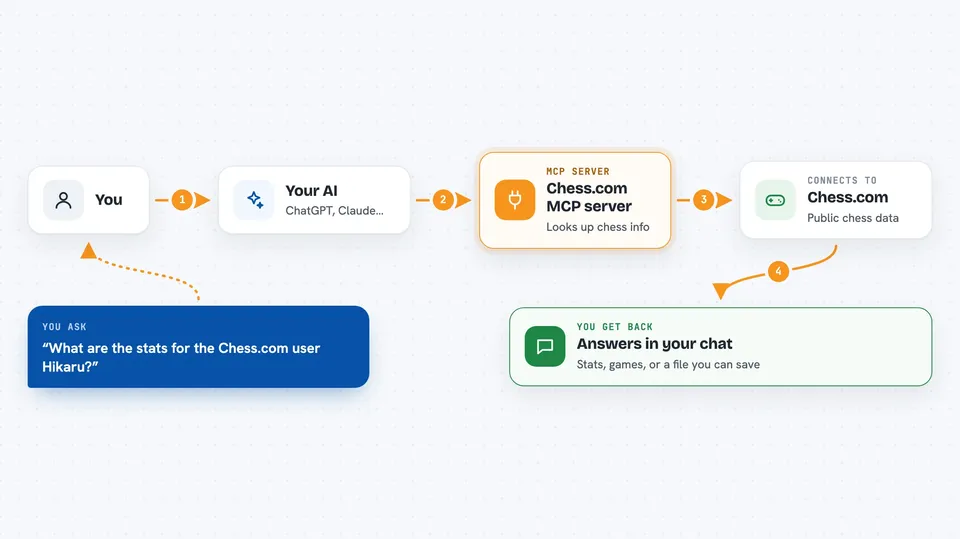
You ask your AI something about Chess.com, like a player's stats or their games from last month. The AI passes your request to this helper program. The helper talks to Chess.com's public data service and pulls back the information you asked for. Then the AI shows it to you in the chat, usually as a tidy list or summary. No login is needed, because it only reads public information.
 Click to zoom
What you can do with it
- Look up a player's profile and stats
- Check whether a player is online right now
- See a player's games from a specific month
- List a player's ongoing games
- Browse the monthly game archives for a player
- Get information about a club and its members
- See lists of titled players
Try asking your AI
- “What are the stats for the Chess.com user Hikaru?”
- “Show me the games Magnus Carlsen played in January 2024”
- “Is the player named GothamChess online right now?”
- “Tell me about the Chess.com club called ChessBrahs and who is in it”
What it gives back to you
You get back plain answers in the chat: a player's profile details, their ratings and stats, a list of games with dates and results, or a list of club members. It can also hand you a PGN file for a month of games, which is the standard chess game file format. Everything shows up as text or a small file you can save, right in the conversation.
Before you start
What you need
- The Claude desktop app (or another AI app that supports MCP servers)
- Docker installed, if you use the recommended setup (free, from docker.com)
Good to know
It only reads public Chess.com information, so it cannot change anything on your account, but it can download game files to your computer when you ask it to.
Install it with your AI
Add Chess.com MCP server to your AI, no technical skills needed
You don't install anything by hand. You copy one prompt, paste it into an AI that can work on your computer, and it checks, installs and connects the server for you, asking you when it needs something.
Sign in to get the install prompt
Members get a ready-made prompt that lets the Claude desktop app check Chess.com MCP server, install it and connect it for them, step by step. You don't need any technical skills: you copy, paste and answer a few questions. Your connected AI can also find and install any of the 4,361 MCP servers here for you.
Who it's for
Chess fans, club organisers, coaches and anyone who wants to look up Chess.com players and games without leaving their AI chat.





