
MCP server · Finance and crypto
Monzo MCP server
by partymola
Let your AI read your Monzo accounts, balances, pots and transactions, and analyse your spending.
This is a small helper that connects your AI assistant to your Monzo bank account, so you can ask questions about your money in plain English. It is read-only, which means it can look at your accounts and transactions but can never move money. It is handy if you bank with Monzo in the UK and want quick answers about your spending without opening the app.
What is an MCP server? The 30-second version
On its own, your AI can only chat. An MCP server is a small helper program that gives your AI a new skill or a connection to an app or service. This one connects your AI to Monzo, so it can look up your accounts, balances and transactions when you ask. You stay in control: you approve the connection once, and the helper only reads.
What this MCP server does
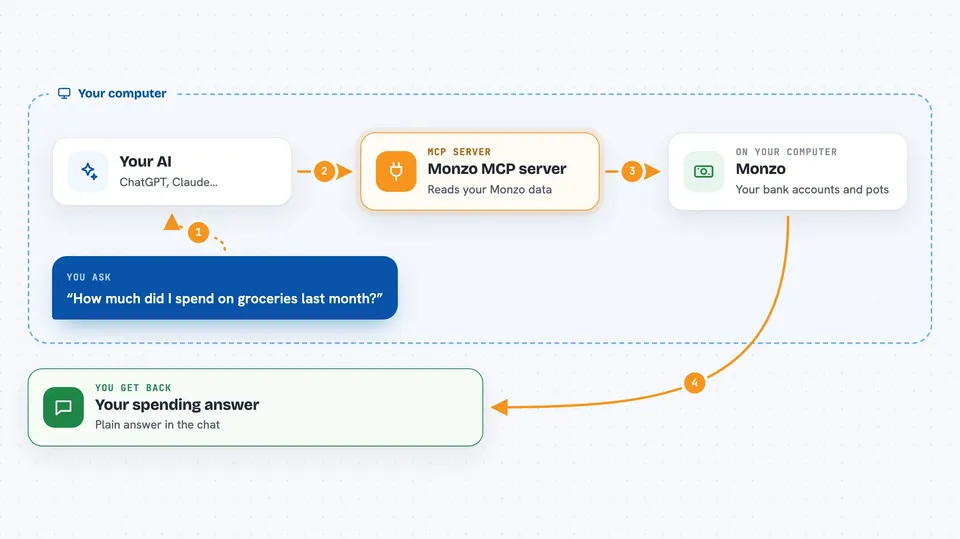
You ask your AI a question about your Monzo money, like how much you spent on groceries last month. The AI passes that request to this helper. The helper talks to Monzo's banking service and pulls back the numbers it needs. It also keeps a local copy of your transactions in a small database on your computer, so it can search and analyse your history quickly. Then you get a plain answer in the chat.
 Click to zoom
What you can do with it
- List your Monzo accounts and their balances
- Show your savings pots and how much is in each
- Search your transactions by merchant, payee, description or notes
- Break down your spending by category
- Find your top merchants for a period
- Compare this month's spending with last month
- See details of bank transfers, including the payee's name and account number
Try asking your AI
- “How much did I spend on eating out last month?”
- “Show me my three biggest merchants this year.”
- “Search my transactions for anything with Tesco in the description.”
- “What is my current balance and how much have I spent today?”
What it gives back to you
You get answers in the chat: lists of accounts or pots, balances, and summaries of your spending. For searches, it shows matching transactions with dates, amounts and merchant names. For spending analysis, it gives category breakdowns and comparisons between months. Everything is read-only, so nothing in your account changes.
Before you start
What you need
- A Monzo account (UK)
- Python 3.13 or newer
- uv (a tool for installing Python programs) or pip
- An OAuth client registered at developers.monzo.com (you get a Client ID and secret there)
Good to know
It can read your private banking data, so keep the login files on your own computer and do not share them.
Install it with your AI
Add Monzo MCP server to your AI, no technical skills needed
You don't install anything by hand. You copy one prompt, paste it into an AI that can work on your computer, and it checks, installs and connects the server for you, asking you when it needs something.
Sign in to get the install prompt
Members get a ready-made prompt that lets the Claude desktop app check Monzo MCP server, install it and connect it for them, step by step. You don't need any technical skills: you copy, paste and answer a few questions. Your connected AI can also find and install any of the 4,609 MCP servers here for you.
Who it's for
Monzo customers in the UK who use an AI assistant and want quick, private answers about their spending without digging through the app.



