
MCP server · Research
Patsnap Patent & Literature Search MCP server
by patsnap
Lets your AI search global patents and scientific papers in plain language and pull back readable records.
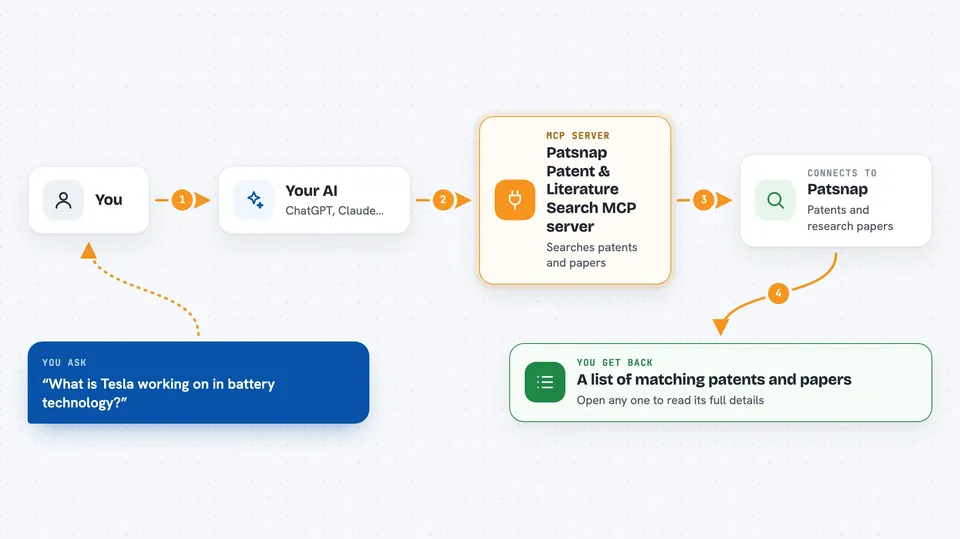
This is a helper that connects your AI to Patsnap, a large database of patents and scientific papers from around the world. Once it is connected, you can describe what you are looking for in normal words and your AI will search that database for you. It is handy for anyone who needs to check what has already been invented or published, without learning a search system.
What is an MCP server? The 30-second version
On its own, your AI can only chat with you using what it already knows. An MCP server is a small helper program that gives your AI a new skill, in this case a connection to Patsnap's patent and scientific literature databases. When you ask a question, your AI passes it to this helper, the helper talks to Patsnap, and the answer comes back into your chat. You do not need to understand how it works, you just add it once and then ask questions like normal.
What this MCP server does
You type a research question in plain English, for example about a technology or a company. Your AI sends that request to this helper, which builds a search across Patsnap's patent and paper collections. The helper can search by topic, by company or inventor, by classification, by date, by legal status, or by citations. It then brings back a list of matching records, and you can ask it to open any of them to see the details. Everything shows up in your chat as text you can read and copy.
 Click to zoom
What you can do with it
- Search patents by keyword, company, inventor, classification, date, or legal status
- Search scientific papers by topic using meaning-based or keyword search
- Combine patent and paper results in one research request
- Filter results by jurisdiction, filing or publication date, and citation count
- Open a patent or paper record and read its title, abstract, claims, and details
- Retrieve citation information and legal events for a patent
- Get patent family information and drawing links where available
Try asking your AI
- “What is Tesla working on in battery technology? Show me recent patent filings and group them by technology area.”
- “Which GLP-1 receptor agonist patents expire before 2028, and what does recent literature say about next-generation mechanisms?”
- “My EV battery loses 40% range in cold weather. What technical solutions exist in patents and academic papers?”
- “Find recent papers on solid-state electrolytes and list the main authors and journals.”
What it gives back to you
You get back a list of matching patents or papers, usually with titles, dates, and short details so you can pick the ones you want. If you ask it to open a record, it returns the full text as readable Markdown, including things like abstract, claims, description, citations, and legal events for patents. For papers, you get bibliographic details and the abstract. All of this appears right in your chat as normal text.
Before you start
What you need
- A Patsnap Open Platform account (free to register, comes with 10,000 free credits and no credit card needed)
- An API key from Patsnap Open Platform (a kind of password the site gives you)
- An AI tool that supports MCP, such as Claude Code, Cursor, or Windsurf
Good to know
Each search and record fetch uses credits from your Patsnap account, so keep an eye on your balance if you run many queries.
Install it with your AI
Add Patsnap Patent & Literature Search MCP server to your AI, no technical skills needed
You don't install anything by hand. You copy one prompt, paste it into an AI that can work on your computer, and it checks, installs and connects the server for you, asking you when it needs something.
Sign in to get the install prompt
Members get a ready-made prompt that lets the Claude desktop app check Patsnap Patent & Literature Search MCP server, install it and connect it for them, step by step. You don't need any technical skills: you copy, paste and answer a few questions. Your connected AI can also find and install any of the 4,361 MCP servers here for you.
Who it's for
Researchers, patent analysts, R&D staff, students, and anyone who needs to look up patents or scientific literature without learning a search system.





