
MCP server · Finance and crypto
Polymarket MCP server
by PaulieB14
Lets your AI look up Polymarket prediction markets, live prices, order books and trader stats for you.
This is a helper that connects your AI assistant to Polymarket, a website where people bet on the outcome of future events. Once it is set up, you can just ask your AI questions about markets, prices and traders, and it goes and finds the answer. It is handy if you follow prediction markets and want quick answers without clicking around the site.
What is an MCP server? The 30-second version
On its own, your AI can only chat with you using what it already knows. An MCP server is a small helper program that gives your AI one new skill, here the ability to reach Polymarket and The Graph, a service that stores blockchain data in a searchable way. When you ask a question, your AI passes it to this helper, the helper fetches the data, and the answer comes back into your chat. You do not need to understand how it works under the hood, you just install it once and then talk normally.
What this MCP server does
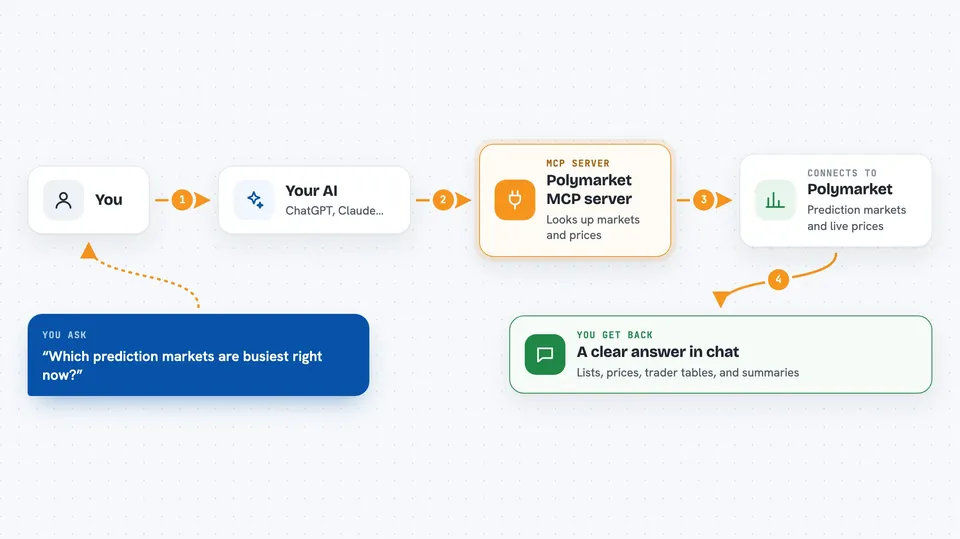
You ask your AI something like which markets are busiest right now. The AI sends that request to this helper program running on your computer. The helper then talks to Polymarket's public data services and to The Graph, which keeps a searchable copy of on-chain trading data. The results come back and your AI turns them into a readable answer, a list of markets, a price, a table of traders, or a summary. Some tools also read live order books and price history, so you can see what is happening right now, not just in the past.
 Click to zoom
What you can do with it
- Search Polymarket for markets about any topic you name
- Check the current live price of a market's yes or no token
- See the full order book and the bid-ask spread for a market
- Look up a trader's profit and loss and win rate by wallet address
- List the markets with the most money locked in open positions
- Browse events and see which markets belong to them
- See recent trades and activity for a specific wallet
Try asking your AI
- “Search Polymarket for markets about artificial intelligence”
- “What is the current price of the Trump yes token”
- “Show me the top traders on Polymarket by profit”
- “What is the order book and spread for this market right now”
What it gives back to you
You get answers in plain chat: lists of markets with names and volumes, single prices, tables of traders with their profit numbers, and short summaries of activity. Some tools return order book rows with bids and asks, or a series of past prices you can look over. When a tool spots something odd, like a market that is resolved but still shows open interest, it adds a small warning next to that row so you know to be careful.
Before you start
What you need
- A free Graph API key from The Graph Studio (a kind of password for apps; the site gives you one for free in about two minutes)
- Node.js installed on your computer so the npx command can run
- An MCP client such as the Claude desktop app, Claude Code or Cursor
Good to know
It only reads data and does not place trades or move money, but it does spend your free Graph API key quota, and the optional HTTP mode has no login protection, so keep that mode local or behind a protected proxy.
Install it with your AI
Add Polymarket MCP server to your AI, no technical skills needed
You don't install anything by hand. You copy one prompt, paste it into an AI that can work on your computer, and it checks, installs and connects the server for you, asking you when it needs something.
Sign in to get the install prompt
Members get a ready-made prompt that lets the Claude desktop app check Polymarket MCP server, install it and connect it for them, step by step. You don't need any technical skills: you copy, paste and answer a few questions. Your connected AI can also find and install any of the 4,609 MCP servers here for you.
Who it's for
People who follow prediction markets, do light trading research, or write about crypto and politics and want quick data without leaving their chat.



